live_tv
Livestream Starting Soon
00
Hours
:
00
Minutes
:
00
Seconds
Up next in 10

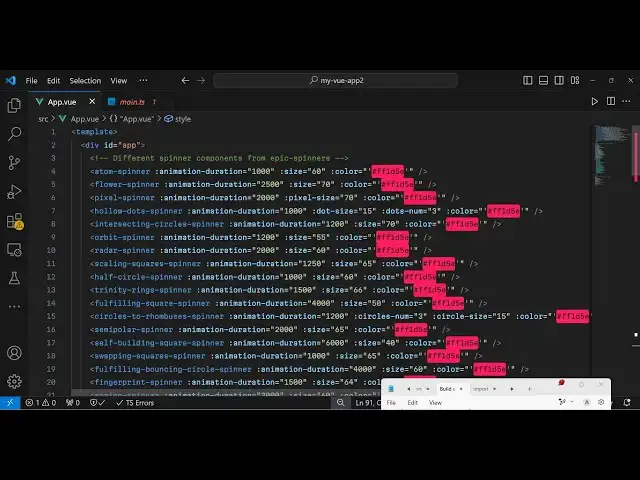
Vue.js 3 epic-spinners Tutorial to Show Loading Animated Spinners in Browser Using TypeScript
Jan 9, 2025

Get the full source code of application here:
https://gist.github.com/gauti123456/9e3ebc6c839019d8d7606a7edc353d42
Show More Show Less View Video Transcript
0:00
uh Hello friends welcome to this video
0:02
so in this video I will show you how to
0:05
uh show these loading Spinners progress
0:09
parts so nice little Spinners so there
0:11
is a package inside view3 which supports
0:14
all these types of spinners you can see
0:17
this is an atom this
0:19
is all sort of shapes all sort of
0:22
animations it supports so the name of
0:24
the package is epic Spinners so if you
0:28
just search
0:30
epic Spinners npmjs.com the very first
0:34
package which comes this is their uh
0:38
I've already installed it this is
0:39
actually a command and it's almost
0:42
having 8,000 weekly downloads and it has
0:45
a nice little website as well uh so if
0:48
you go to their website this is their
0:51
website they do offer a nice little
0:54
documentation explaining about each
0:57
spinner in detail and uh
1:00
get started so they do offer a complete
1:03
example right here so I will show you
1:06
this complete example so just inside
1:08
your app. view after installing this
1:11
Plug-In or Library just inside your
1:15
script
1:16
tag we will first of all write our
1:19
typescript code or requiring this so
1:23
whatever spinner that you're working
1:24
with we first of all need to require it
1:27
so let's suppose I want to display the
1:29
atom spinner and it will be coming from
1:31
this epic
1:34
Spinners so we require this then we
1:39
export this
1:41
component export default and then the
1:46
components like this so we are using
1:49
this atom spinner we are exporting this
1:53
that's all that we need to do and now we
1:55
come to the template part where we need
1:58
to display this so
2:01
so we display this by
2:05
simply we will have a div tag right here
2:08
and just give it an ID here inside this
2:11
we say atom
2:14
spinner and then it actually takes some
2:17
parameters first of all the animation
2:20
duration you can control it animation
2:23
duration it is in millisecond I just
2:26
want it to happen around 1,000
2:29
millisecond it's essentially 1 second
2:31
then you can even control the size as
2:33
well which I will say 60 and then you
2:36
can even control the color as well so
2:38
here you need to specify the exad
2:40
decimal
2:45
code so let is is the pink color so if
2:48
you refresh your
2:51
application so I
2:56
think it needs to come inside single
2:59
code so just make sure you put single
3:02
codes right
3:05
here so now you can see your animation
3:08
happens for one
3:10
second so this is your atom
3:13
animation
3:15
so you can control it change it to 5,000
3:19
so now it happens very slowly you can
3:22
change it any
3:28
color so pleas change it to yellow color
3:31
you will see it will change to yellow
3:32
color so in this way uh you
3:37
can let me paste the full code uh I have
3:41
given the full code in the description
3:42
of this video where I just given all the
3:45
examples you can see that you can easily
3:47
customize this if you have this code so
3:50
just go to the description and you can
3:52
play with this examples you can play
3:54
with the sizes so if you decrease the
3:57
sizes
3:59
so you'll be able
4:08
to so this is actually the package guys
4:11
all these customizations you can do you
4:14
can control the animation duration size
4:17
color so these three things about the
4:19
loading Spinners that you see so epic
4:23
Spinners is it calls it's contain almost
4:25
20 Spinners and it's vuejs integration
4:28
CSS animations it supports so thank you
4:31
very much for watching this video and do
4:33
check out my website as well uh free
4:36
mediat tools.com uh which contains
4:39
thousands of tools regarding audio video
4:41
and image and I will be seeing you guys
4:44
in the next video Until then thank you
4:46
very much