0:08
hello everyone myself
0:11
badas in this video I will discuss one
0:18
example which is water pump control
0:23
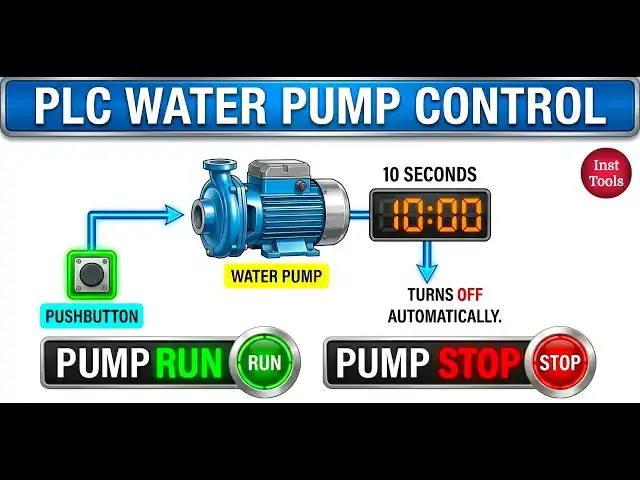
application let's say there is a water
0:30
when you press the push button then this
0:37
seconds and then turns off
0:42
automatically also there are status
0:46
lights run light and stop
0:51
light when the pump is in running the
0:54
Run light will be in on state when the
0:57
pump is in stop or when the pump is not
1:00
running then this stop light will be in
1:04
on State this is a simple beginner level
1:09
exercise we will do this in our logo PLC
1:14
software so first open the PLC
1:20
software now I will take one
1:25
input and give the command this is our
1:36
button if you see we have one push
1:39
button this is digital input and one
1:44
water pump this is digital output
1:49
and two status lights these are digital
2:06
is under timer category Edge triggered
2:13
relay give the comment
2:25
okay and connect this push button
2:35
okay now I will take three digital
2:46
outputs and the first one is our water
2:57
pump Conn this with Edge triggered
3:02
output and the second one
3:10
status this light will be in on state
3:18
running and connect this to Edge
3:20
triggered wiping relay
3:42
status now I will take one not gate so
3:46
go to basic functions select not and
3:52
here and cannot Edge triggered wiping
3:55
relay output again with to the not gate
3:59
and before that give the comment
4:03
not so this is our not
4:09
gate and connot the not gate output to
4:50
now if you see whenever we press the
4:54
push button then this
4:57
pump runs for 10 seconds seconds right
5:00
so we have to enter the time go to the
5:05
properties and select minutes and enter
5:10
10 seconds you can change this value as
5:19
okay now open the PLC
5:25
Hardware now give the download before
5:30
before that just see the output three
5:32
status this is the output three status
5:39
okay just remember that we will
5:43
see how it will be in on
5:45
state in this video there is only small
5:49
difference that is why I'm
5:52
just giving you the hint
5:55
before now the program is downloading if
5:58
you don't have the Hardware with you
6:01
just go to the simulation and test the
6:05
logic remember avoid just listening to
6:09
the videos or only seeing
6:14
creation instead of that go and do it
6:19
yourself I'm going to the online mode
6:24
now it will be very easy to you if you
6:31
practicing it will be difficult for
6:34
you when you are going to do the
6:38
program for beginners remember that if
6:41
you are experienced person it is
6:44
fine now if you see the water pump is
6:48
not running it is in off State pump run
6:51
status is also in off State as water
6:54
pump is not running that is why our pump
6:59
stop status is in on state Q3 is in on
7:03
state if you see in the hardware right
7:05
now the output three is in on state
7:14
give input push button okay just
7:19
observe I'll press this this is the
7:22
the edge triggered wiping relay I'm
7:28
i1 this relay output is in on state
7:31
water pump on run status on stop status
7:35
off timer is running when timer is
7:38
completed water pump will be off run
7:40
status will be off again stop is in on
7:45
state I will just increase the time so
7:51
again with more time okay 20 seconds
7:55
okay again I will press the push button
7:59
see output three off output one on
8:07
running this input is Edge
8:10
triggered input no need to be
8:12
continuously on that is why it is Edge
8:15
triggered when the timer is completed q1
8:21
simple so this is our water home control
8:26
application and I will give you one toss
8:29
for you remember in plcs we can create
8:37
with any other function blocks also that
8:41
means there is always possibility that
8:45
you can design one simple program with
8:51
blocks here I'm using Edge triggered
8:55
relay now your task is to do not use
8:59
Edge triggered wiping relay block you
9:01
can use any other function blocks just
9:05
complete the same circuit I mean same
9:11
problem and share with us how you
9:15
logic with other function blocks without
9:18
using Edge triggered wiping relay with
9:21
us through the comment section do not
9:26
try this program okay you can use any
9:30
other blocks except Edge triggered
9:34
relay try to do it yourself thank you I
9:38
will meet you in the next video