0:00
uh Hello friends welcome to this video
0:02
so in this video I will show you how to
0:04
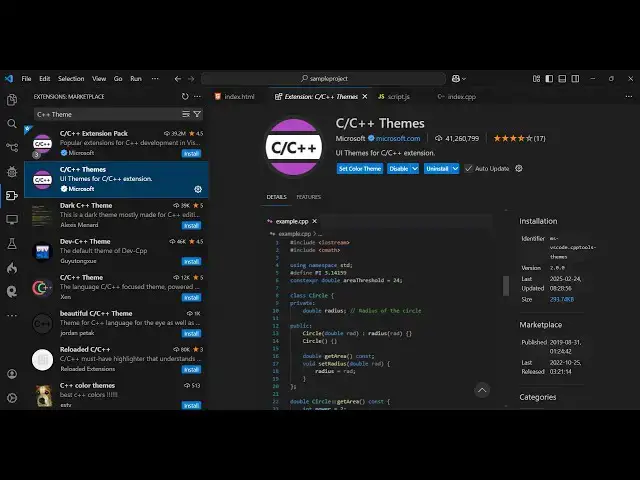
integrate the cc++ theme which is
0:09
developed by Microsoft inside vs code so
0:11
there is an extension right here which
0:13
you can install right by going to the
0:15
settings and going to the extensions and
0:20
C++ and as soon as you type it just add
0:23
the theme as well so this is the
0:26
official theme developed by Microsoft
0:28
you'll see that it's very right and just
0:31
install it's having almost 41 million
0:34
downloads install so it's a very popular
0:37
UI theme for vs code so simply select
0:40
the install button click the install
0:42
button and now you will see we have
0:44
various flavors of V Visual Studio C++
0:48
theme you can use any theme Here dark
0:51
light so this is a 27 Dark theme here so
0:56
as you select right here you will see it
0:59
will look something like this the index
1:01
CPP file so the highlighting the syntax
1:04
color combination will look something
1:05
like this so This is actually the Dark
1:08
theme and similarly if you want the
1:10
lighter theme this is actually having
1:13
the white background color you will see
1:14
that so this is actually the light
1:17
theme so this is the exact theme that
1:20
you will get if you install uh Visual
1:23
Studio this is which is actually the
1:25
official IDE for C++ application so you
1:31
highlighting so we also have the Dark
1:34
theme here again this is a slight a
1:39
so it's not very fancy but it's very
1:42
standard uh so whenever you code using
1:45
this theme so it will be standard black
1:48
background color that's why it is having
1:50
so much of installs 41 million downloads
1:53
so it's a very old theme as well you'll
1:56
see that 41 million downloads
2:00
so it's developed by Microsoft as well
2:04
so personally I like the dark theme more
2:07
than the Light tee because uh it is the
2:10
code is readly readable CP you can see
2:15
the it's not fancy so it's just a very
2:20
basic minimalistic theme with the good
2:24
color combination and you will see all
2:27
the nice keywords are highlighted per
2:29
perfectly using the gray background
2:31
color so if you need a very basic theme
2:34
but at popular at the same time you can
2:37
use this theme personally I don't use
2:39
this theme but I just wanted to make a
2:41
video on it I have used in the past this
2:46
theme and specifically if I did C++
2:50
development it's a great theme official
2:52
theme developed by Microsoft you so you
2:55
can perfectly use it simply install it
3:00
whichever if you want to use the light
3:03
version or dark version so this is
3:04
actually the theme guys so thank you
3:07
very much for watching this video and
3:09
also check out my website as well free
3:12
mediat tools.com uh which contains
3:15
thousands of tools regarding audio video
3:17
and image and I will be seeing you in