live_tv
Livestream Starting Soon
00
Hours
:
00
Minutes
:
00
Seconds
Up next in 10

Volta (NVM) Package Manager Alternative to Manage Node.js & JS Versions in CMD Full Tutorial
Jan 21, 2025

Buy the full source code of application here:
Hi Join the official discord server to resolve doubts here:
https://discord.gg/cRnjhk6nzW
Visit my Online Free Media Tool Website
https://freemediatools.com/
Buy Premium Scripts and Apps Here:
https://procodestore.com/
Show More Show Less View Video Transcript
0:00
uh hello guys welcome to this video so
0:02
in this video I will show you a brand
0:04
new uh JavaScript and node version
0:08
manager inside uh programming so if you
0:12
are a programmer if you want to just
0:15
install multiple versions of
0:17
node you can use this vola it's the name
0:20
of the version package manager and it's
0:23
a great alternative to node version
0:26
manager if you have search NVM it's a
0:29
node version manager
0:30
which also does the same thing uh it is
0:33
less popular but uh you will see NVM if
0:37
you type here NVM list is the command it
0:42
will list out all the versions of nodejs
0:44
installed on my machine so currently I'm
0:46
using
0:47
20.9 but you can install multiple
0:50
versions of node at the same time and if
0:53
you want to ship to a particular version
0:54
there's NVM which is there but vola is
0:58
similar to it but it's little bit
1:01
popular so if you just type here Volta
1:04
on Google the very first link which
1:06
comes right here this is the hassle free
1:08
Javascript tool manager and uh the
1:11
command is simple here for you need to
1:13
just open your
1:15
Powershell so run as administrator and
1:18
uh simply open they have given this
1:21
instruction by you can use the curl
1:23
command here and just type this address
1:27
get. Volta sh
1:30
bash so this is actually the command
1:33
simply copy this command and write this
1:35
inside Powershell enter it and this will
1:38
install vola inside your machine
1:45
so so it is saying
1:53
that
1:58
processing so for this if this doesn't
2:00
work you can use another alternative
2:03
which is winget which is there
2:08
inside wiet is actually a Windows
2:11
package manager where you can
2:16
manage programs here so if I type here
2:19
vet install
2:21
WTA so what it will do it will install
2:24
this program
2:35
so if I just want to install
2:53
this so you can see it is installing it
2:56
directly from the GitHub repo 5
3:00
megabytes so it's preparing to install
3:02
it so you can use vet is very easy
3:05
program which install
3:08
programs you can watch the video on it's
3:11
already there if you want to install
3:13
winget inside your system so you can see
3:16
now it's saying successfully
3:18
installed and you can close this window
3:21
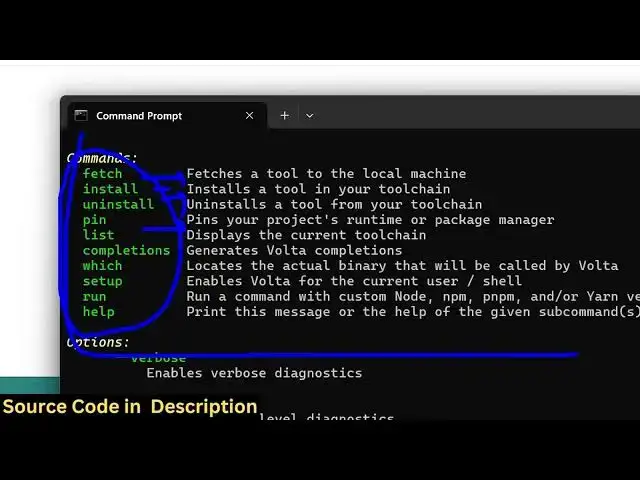
and if you now just type Volta
3:26
command so you can see that so on
3:30
this command will be successful so these
3:33
are the different commands just fter
3:35
tool managers managers
3:39
supports install uninstall list
3:43
out so if I
3:48
say Volta list out so it is saying no
3:51
node run times is
3:53
installed so if you want to install a
3:56
specific nodejs version so I will say
3:59
Vol time
4:00
install
4:04
node so it is fetching the latest
4:06
version if you see automatically detects
4:08
is 22.13 which is the latest version of
4:11
nodejs so it actually install it uh
4:15
directly inside the command line so now
4:17
it actually tells us that the program is
4:22
installed and if you want to set this as
4:25
default you
4:26
can so now if I run the command Volta
4:29
list l so it is saying that node nodejs
4:34
version
4:35
22.30 is your default
4:39
one and let's suppose if I want to
4:42
install the nodejs version specific
4:44
version you can tell it let's suppose
4:48
uh node
4:51
18 so it will now install node 18 inside
4:54
your system so in this way successfully
4:57
the node 18 has been installed so if you
5:00
now
5:02
VA list so now there will be
5:07
two binaries which will be
5:11
there and you can even uninstall this as
5:14
well by this uninstall command so there
5:17
you can simply uninstall
5:21
it so uninstalling node is not supported
5:24
yet so
5:34
so you can see vola uninstall node 0 and
5:38
it has been uninstalled
5:40
because it was set to Lo uh the active
5:44
tool that was you can't install the
5:47
default
5:49
nodejs but if I run the NVM command
5:55
here so if you're also using NVM at the
5:57
same time you can't use both the tool
5:59
tools at the same time so you need to
6:01
use NVM or Volta but my preference will
6:05
be NVM
6:06
so I just showed you for this video but
6:10
you can also use vola as well so it's
6:12
also
6:16
easy
6:21
so if you see the version which is I'm
6:23
using which is 2.0.2 which is the latest
6:26
version
6:33
so let's suppose if I install node 18
6:36
once again and if you want to
6:40
move if you want to use this one so you
6:42
will say Volta use node 18
7:11
so this was the tool manager guys you
7:14
can directly use it to
7:17
install nodejs
7:21
packages
7:23
so can see it has given these commands
7:33
so you can use this note uh package
7:36
manager which is vola inside your system
7:39
so thank you very much for watching this
7:41
video and do visit my website as well
7:44
free mediat tools.com uh which contains
7:47
thousands of tools regarding audio video
7:49
and image and I will be seeing you guys
7:51
in the next video
#Computers & Electronics
#Programming
#Software