Up next in 10

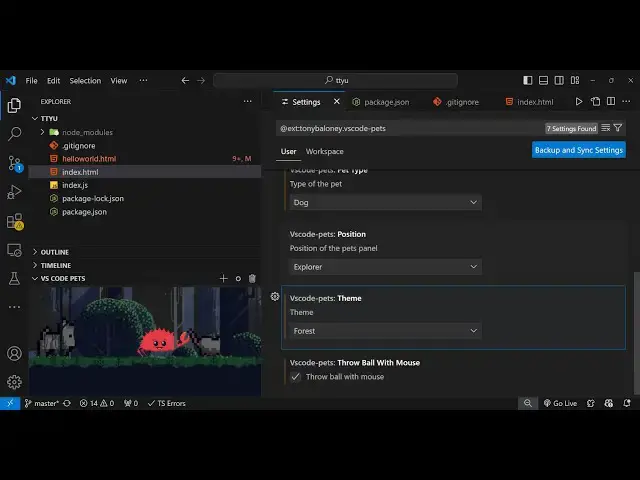
This VSCode Extension Allows us to Add Animals and Pets While Coding Using vscode-pets
Feb 15, 2025

Get the full source code of application here:
Hi Join the official discord server to resolve doubts here:
https://discord.gg/cRnjhk6nzW
Visit my Online Free Media Tool Website
https://freemediatools.com/
Buy Premium Scripts and Apps Here:
https://procodestore.com/
Show More Show Less View Video Transcript
0:00
uh hello guys welcome to this video so I
0:02
just want to show you one extension
0:04
inside vs code which lets you add pets
0:08
right inside your terminal so while you
0:09
are coding it will boost your
0:11
productivity and also someone watching
0:14
you will also get engaged so this is
0:16
actually the extension if you go to the
0:18
extensions Tab and just search vs
0:22
code Das pets so if you just search for
0:27
this you will see this extension comes
0:28
in Anthony shop and it's almost got 1.6
0:32
million downloads and uh just click on
0:35
the install button so as soon as this
0:37
extension is installed you will see and
0:40
also go to the settings
0:42
option just click on settings and just
0:45
open right here you'll see it will add
0:48
this like this by
0:50
default the theme will not be selected
0:53
it will appear like this you can adjust
0:55
the size of
0:56
the talks right here so if you want to
1:01
Let's suppose cut this remove it you can
1:03
click on right click it and remove
1:10
it so you can remove the pets right
1:14
here just click the dust pin
1:18
icon and just remove
1:21
it let me just show you from scratch so
1:24
by default it will look something like
1:25
this and now at the bottom side you will
1:28
see this option vs code pets and then
1:31
you will toggle this and there is a plus
1:33
icon right here you click this and these
1:35
are the different kinds of pets you can
1:37
directly add it so we have cat chicken
1:41
so if you select the name and then you
1:44
need to give it a
1:46
name let me go with the default name so
1:49
you will see this scrab will be added so
1:51
while you are coding right here you will
1:52
see you will be able to see
1:55
this and let's suppose I want to
1:57
increase the size by default it's medium
2:00
you can set it to small you can set it
2:03
to Nano or large as well so you can even
2:07
add
2:11
a you can see
2:15
that so we also have the position uh
2:18
theme as well various themes are also
2:20
present this is a forest
2:22
theme this is different themes you can
2:25
see beach one can see this is the winter
2:29
one so there are four thems available
2:31
for you and you can click the mouse and
2:35
just
2:36
send just throw Balls to the pet here
2:39
you'll see that if you click it these
2:41
balls will be thrown and you can add
2:45
more can see dog can adjust the color of
2:49
it as
2:51
well so you can see that so let me stick
2:55
to medium which looks great
3:01
so we can add some more one which
3:11
is so in this easy way you can
3:15
actually do this it's a very good
3:18
extension used by many developers
3:22
so it lets you engage more while you are
3:26
coding
3:28
so it's a great extension to have in VSS
3:31
code can add as many pets as you want
3:36
and you can see that
3:40
so if you don't want any theme click on
3:42
N so theme will be removed and it will
3:45
look something like this so all these
3:48
options you can customize it so the
3:50
theme name is vs code pets you can
3:54
directly customize the look and feel and
3:56
then add this so
3:59
this was the theme and thank you very
4:01
much guys for watching this video uh
4:04
please hit that like button subscribe
4:05
the channel and also check out my
4:07
website free mediat tools.com uh which
4:10
contains thousands of tools regarding
4:12
audio video and image and I will be
4:15
seeing you in the next video
#Programming
#Multimedia Software
#Clip Art & Animated GIFs
#Pets
#Video Game Mods & Add-Ons