Up next in 10

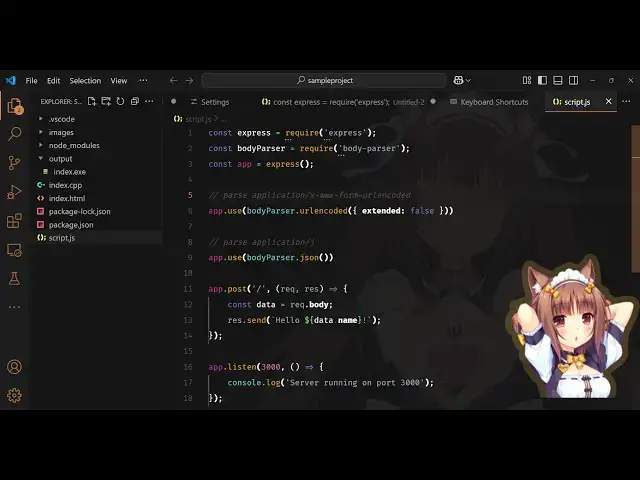
This VSCode Doki Theme Extension applies Animated Stickers & Background While Coding Full Setup
Feb 23, 2025

Watch My Visual Studio Code IDE Setup Video For Fonts,Themes & Extensions
https://youtu.be/Bon8Pm1gbX8
Hi Join the official discord server to resolve doubts here:
https://discord.gg/cRnjhk6nzW
Visit my Online Free Media Tool Website
https://freemediatools.com/
Buy Premium Scripts and Apps Here:
https://procodestore.com/
Show More Show Less View Video Transcript
0:00
uh hello guys welcome to this video so
0:02
in this video I will show you a very
0:04
interesting uh extension inside vs code
0:06
which will apply animated stickers and
0:09
backgrounds while you code in the
0:11
background if you want to customize it
0:13
you can install this extension which is
0:16
actually a theme called as Doki Doki
0:19
theme if you just type it you will see
0:22
what I'm talking about so it actually
0:24
apply these animated characters it comes
0:27
with all the animated characters it's
0:30
almost got 43 4,000 weekly downloads so
0:33
just simply install it and you'll see
0:36
the live preview as well you see this
0:38
animated background it will apply in the
0:41
background and also in the stickers as
0:42
well so it's have all the stickers you
0:46
can see that cartoon stickers so just
0:48
click the install
0:50
button and you can see it has various
0:52
themes out
0:55
there and based upon that it has a lot
0:59
of animated collectors as well so now
1:02
just select your favorite theme just
1:04
apply this let's suppose I
1:07
select this theme I enter it so the
1:11
theme is applied now for the animated
1:13
colors to be seen just press the
1:15
shortcut key control shift p and here
1:18
you will open your settings user
1:21
interface and just search for the
1:23
setting which is
1:24
Doki and here you will see this uh you
1:28
just need to disable this first of all
1:31
just remove this setting background
1:33
enable to be just remove this sticker
1:37
and also this setting as well just
1:39
disable it both the things and now you
1:42
need to install these stickers just
1:44
again press the shortcut key control
1:46
shift p and here you just need to
1:49
say docky
1:52
install and here you need to install all
1:56
these stickers which are available so
1:58
let me install this one which is
2:02
install so you just need to restart or
2:05
quickly reload the window and now what
2:07
happens it will actually apply
2:13
this
2:15
sticker you just need to enable enable
2:19
this once again enable this click the
2:22
buttons these two
2:27
buttons and just I think you just need
2:30
to restart the terminal so just restart
2:33
the
2:42
terminal so again press the control
2:45
shift B
2:52
and install this we actually install
2:56
this so please wait for the installation
2:58
to finish
3:00
so you will see aqua's wallpaper is
3:02
installed quickly reload to see
3:25
changes so if you do want to remove
3:28
these images there is an option right
3:30
here remove sticker background so just
3:34
apply this option whenever you are
3:36
uninstalling this extension just remove
3:39
it and then uninstall this extension to
3:41
actually uninstall all the images that
3:44
you have installed for some reason it is
3:47
not appearing in my window but you will
3:50
see this
3:51
result actually you need to set the
3:54
color theme
4:01
M let me
4:19
just so just restart this so
4:31
just go to the settings and if if for
4:34
some reason it is not appearing just
4:37
disable
4:41
this don't disable this only disable
4:44
this background
4:48
enable and wallpaper enabled just tick
4:51
mark this
4:58
option don't disable this just enable
5:01
this and just just disable this and now
5:04
install
5:05
your
5:07
any Watermark that you want to say so
5:12
let me install
5:13
this any sticker
5:52
so you can actually use this extension
5:55
guys for some reason I don't see the
5:58
wallpaper appearing because I think it's
6:00
some kind of problem with this extension
6:03
but you can check right here there are
6:05
steps given right here you need to
6:07
choose the team then enable the
6:11
wallpaper yeah I think I have it enabled
6:15
so there is a setting right here if you
6:17
check
6:38
so you can actually do this I
6:51
think you can install this to actually
6:54
add animated characters while you code
6:57
this is a nice little extension which
6:59
will add these
7:02
things so it is saying that glass seat
7:05
decrees not
7:10
found keyboard
7:15
shortcuts just wait class it I think I
7:19
is creating some kind of problem
7:58
uh think here remove
8:03
keybinding okay that's the thing so you
8:06
can install this extension guys it's
8:08
very
8:09
easy uh now let me
8:14
just just uninstall
8:26
this so you can see that now it is
8:29
appearing perfectly we'll see that so
8:33
here you can actually write the code
8:41
here so it will actually appear like
8:44
this so you can see you can show the
8:47
sticker and in the background also it
8:49
will look something like this so in this
8:51
way you can
8:54
actually change the theme right here
8:59
so you can
9:06
actually so after you install it you
9:09
just need to restart this terminal so
9:11
just close it from here and then open it
9:14
so just you install any sticker so you
9:17
will now see this sticker will come so
9:20
there are lots of stickers which are
9:22
available in this you will see that so
9:29
so as soon as you install
9:32
it please wait it is installing this
9:36
wallpaper so as soon as it installs so
9:40
just close
9:45
this and now you can see that it has a
9:51
different and you can even change the
9:54
theme as well so
10:01
so you can see that you can pick
10:05
anything so you can see how beautiful it
10:08
is looking while you code basically you
10:10
will see this nice little
10:19
picture so in this way guys you can do
10:22
this process thank you very much for
10:24
watching this video and I will be seeing
10:27
you in the next one
#Comics & Animation
#Online Media
#Programming
#Online Goodies
#Clip Art & Animated GIFs
#Skins, Themes & Wallpapers
#Animated Films
#Development Tools