0:00
uh hello guys welcome to this video so
0:02
in this video I will show you a very
0:04
popular vs code extension which allows
0:06
you to run any code inside vs code it
0:09
can be in any language C++ Java
0:12
JavaScript PHP python so this is a very
0:15
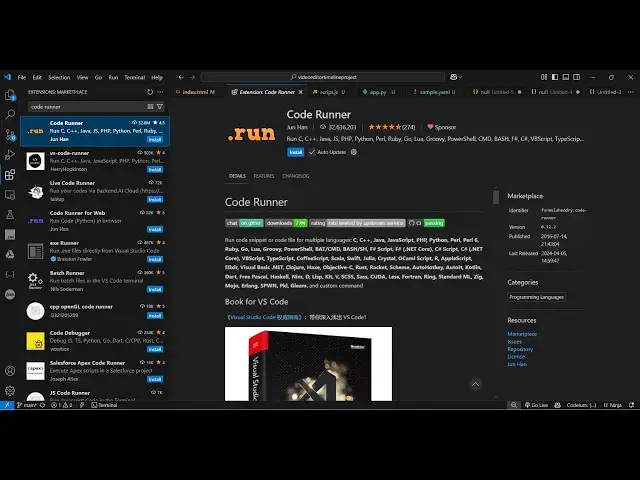
popular extension used by 32 million
0:18
developers and the name of the extension
0:20
is code Runner and it's developed by Jan
0:23
Han you will see 32 million installs are
0:26
there so if you just go to extensions
0:29
just typ code Runner the very first
0:32
extension which comes right here and
0:34
simply now install this and activate
0:37
this extension and as soon as you
0:39
activate this you will see this it will
0:45
button right here if you see there will
0:48
be this run button added and now if you
0:51
go to any file right here now let's
0:53
suppose I am writing a simple JavaScript
0:57
program right here and I just write a
1:05
statement and now for this you don't
1:07
need to open the browser you will simply
1:10
hit this run code button right here this
1:13
button and as soon as you do this you
1:15
will see it will run your project and
1:17
the console log statement will be
1:19
printed out so this extension is quite
1:22
useful because it will save you a lot of
1:25
time and side by side you can run your
1:28
code and you can just see if I write a
1:36
function and I just call this
1:43
function so again run this you will see
1:46
that uh 4 + 5 is equal to 9 so it
1:51
actually run this JavaScript code here
1:54
and for this we don't need to open the
1:55
browser we can simply install this
1:58
extension and it will add this run code
2:01
button right here inside your vs code
2:04
and it can be for any language so if you
2:09
program you can just say hi this is a
2:15
python file so again this run button is
2:25
uh yeah so you'll see
2:28
it it works for not python it works for
2:32
Java C C++ PHP python as well so they
2:37
have mentioned it will work for python
2:39
as well but I'm not seeing yeah so there
2:43
is this run button if you see run code
2:46
so just click this and you will see this
2:48
button run code and you will see the
2:51
printed statement right here so you can
2:56
function you'll see that so we can call
3:05
this so it will run this code here 1 + 2
3:09
is equal to 3 so this is actually the
3:11
python code so in this easy way guys you
3:14
can run code of any programming language
3:17
it can be JavaScript Python and it can
3:21
be PHP as well so if I write a PHP
3:36
so now if you want to run this you will
3:38
again see this run button available for
3:41
you so you simply click this button and
3:44
as soon as it opens you will see hi this
3:48
is PHP file so uh it will compile and
3:52
run your any program of any language
3:55
inside your vs code you should have this
3:57
extension installed so it's very popular
3:59
30 2 million installs so thank you very
4:02
much for watching this video and also
4:03
check out my website free mediat
4:05
tools.com uh which contains thousands of
4:08
tools regarding audio video and image
4:11
and I will be seeing you in the next