Up next in 10

React.js Project to Display USA Colorful Map With All States & Cities in Browser Using react-usa-map
Dec 22, 2025

Buy the full source code of application here:
https://procodestore.com/index.php/product/react-js-project-to-display-usa-colorful-map-with-all-states-cities-in-browser-using-react-usa-map/
Show More Show Less View Video Transcript
0:06
Uh hello friends today in this tutorial
0:07
I'll be showing you that how to display
0:09
a colorful map in the browser. So this
0:11
is a USA country map here you can see
0:13
that which contains all the states and
0:15
the cities. So you can also highlight
0:18
those states using uh colors different
0:21
kinds of colors you can use hexadesimal
0:23
values here. So you can see this is the
0:25
USA map here inside the world. This is
0:28
the map that you see inside the
0:30
worldwide map. So we are using a
0:33
dependency inside ReactJS application
0:35
which is react USA map which displays
0:38
the America map here inside the browser.
0:40
So if you hover onto this you will see
0:42
it will display the states names.
0:44
Montana, you can see that Washington and
0:46
you can see Oregon. So you just need to
0:49
hover onto it and you will see it will
0:51
display all the states names. California
0:53
you will see that Nevada
0:55
would have you can see Colorado you can
0:58
see Kansas
1:00
misori you can see Tennessee Texas so
1:04
this is a very good library if you want
1:06
to display map of USA inside your
1:09
application if you have the requirement
1:12
to display that map you can use this
1:14
library I will be showing you in this
1:16
live stream step-by-step instruction on
1:18
how to use this library uh inside your
1:21
code.
1:23
So I have given all the source code in
1:24
the video description of my blog post.
1:26
So if you want to copy all the source
1:28
code, you just need to go to the video
1:31
description link of this live stream. So
1:33
simply go to the edit option and go to
1:36
the description of this video to get all
1:38
the source code. So here you will be
1:40
displaying the colorful map. Here you
1:43
will see that. So the dependency is
1:45
pretty simple. If you just go to
1:47
npmjs.com
1:49
and you just need to search for this
1:51
dependency which is called as
1:53
reactus-map.
1:55
So this is a dependency which displays
1:58
uh svg USA map. It renders renders it on
2:02
the browser site. You can see it's a
2:04
very popular module. 3006
2:07
3600 weekly downloads are there. So you
2:11
can also the documentation is quite
2:14
good. So I have given the link in the
2:16
video description. So this is my blog
2:18
post step-by-step instruction is given
2:20
and the example code is also given. So
2:22
you can simply copy this code. So let's
2:25
start now implementing this inside your
2:27
ReactJS project. So right here you need
2:29
to create a brand new ReactJS project
2:31
inside your app.js. It is currently
2:34
empty. So the very first thing you need
2:36
to do is that you need to install this
2:38
library. So, npmi
2:40
react- USA usa-map.
2:43
So, simply you need to execute this
2:45
command and uh install this library. So,
2:48
once it is installed, you can use this
2:50
library inside your application.
2:53
So, I have already installed it. So,
2:56
just now start this application npm
2:59
start.
3:01
So, nothing will be there. So, right
3:04
here first of all guys we need to import
3:06
the react library. So we will import the
3:09
react library from react.
3:14
And now we will make the class app and
3:17
this will extends the component library
3:22
react component library.
3:24
So this will be you can see that it is
3:27
uh imported automatically from the
3:29
actual react library. You can see that.
3:31
So inside this guys we will have uh
3:36
we need to render on the screen. So we
3:38
will use the render method. So inside
3:41
this
3:42
we will have a simple div which will say
3:45
hello world.
3:46
So now if you just uh
3:50
refresh it. So first of all you also
3:53
need to export this component at the
3:55
bottom. So export default app. So just
3:59
write this. So now you will see hello
4:01
world will be rendered on the screen. So
4:03
you will see that. So now we need to use
4:05
this library to display the map here. So
4:08
it is very easy. So right here at the
4:10
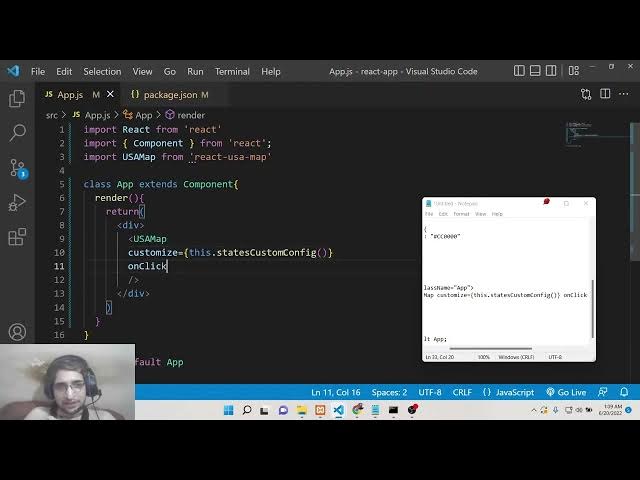
very top you need to import this library
4:13
which is import USA
4:16
map. So which is coming from this react
4:20
USA map library. So now we need to use
4:24
this live uh directive here inside this
4:28
inside our div. So this contains this
4:30
tag here which is USA map and uh this
4:35
takes some options here which you need
4:36
to pass here.
4:40
So the very first [snorts] option is
4:42
takes is the
4:45
the customize option. So basically if
4:48
you now refresh it you will now see it
4:50
will render out this nice little map
4:53
here on the screen here. You will see
4:54
that this is a shape of USA map. So
4:57
whenever you see here you will see this
4:59
when you hover onto it it will display
5:01
all the states automatically. So this is
5:04
just this code that is required here
5:06
that's it. So now if you want to
5:08
colorize certain section inside the map
5:10
it is very much possible you need to do
5:13
some customization for this. So this
5:16
takes this option here which is
5:17
customize.
5:19
So this takes this object which is this
5:21
dotstates
5:24
customize
5:27
this dot states custom config. This is a
5:32
method we need to make
5:36
[snorts] and the very second option is
5:38
take when we click the map in a certain
5:40
section what will happen on click. So we
5:43
need to define a function here for this.
5:45
So we will say this do map handler. So
5:48
we need to make these two functions
5:50
which is first is this dom handler and
5:53
the second is this dot uh states custom
5:56
config.
6:01
So right here at the very top before
6:04
render function we need to make these
6:06
two functions. So the very first
6:08
function we will make is this function
6:10
which is states custom config. So this
6:14
will be arrow function and inside this
6:16
we will uh highlight
6:19
with color
6:21
inside map. So now to highlight this
6:24
certain sections you need to return a
6:28
object here. So this contains the
6:30
twodigit code of a state. So NJ stands
6:34
for New Jersey. So you will see that
6:36
inside USA New Jersey is a state. So
6:39
here we need to highlight this with a
6:41
certain number of color. So we will fill
6:43
it with the navy color
6:46
and whenever you click it what will
6:48
happen? So inside that section
6:52
click handler. So this will be a event
6:55
and here we can simply console log a
6:58
simple message that this is New Jersey.
7:03
So now
7:06
if you now refresh it you will now see
7:08
New Jersey is highlighted. You can see
7:10
that blue blue color which is navy
7:13
color. So you can change this color to
7:15
red. Let's suppose you will now see it
7:18
will change to red.
7:20
So if you now uh click on this section
7:22
you will see that. Let me click it.
7:26
So now you can see New Jersey is printed
7:28
out in the console. So this is a way by
7:32
which you can highlight any section in
7:34
the map. So you just need a twodigit
7:36
country or sorry state code. So let's
7:39
suppose we have another uh code for
7:44
I think it is New O which is NY. So we
7:48
can highlight it with let's suppose now
7:51
black.
7:54
So now you can see that New York is also
7:58
highlighted. You can see Washington.
8:02
So, you just need to
8:04
uh have the twodigit code
8:08
for
8:13
so USA you can just search it if you
8:15
don't know
8:19
on Google and you will have all this you
8:22
will see Alabama Arizona you will see
8:25
that if you California it is CA so it is
8:29
this information is available in Google.
8:32
So,
8:34
California will see if you want to fill
8:36
it with green.
8:44
Now you can see this is highlighted with
8:45
green color.
8:48
So in this way guys you can highlight
8:50
any section on the map. It is that much
8:52
easy. and uh Texas. I think it is.
9:01
Texas.
9:07
If you search it
9:13
twodigit code.
9:32
So here you will get all the quotes here
9:34
which is required here. if you want to.
9:38
So here we can text it is TX. So
9:43
now we can also highlight this. So TX
9:48
fill it with uh
9:52
let's suppose yellow.
9:58
You can see that. So it is not limited
10:00
to only this uh number colors. uh
10:04
character colors. You can also provide
10:06
your hexadimal code as well like 00 0.
10:10
This is black color. So now it is
10:12
highlighted using black color. You can
10:15
change this to blue as well. So F
10:19
0 F
10:21
I sorry this is 00F this is blue color
10:26
you will see that's so in this way guys
10:29
you can do this. It is damn easy in
10:32
order to display a USM map inside the
10:34
browser using ReactJS application and
10:36
also highlight certain sections using
10:39
colors. This is a very awesome library.
10:41
You definitely check out this library.
10:45
So if you like this video then please
10:47
hit the like button, subscribe the
10:49
channel as well and I will be seeing you
10:51
in the next video.