live_tv
Livestream Starting Soon
00
Hours
:
00
Minutes
:
00
Seconds
Up next in 10

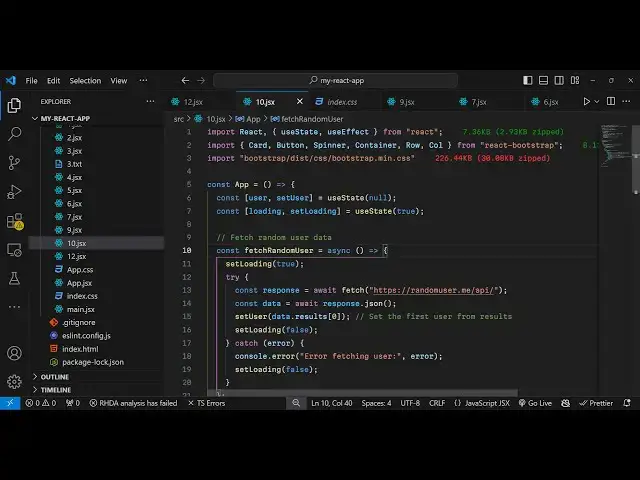
React Fetch API Example to Build Random User API Generator and Display it Using Bootstrap
Jan 9, 2025

Buy the full source code of application here:
Show More Show Less View Video Transcript
0:00
uh hello guys welcome to this video so
0:02
in this video I will show you how to
0:04
fetch random users data such as email
0:07
phone number location this Avatar URL
0:10
from a random user API that I will show
0:12
you so whenever you click the button a
0:14
random user will be popping in inside
0:16
your reacts application and uh in this
0:20
way you're making a simple HTTP call to
0:22
the rest API where they actually fetch
0:24
this random user and show these details
0:27
inside your browser
0:30
and for this interface we are actually
0:32
using bootstrap specifically react
0:35
bootstrap for actually building the user
0:37
interface so all the source code will be
0:39
given in the description so now let's
0:41
get started so before that let me
0:43
introduce to the API so if you just type
0:46
random user
0:49
API or simply go to this user random
0:53
user me so Random user me API just type
0:57
this we using this API
1:00
random user generator so it's a simple
1:02
free API open-source API for generating
1:05
random user data and uh we will use this
1:10
endpoint so now to get started I will
1:12
just make a simple functional
1:14
component and write here at the very top
1:17
we do need to install two additional
1:19
packages first is your react bootstrap
1:22
and
1:23
bootstrap so specifically for building
1:25
the user interface so just install these
1:28
two packages I've already done done that
1:30
so I will just start the development
1:32
server so right here we need to actually
1:35
import bootstrap and the specific
1:37
components required so we are importing
1:39
the card component button spinner
1:42
container row column and we are also
1:44
importing uh the bootstrap
1:46
CDM so after you import that we need to
1:50
declare some State variables we need to
1:53
keep track of the user which will be
1:55
displaying so for this we'll be using
1:57
the use State hook ini IAL value will be
2:00
null and the second one will be for
2:03
showing the loading progress path for
2:06
this we will again be using the UST
2:08
State hook initial value will be
2:14
true
2:15
so now right here we will actually use
2:19
the use effect hook which will
2:22
automatically be executed whenever you
2:24
load your react CH applications so by
2:26
default we will load a function we will
2:29
execute this fun function which will be
2:30
fetch random
2:32
user so inside this function we will
2:36
fetch the user and we'll Define this
2:39
function fetch random
2:42
user right inside this function we will
2:45
actually make a simple HTTP just API
2:48
call so let me make this function as
2:51
async and first of all let me change the
2:54
set loading to
2:57
true and then inside the try catch
3:06
block so for the loading progress part
3:09
just make initial value to be false
3:11
because whenever you load the page the
3:14
application will be not be fetching data
3:17
so that's why it would be false and now
3:19
inside this function we are changing
3:21
this to true so now in the try catch
3:24
block we need to make the HTTP call so
3:27
you'll be using the fetch API for this
3:29
this so we are defining a simple
3:33
get API call to this
3:36
endpoint and then we need to actually
3:39
change our data to Json so we will
3:42
convert this response to Json by using
3:45
this function and then whatever is the
3:47
data coming we'll be setting the user to
3:49
that I can even console log the data
3:52
just to check in the
3:56
console so if you refresh your browser
3:59
go to
4:01
inspect element and che check the
4:03
console you will receive an
4:08
object you will see you're receiving
4:11
this object it contains this results
4:14
property and inside the result property
4:16
we get the random user data gender ID
4:19
location login name date of birth
4:22
everything so we just need to store the
4:25
result property so data. results zero we
4:29
only saving the this one so again we'll
4:32
be reset the set loading to
4:35
false like
4:38
this and now to actually show this data
4:41
in the jsx we will wrap everything using
4:43
the container element of react
4:46
bootstrap and we'll be using the class
4:48
name which is this one these are all
4:52
bootstrap classes and inside this H2 we
4:55
will simply say
4:58
random user profile and I will just give
5:02
it a class
5:04
name of text Center we align that head
5:09
heading in the center and inside this we
5:12
will basically depending upon the value
5:15
of loading which is a Boolean parameter
5:17
if the value is true in that
5:21
case we will show this data
5:29
just show this progress part is little
5:32
spinner that
5:34
uh it's a bootstrap spinner progress
5:39
part and in this paragraph We will
5:41
simply say that
5:47
loading but if the loading parameter is
5:50
false in that case we need to show the
5:52
data and again here we will be comparing
5:54
if the user is available in that case we
5:57
need to show the user details in this
6:02
web page so we'll be giving these
6:03
bootstrap classes
6:05
justify content Center just to make
6:09
alignment in the center position so in
6:11
the call we will give it a medium
6:14
property of
6:17
six so you'll show the user information
6:20
in the card like structure using the
6:22
card component of bootstrap so
6:25
card and
6:27
uh inside this card component we have to
6:30
show the profile picture so for this we
6:33
are using card image component and it
6:36
takes the variant property to be top we
6:39
need to show the top position and in the
6:42
source inside curly bracket we will show
6:44
the user profile picture which is
6:47
located inside user
6:49
picture. large so if you refresh here
6:52
you will now see the picture appearing
6:54
every time if you load the page a
6:56
different user will load and now we just
6:59
also need to
7:01
show the information about the user so
7:04
in the card
7:06
body and we'll Define the card
7:10
title which will contain the username so
7:13
you'll simply say user.name do
7:18
first so you will see the name
7:28
appearing so what what we will do we
7:30
will also print out the first and the
7:32
last name so for this we will simply
7:36
concatenate like this inside C bracket
7:39
you will
7:42
see and now to Show additional
7:45
information we will also
7:47
be showing the email
7:52
address the location everything so all
7:55
these things are available you will see
7:57
we are showing it the email of the user
7:59
phone number location everything the
8:02
country so if you see now this
8:06
information is
8:09
appearing so at last we will had we will
8:13
love to have a button
8:16
which so when we click the button a new
8:19
random user will pop so we
8:22
will give it a primary which will be a
8:24
blue button so you'll bind an onclick
8:27
listener so whenever you click we will
8:30
again call the same function fetch
8:32
random user so the label of the button
8:35
will be simply load new
8:38
user so this completes the application
8:41
we have a button so whenever you click
8:43
the button it will make a new HTTP rest
8:45
API call to the API and it will again
8:48
load a new user and display
8:50
it so in this way you can create this
8:53
awesome looking simple application a
8:55
random user generator application in
8:57
react CHS using this API
9:00
and using fetch API so thank you very
9:03
much for watching this video and do
9:05
check out my website as well free mediat
9:08
tools.com which contains thousands of
9:11
free tools regarding audio video and MH
9:14
and I will be seeing you in the next
9:15
video