live_tv
Livestream Starting Soon
00
Hours
:
00
Minutes
:
00
Seconds
Up next in 10

Python Tutorial to Start HTTP Live Server For Static Files in Terminal Full Tutorial
Feb 5, 2025

Get the full source code of application here:
Hi Join the official discord server to resolve doubts here:
https://discord.gg/cRnjhk6nzW
Visit my Online Free Media Tool Website
https://freemediatools.com/
Buy Premium Scripts and Apps Here:
https://procodestore.com/
Show More Show Less View Video Transcript
0:00
uh hello guys welcome to this video so
0:02
in this video I will show you uh how to
0:04
serve HTML files in a static directory
0:07
in Python so python if you don't know
0:10
guys uh the python has a built-in HTTP
0:13
live server which you can use it inside
0:16
your current directory so if you are
0:18
building any sort of application which
0:20
runs in the browser so python does have
0:23
a built-in HTTP live server you don't
0:26
need to install a third party package
0:27
for this so just need to go to the
0:29
direct
0:30
and I just simply make a simple index.
0:33
HTML file here and we have some data
0:36
present right here so if I need to open
0:38
this in the browser so you can go to the
0:41
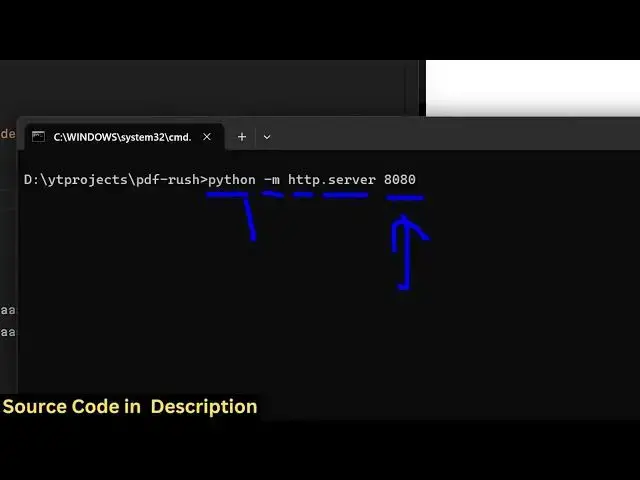
command line and then just type Python
0:44
dasm and then HTTP do server and then
0:48
the port number so if you choose 8080
0:52
then let me zoom in this is actually the
0:54
command python DM http-server
1:00
and this is then your port number which
1:02
is
1:03
8080 this is actually the command if you
1:05
run this automatically it will open this
1:09
HTTP uh static server which runs on this
1:13
port number 8080 so if I change this
1:16
port number let's suppose I want this to
1:18
be 4,000 so now it changes this port
1:21
number to
1:27
4,000 so if you refresh now uh
1:30
let me just make some
1:33
changes so
1:35
one disadvantage of using it this is
1:38
that whenever you make changes you do
1:39
need to refresh the page for the changes
1:42
to reflect back so it doesn't have hot
1:44
Auto reload functionality but that but
1:47
still it is a a built-in HTTP server
1:51
it's a very handy Way by which you can
1:53
directly open your index. HTML file so
1:55
if you're developing some kind of web
1:57
application inside python then you can
1:59
directly open this HTTP server by
2:01
executing this command so you can embed
2:04
images as well
2:06
so you can do any sort of thing right
2:11
here so just refresh it you will see the
2:15
image will be
2:17
there it can be anything it can be
2:19
JavaScript CSS code so once you open
2:23
this once you refresh it you will see
2:25
all these changes there so I just wanted
2:28
to show you that python does have a
2:31
built-in HTTP server so you can invoke
2:33
this simply by executing this command so
2:36
you must have python installed inside
2:39
your command lines for this to work so
2:41
it's a very quick way or a handy way so
2:44
you can directly open a simple HTTP
2:46
server for serving these static files so
2:50
thank you very much guys for watching
2:51
this video and also check out my website
2:54
as well free mediat tools.com uh which
2:56
contains the thousands of tools
2:58
regarding audio video and image
3:00
and I will be seeing you guys in the
3:02
next video