Up next in 10

Python 3 Web Scraping to Get Country Information & Save it in CSV File Using countryinfo Module
Jan 9, 2025

Official Website:
https://freemediatools.com
Show More Show Less View Video Transcript
0:03
uh hello guys welcome to this uh live
0:05
video so in this live stream we will
0:07
actually be building a simple python
0:09
script which will actually scrape all
0:12
the country information about a specific
0:15
country such as currency population the
0:17
name of the country the capital all this
0:20
information we will be scraping it and
0:22
storing it in a CSV
0:24
file so let's start building this
0:28
application so
0:31
let me just show you what we are
0:33
building right
0:35
here let me see if the live is let me
0:39
just check right
0:44
here yeah so now we are live here so in
0:47
this live stream guys we are actually
0:49
building an application which allows you
0:52
to actually get the specific country
0:56
information such as uh let me show you
0:59
the name name of the country capital
1:01
population how many people live and
1:04
currency all this information we will be
1:06
storing it in a CSV file comma separated
1:09
value so this file will automatically
1:11
get created and uh here you can see that
1:14
we are storing it this is Canada the
1:16
capital of that country the population
1:19
the currency code CAD for Canada USD for
1:22
United States you will see that so each
1:24
country will storage this information
1:26
and let me now run this python script
1:29
and show you the live demo so this is
1:31
actually the python script that we
1:32
developed right here you will see that I
1:34
will write each line in detail
1:37
explaining you step by step so first of
1:40
all let me just show you how to run this
1:42
python script so you can just run like
1:46
this Python
1:48
app.py and Then followed by the country
1:50
name you need to provide so let's
1:52
suppose I write write here India so you
1:54
will basically see here we are passing
1:56
an argument to this python script so
1:58
whenever I click and enter right here on
2:01
the left hand side a file will be
2:02
created country info. CSV and you will
2:06
basically see name Capital population
2:08
currency India New Delhi 1.26 billion
2:11
which is a population and currency code
2:13
which is INR all this information is
2:16
stored right here you can even do it uh
2:19
pass multiple countries as well if you
2:21
don't want to pass singular country you
2:23
can just write here USA UK you can pass
2:27
multiple countries
2:30
as arguments this will also handle
2:34
multiple countries as well so you can
2:36
see we are passing multiple countries as
2:38
command line arguments and I if I
2:41
basically enter so it will calculate all
2:45
this automatically it will prefill
2:47
append this inside it is already present
2:50
so it doesn't get deleted it
2:52
automatically append you will see United
2:54
States Kingdom Canada Australia you will
2:57
see that
3:00
Bangladesh you can
3:02
see I
3:04
think sorry I think it
3:07
is not handling you need to pass without
3:12
spaces let me just
3:16
see
3:18
so you can also take the help of chat
3:22
GPD as well I will simply say it is now
3:26
not handling spaces in
3:30
countries so modify it
3:34
also let me take an help of chat GPD
3:36
because this is you can see that in the
3:39
spaces if the country has contained
3:41
spaces then it is returning error so it
3:44
will modify the script accordingly so
3:46
that it handles the spaces as well so
3:49
just wait chat GPT is giving me the
3:52
correct script so let me just copy this
3:55
and paste
3:58
it so if you
4:02
now delete this file and rerun your
4:06
python script here passing the same
4:10
arguments so you will basically see file
4:13
will be created and uh once
4:20
again I think I had this
4:28
one but let me again do
4:46
this I got
4:49
this copy this
4:54
here I will explain you guys just wait
4:57
for a while here I am just
5:12
uh I just copy the correct code here
5:15
which handles
5:16
multiple countries
5:45
so python app.py so if you just pass a
5:47
singular country here then it is working
5:50
you will see that guys so you can do
5:52
this as singular countries as
5:55
well so if you just pass a USA you will
5:58
basically see all the countries would be
5:59
appended right here so the
6:02
newly we have passed here you can run
6:04
this using pass pass a country you will
6:07
see that it is saving it
6:10
automatically appending it so you can do
6:14
this very easily just pass the country
6:17
name to this python script like
6:21
this you can see that so I think it
6:24
doesn't you need need not have to pass
6:27
spaces
6:39
let me just it
6:41
doesn't handle the spaces in country now
6:46
fix that so you can basically write the
6:49
prompt like this and based upon that uh
6:52
chat GPT will return an answer which
6:54
will actually fix your program so in
6:57
times you need to
7:03
let me just modify
7:19
this so now you can see that it is
7:21
successfully handling those spaces as
7:25
well and let me pass multiple countries
7:36
and now once again you need to write a
7:37
second prompt now it is
7:41
creating problem if I pass multiple
7:46
countries as
7:48
arguments fix that so now it will fix it
7:52
will just uh recreate the script so that
7:55
it handles multiple currencies if you
7:57
pass it in the command line so in this
8:00
way you can use chat GPT in efficient
8:02
way for coding purposes it will actually
8:06
fix your problems very
8:08
easily so that's why I use it on a daily
8:12
basis now you can see that it has fixed
8:15
the problem so now it is a correct
8:17
script so just sorry for the delay guys
8:22
so you can see we are passing multiple
8:24
countries python app. ppy USA UK Canada
8:27
Australia we'll see new land it contains
8:30
spaces in between the country name
8:33
also so if I now see you will see
8:47
that you need to pass the S message it
8:50
is giving
8:51
me output like
8:56
this the countries with spaces
9:00
again creating
9:03
problem you need to write uh this prompt
9:06
efficiently so that it
9:09
fixes the
9:15
problem
9:17
so it is refining this code so that it
9:20
handles each situation in an efficient
9:24
way I will show you guys how I written
9:27
the script so just wait
9:50
again same output
10:04
so you can see that guys it in some
10:06
cases it takes a lot of time to actually
10:09
refine the script in such a way that you
10:11
are interested in the output so you need
10:14
to keep on repeating the same process
10:15
give the current correct prompt so that
10:19
whenever your problem is solved so now
10:22
you need to give that output
10:35
so it is actually trying out different
10:37
ways by which the problem can be solved
10:40
by applying various artificial
10:42
intelligent algorithms of chat gbt so
10:45
you just need to wait and
10:47
actually ask the question again and
10:50
again eventually it will solve your
10:53
problem but still I think it
10:56
doesn't so I Will Not Waste Your times
10:59
so that I will just tell you how I
11:01
develop
11:14
this I will try one or two times if the
11:17
output doesn't come then I will show you
11:19
how the script works
11:33
so I think it is not working with
11:36
passing multiple countries as command
11:38
line arguments
12:05
just paste it once again you need to run
12:42
uh let me paste it once again and try to
12:44
run the script once again
12:50
if okay I think it doesn't handle the
12:53
multiple thing if the country name
12:56
contains spaces in this way
13:03
so what I was talking about let me just
13:06
show you copy this
13:41
so let me tell you how I build this
13:43
script guys so we are actually using a
13:46
python
13:47
module we need to go to this website uh
13:51
python projects just search for this
13:54
module which is country
13:56
info which is used to actually fet
13:59
information about a specific country so
14:02
you need to Simply install this module P
14:04
install country info inside your command
14:07
line we are using latest version of
14:09
python
14:10
3.1.2 point2 and P install country info
14:15
this is a free module which provides
14:17
information about a specific country I
14:20
already installed it
14:22
so basically you need to install CSV uh
14:26
import it for saving it in a CSV file
14:30
and from this country info
14:33
module we need to import the country
14:38
info
14:39
and now inside your main function we
14:43
need
14:46
to this is our main
14:53
function we need to import the system
14:55
module because we need to handle
15:04
if the system argument here we are
15:06
simply telling to the user that if it is
15:08
greater than two arguments then we need
15:11
to Simply tell to the user that you need
15:13
to pass the country name as
15:17
well Python script.py and here we need
15:20
to pass the country
15:27
name then say system just exit the
15:30
program like this and then here we need
15:33
to Simply collect the country names
15:36
which are passed so country names we
15:38
need to store it in a variable system AR
15:43
RGB and here one colon so it will simply
15:47
store it all the country names which are
15:49
passed and we need to store it in a LS
15:51
list country info underscore
15:56
list and here we need to define a
15:58
function
15:59
which is got get in country info and
16:02
here we need to pass the country
16:07
names so here we are actually running a
16:10
simple for Loop and we are looping
16:12
through each country name which is
16:14
passed right here and using the strip
16:16
function for country name and country
16:18
names this is actually an array which
16:21
contains multiple country names which
16:22
are pass and we need to Define this
16:25
function which will actually fetch
16:36
so here we need to pass the country name
16:38
as an
16:42
argument so inside this uh inside TR
16:46
catch block we need to get
16:49
the we need to call this country info
16:53
pass the country name as an
16:56
argument and then the info will be
16:58
returned to us and we can simply print
17:01
this in the command
17:10
line we also have inside Tri blog we
17:14
have except if any sort of exception
17:16
take place we can simply print the
17:20
exception so if you just pass the
17:22
country name let's
17:24
suppose if you run the script pass USA
17:28
you'll basically see this a list will be
17:31
returned to us all holding all the
17:33
information name and uh area code
17:35
borders calling codes Capital population
17:38
all this stuff it'll be returned you
17:40
will see that so we just need to display
17:43
or save this information in a CSV file
17:45
so how we can do that it's very easy we
17:48
need to individually fetch the
17:50
information first is the name of the
17:52
country which is will be stored in for.
17:55
getet
17:56
name and this will be country
18:01
name and then comes the capital and
18:04
similarly we can get the capital
18:07
using capital and if the capital is not
18:10
available then we will say Capital not
18:14
available then comes the
18:22
population the population not available
18:25
then we say population data not
18:27
available
18:35
and then similarly we have the currency
18:38
as
18:51
well so that's all uh here we need to
18:54
Simply convert the Curren uh population
18:57
to a number which is there in million or
19:00
billion you can basically have
19:05
this you can basically make a function
19:08
which will convert this number into
19:10
format it into a number of million and
19:13
billion so we need to make a function
19:16
which will actually do this process for
19:18
us which is
19:19
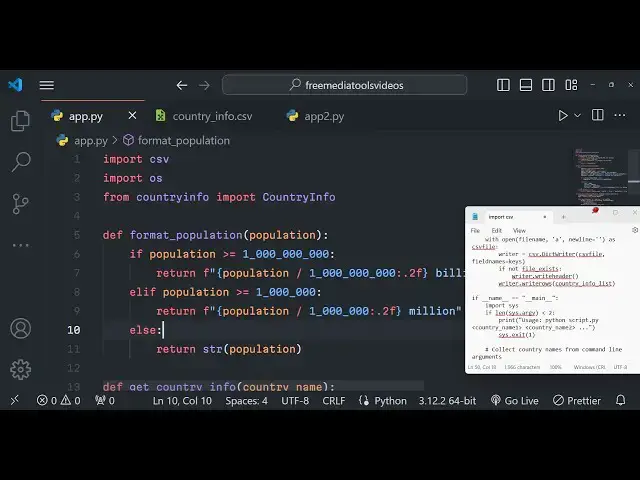
format population and we will be having
19:24
population as an argument passed as a
19:29
this is a simple logic we are defining
19:31
it very simple mathematics we are doing
19:38
it so if the population is greater than
19:42
100 crores then we are simply saying 1
19:44
billion and it is if it's greater than
19:48
10 lakhs then we are simply saying 1
19:51
million so we just returning population
19:53
in million and
19:55
billions and after this we need to
19:58
Simply turn this a Json object holding
20:02
these four properties name of the
20:04
country then is the
20:06
capital and then we have the population
20:09
of the
20:12
country and then lastly the
20:15
currency so currency can be multiple
20:18
currencies as well so we need to only
20:20
pick the first currency if multiple
20:21
currencies are
20:23
there from the
20:25
list like this we are only picking the
20:28
first correct
20:29
curcy
20:31
else if multiple currencies are not
20:34
there we can simply say else currency
20:36
that's
20:38
all this is all that we need to do from
20:40
this function and uh now the these will
20:43
return four properties and
20:47
here after
20:52
this we need to define a function which
20:55
will actually save this information into
20:57
a CSV file
21:06
so then we can simply print a message to
21:09
the user info saved so now here we need
21:13
to Simply Define this function which
21:15
will actually save the
21:33
country info list and then the file name
21:36
so if the file name is not provided then
21:38
the default one will be country info.
21:41
CSV so as you can see we are only
21:43
providing the first argument to this
21:45
function so this will be taken as
21:47
default so country info. CSV so this is
21:50
called as default argument so by default
21:53
this will be the file name we'll be
21:56
using the CSV module in Python and
21:59
dictionary writer to actually write a
22:00
CSV file with that file name so file
22:03
name it takes some property file names
22:06
here we need to pass the keys
22:10
parameter so here first of all we need
22:12
to check right here in a variable that
22:15
if the file already
22:17
exist then operating system module path
22:20
is file if the file name already exist
22:23
in that case we will simply get the data
22:26
which is already present
22:30
zero Keys like
22:32
this so we are simply passing
22:38
it CSV file so here we if
22:42
the we need to append this data like
22:46
this new
22:49
line As CSV file like
22:54
this to just format this like this put a
22:57
Col
23:00
so here we have a if condition that if
23:02
the file doesn't
23:04
exist then we need to create a new file
23:07
so writer. write
23:09
header need to write three headers which
23:12
are
23:15
there country info list that's
23:18
all this is all the application is
23:20
required guys and if I just delete this
23:23
file and rerun the application by
23:26
passing python app.py USA so if you see
23:31
uh field names no positional argument
23:34
save to P CS
23:44
fre country info
23:50
list uh where is the problem right here
23:53
let me
23:56
see so all the source code guys is given
23:59
in the description of the video so you
24:01
can check out the description and get
24:03
the source code if I once again do this
24:06
purchase the full source
24:08
code from my website Pro Cod store.com
24:11
and once again if I run the script you
24:14
will see it will get created
24:16
and name of the country this is the
24:19
capital this is the population this is
24:22
the currency
24:23
code once again run it with a different
24:25
country UK you will see that so London
24:30
this is you will see for R it let's
24:43
suppose you can see automatically as we
24:46
are running with different countries it
24:48
is fetching the data and it is loading
24:49
it in the
24:51
app so if you interested guys the link
24:53
is given you can directly purchase the
24:55
full source code and uh if you are
24:57
interested
25:01
please hit that like button subscribe
25:03
the channel as well and I will be seeing
25:06
you guys in the next live stream
#Programming
#Computer Science
#Computer Education