live_tv
Livestream Starting Soon
00
Hours
:
00
Minutes
:
00
Seconds
Up next in 10

PHP Project to Parse Markdown to HTML & PDF Converter in Browser Using DOMPDF in JS
Jan 9, 2025

Buy the full source code of application here:
https://procodestore.com/index.php/product/php-project-to-build-markdown-template-to-pdf-converter-web-app-in-browser-using-javascript/
Show More Show Less View Video Transcript
0:00
uh hello guys welcome to this video so
0:02
in this video we'll be looking at how to
0:04
create a markdown to PDF converter
0:07
inside PHP and uh we will be looking at
0:11
uh this is actually the demo of the
0:13
application so you will actually see we
0:14
are using bootstrap for the UI user
0:17
interface we have a simple choose file
0:19
button where the user will select the
0:21
markdown file that needs to be passed so
0:24
let's suppose if I select this markdown
0:26
file let me show you the markdown file
0:28
so
0:30
so this is actually the markdown file
0:33
you will actually
0:36
see so these are two file sample MD
0:39
sample 2 MD
0:42
so so we will simply select this
0:44
markdown
0:45
file so first of all we will pass this
0:48
markdown file and convert to HTML and
0:50
then we will be using Dom PDF Library
0:53
which is a very
0:54
popular PDF library in PHP to convert
0:57
the HTML to PDF so if I click this
0:59
button you you will actually see a PDF
1:01
file will get
1:03
downloaded so if I open this now you
1:05
will actually see all the markdown that
1:07
was written in that file is actually
1:09
passed and successfully converted first
1:11
to
1:12
HTML for that we will be using another
1:15
open source library in PHP to convert
1:17
markdown to HTML and then from HTML to
1:19
PDF we are using the Dom PDF library in
1:23
PHP to do this task right here you will
1:25
see the PDF file is successfully
1:27
generated with all the correct
1:29
formatting it also contain third party
1:32
links as well in the you can take any
1:35
markdown file so now this is I'm taking
1:38
the second one so again it will convert
1:41
this you will see it's a kind of a
1:43
resume so markdown files are really
1:47
useful in programming in day-to-day life
1:50
so it's a good practice lot of tools are
1:54
available on internet which converts
1:56
markdown to PDF so just wanted to show
1:58
you in this video so how to make this
2:00
converter in PHP so all the source code
2:03
that I will be using in this video is
2:05
given in the description so you can
2:06
directly go to my website brod store.com
2:09
and if you want you can purchase the
2:11
full source code with full directory
2:13
structure you will actually get the zip
2:15
file after you purchase it you will be
2:18
redirected to Google Drive where you
2:19
will get this ZIP file which will
2:21
contain the full directory structure so
2:23
if you need this you can go to the
2:25
description link so now let's get
2:27
started so you need to have have this
2:30
software installed on your system exam
2:32
control panel which comes with Apache
2:34
server from which we run our PHP server
2:38
so simply install this and start this uh
2:42
at Port 80 so by default it is located
2:46
in the C directory if
2:48
you write here inside your exam
2:52
directory it has and uh inside your HD
2:56
docs you will actually create a new
3:00
project directory so let me make
3:03
markdown to PDF
3:11
converter so I will open it inside vs
3:14
code so you will actually see currently
3:16
the directory is empty so the very first
3:19
thing we need to do we need to install
3:21
those packages so let me show
3:24
you the briefly about the packages we
3:27
will be using we'll be using this
3:29
package first of all which is a markdown
3:32
parser in PHP so the official website of
3:36
this package is pars down.or G so this
3:40
is actually the markdown parer that
3:42
we'll be using
3:44
so the next Library will be using is Dom
3:47
PDF which is actually a HTML to PDF
3:51
converter for PHP which actually
3:53
converts the HTML which is passed from
3:56
markdown so this is both these libraries
3:59
are open source you can read the
4:02
documentation so now to install these
4:04
packages we will be using a tool called
4:06
as composer composer is actually a
4:09
dependency manager for PHP so I already
4:12
have composer installed you can install
4:17
it so now to install those packages we
4:20
need to write composer require so this
4:23
will install those packages so the Dom
4:28
PDF /d PDF this is the first package for
4:32
converting HTML to PDF and then second
4:34
package is for parsing the markdown so
4:37
this is
4:38
e
4:41
v/b down so these are two packages you
4:44
will see this is actually the command
4:45
here composer require this is the first
4:48
package and this is a second package
4:50
simply enter and you will actually see
4:52
it will actually create a composer. Json
4:56
file with these two packages installed
4:58
it will also create a vendor folder
5:00
which will contain all the files for
5:02
your libraries you will actually see so
5:06
once it is installed you can see all
5:08
these packages have been installed so
5:11
now you need to create your index. HTML
5:15
file which will be a simple form where
5:19
we will
5:21
be so we can use GitHub copilot as well
5:25
so I already have so I can just say
5:28
write HTML file
5:30
which contains
5:33
a user input field where user can select
5:39
only markdown files and we need to
5:44
use uh bootstrap as UI so you can just
5:49
see I already have installed GitHub
5:51
copilot which actually helps in
5:53
generating code because uh it will save
5:56
a lot of time because common code it
5:59
will write you will see I'm just writing
6:00
a
6:01
simple instructing to is WR HTML file
6:04
which contains user input
6:06
field and uh a button to submit the
6:11
form so now if you see it will write
6:14
this HTML file for me you can see
6:20
that so this actually helps in
6:23
generating a lot of content you can see
6:25
it included the bootstrap CDN markdown
6:27
it added the title
6:29
you can just see if I open this now uh
6:32
in the browser Local Host mark down to
6:36
PDF
6:38
converter so now you can see it has
6:40
generated this so we just need to add
6:44
the BTN
6:45
block BTN
6:50
danger and just use the form control
6:54
class it will make this interface like
6:57
this and just make the heading in the
6:59
center position so so in this way you
7:02
can use GitHub co-pilot to actually
7:04
increase the productivity and save time
7:07
as well now this is a HTML file that
7:09
guys we are Simply Having a simple form
7:12
and this form will
7:14
submit basically to a PHP script We'll
7:18
add the action attribute so this will be
7:20
submitting to upload.php Method will be
7:25
post encoding type will be multi-art
7:27
form data
7:29
and uh we also need to give it a name
7:33
parameter as well because in PHP we will
7:36
be using this name parameter so we have
7:39
given file here so we will be refreshing
7:41
it inside the PHP script that we will
7:43
write we need now need to create this
7:45
script so simply create the script
7:47
upload.php
7:49
so right inside the script we need to
7:53
create a public slash uploads directory
8:00
so here we'll be storing all the input
8:02
files which will the user will upload so
8:05
just create this directory structure and
8:07
now in the PHP script we need
8:13
to first of all upload the file so just
8:17
add the PHP
8:25
tag so right here you will be first of
8:27
all be requiring the autoload file the
8:31
vendor
8:32
SL autoload.php
8:35
so this is required because we need to
8:37
load all these packages which is this is
8:39
autoload PHP file we are loading it to
8:42
load the packages third party packages
8:44
so after this we need to in require
8:47
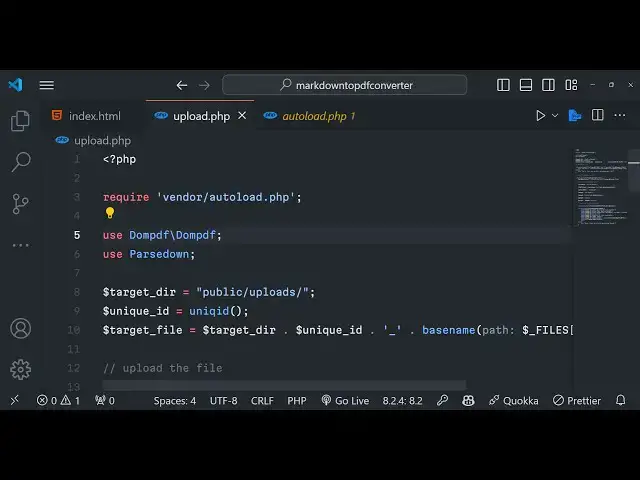
those classes first of all for Dom
8:51
PDF
8:53
slash sorry this slash Dom PDF and the
8:57
second package is pars down
9:04
so we you can see we have required all
9:06
these two classes Dom PDF bar down these
9:09
two packages that we installed now we
9:12
need to actually tell in which directory
9:14
you need to store the input file so we
9:18
will be storing inside the public SL
9:21
uploads
9:24
directory and then we need to Simply
9:27
tell uh you need to give it a unique ID
9:30
to the input file that will be uploaded
9:33
so here we'll be having the target file
9:36
so this will be equal to Target
9:38
directory unique
9:40
ID so we will be making this path here
9:43
so it will be located in the Target
9:46
directory concatenating by the unique
9:50
name that we will be giving to
9:52
the
9:53
file and then you we will be having this
9:58
underscore and then dot symbol is used
10:02
in PHP to
10:03
concatenate and here you'll be using the
10:05
base name function to actually extract
10:08
the extension so
10:12
files so here we need to get the name of
10:14
the files so we can simply get this by
10:17
this is a file here and this is actual
10:19
name parameter we have given if you see
10:23
we have in index.html we have given this
10:25
name parameter this needs to be same
10:29
to actually get the name of the file
10:32
that's all so this will be the complete
10:35
path so after getting the path we can
10:38
simply upload the
10:41
file for uploading the file we be using
10:43
the built-in function PHP which is move
10:46
uploaded file so here it basically takes
10:50
two arguments first is takes the actual
10:54
name the temporary file this will be
10:57
file
10:59
you can just see it is giving me
11:01
suggestion
11:02
store
11:04
name and then the second one will be the
11:07
actual Target file that needs to get
11:09
uploaded so Target uncore
11:12
file so if if this function execute
11:15
successfully then it will return true
11:17
and in this case we can simply Echo a
11:21
simple line that the file
11:31
you can print out the name of the file
11:32
as well using the HTML special
11:35
characters
11:37
function the file name has been uploaded
11:39
this is not mandatory but we are just
11:41
letting the user know that your file has
11:43
been uploaded so after uploading this
11:45
file we can even write else statement if
11:48
it you can simply tell a message sorry
11:51
there was error uploading your file so
11:53
now if you basically see if you try to
11:57
select a file click on convert to PDF
12:01
you can see the use statement with the
12:02
non-compound name pass down has no
12:05
effect but you see this the file sample
12:08
MD has been
12:10
uploaded because this condition
12:13
evaluates to true if you now check
12:16
basically we have uploaded this markdown
12:18
file it has given a unique name to it or
12:21
added a underscore and then the name of
12:24
the
12:26
file so now we have successfully
12:29
uploading the files now we simply need
12:31
to basically pass the markdown to
12:36
HTML for doing this first of all we need
12:38
to check that if the file exist at that
12:42
part that is the target file if this
12:45
exist or not if this exist then it will
12:48
return true and now we need to Simply
12:51
pass the markdown content we will be
12:54
first of all be using the file uncore
12:56
getor contents function of PHP to
12:59
actually read all the content of this
13:02
markdown file and store it inside this
13:04
variable so after this we need to
13:08
pass this uh markdown and convert this
13:11
into
13:13
HTML so for doing this we'll be using
13:15
this third party Library which is Parts
13:18
down we're making a new Constructor of
13:20
it like
13:23
this so after this we will be making a
13:26
[Music]
13:27
simple we we'll be using a simple
13:30
function to pass the markdown file and
13:36
convert this into HTML so we'll be using
13:38
the text function which is available and
13:41
we'll passing the
13:42
markdown content that
13:45
we got in the previous variable right
13:49
here we are passing this this will
13:51
actually pass the markdown and convert
13:54
the uh markdown to HTML and store it in
13:58
this variable
13:59
so now the job is really easy now we
14:01
need to convert this HTML to PDF using
14:03
the Dom PDF
14:05
Library so we using the two libraries
14:08
simultaneously so now we need to Simply
14:10
say the output file name let me pick
14:13
output.pdf
14:15
just make sure that you put
14:18
semicolon at the end in PHP if you don't
14:22
you will get error and now we'll be
14:24
using the second Library which is Dom
14:26
PDF we making a new Constructor of it
14:29
and then we will be using Dom PDF SL
14:33
load
14:34
HTML and we'll be using this function
14:37
load HTML to actually convert this HTML
14:40
to
14:41
PDF very simple step and now we'll be
14:44
using a render function of Dom PDF to
14:48
render this HTML to PDF and now at last
14:52
we just need to Output make use of this
14:55
output function and store the PDF in
14:58
this variable
14:59
now we need to Simply download the file
15:02
in the
15:04
browser so now how to do this we need to
15:07
Simply first of
15:09
all create this file using file putut
15:13
contents function in PHP so here it will
15:17
actually create this file at that path
15:21
with this content
15:24
output so it will actually create this
15:26
output file output.pdf right in the r
15:29
directory and now we need to actually
15:31
download this file in the browser for
15:34
doing this we first of all again we will
15:36
say file exist function we will actually
15:39
check if this file has been
15:41
created using this
15:45
path if this created then it will return
15:48
true and here we need to add all these
15:51
headers if you check if you basically
15:54
want to download any file in PHP first
15:56
of all you need to add these headers
15:58
just a about more information about the
16:00
file that you're downloading so in this
16:02
case we are downloading pH PDF file so
16:05
we adding these all these headers so all
16:08
the source code will be present if you
16:10
purchase it you will get all this
16:14
so if these if the file is not present
16:17
we can actually sorry there was er error
16:20
gener generating the PDF so now this
16:24
application is complete so you can
16:26
actually try this in the browser and
16:28
simply go to the the homepage of this
16:29
application and select your markdown
16:32
file click on this button convert to PDF
16:35
and now if you see the PDF file is
16:38
successfully downloaded if you open it
16:40
you can actually see all the markdown
16:42
that is
16:44
uh was there it has been converted to
16:48
PDF and if you also see basically first
16:52
of all we are converting this markdown
16:55
to HTML using this
16:59
the second library that we are
17:04
using if you just see uh if you only
17:08
want the HTML file you can even download
17:10
the HTML as well totally depends upon
17:12
you if you want the HTML or
17:16
PDF so it does the both the
17:20
things you can take any if I take the
17:24
sample 2
17:26
one you can see again
17:33
has so if you want to try this before
17:36
purchasing it in the checkout page I
17:38
have given the link as well you can go
17:40
to my website I basically deployed this
17:43
tool if you go to free mediat tools.com
17:46
mark down to PDF this is actually the
17:49
tool that I
17:51
deployed so if you need to try this tool
17:53
first of all you can try
17:55
this this is also you make made using
17:59
PHP the same you can just
18:02
see so you can try
18:05
this the full source code is present in
18:07
the description you can purchase it
18:09
thank you very much for watching this
18:11
video please hit that like button
18:13
subscribe the channel as well and I will
18:15
be seeing you in the next video
#Programming
#Software
#Open Source