Up next in 10


Watch My Visual Studio Code IDE Setup Video For Fonts,Themes & Extensions
https://youtu.be/Bon8Pm1gbX8
Hi Join the official discord server to resolve doubts here:
https://discord.gg/cRnjhk6nzW
Visit my Online Free Media Tool Website
https://freemediatools.com/
Buy Premium Scripts and Apps Here:
https://procodestore.com/
Show More Show Less View Video Transcript
0:01
Hello guys, in this live stream I will
0:03
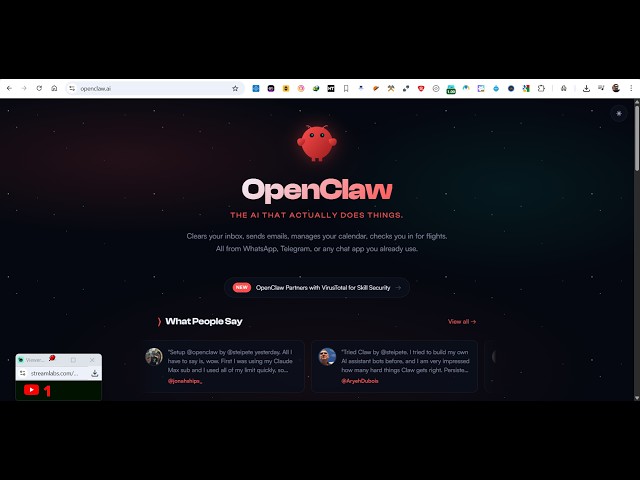
show you a very popular AI platform
0:06
which is recently released. It's called
0:08
as open claw.
0:10
Uh it can literally do anything. You can
0:13
connect this app
0:15
with any sort of app. It's called as
0:19
open claw.
0:20
It's actually developed by a individual.
0:25
So, if you go to Google, simply type
0:26
here
0:28
open claw
0:29
and this website will come right here,
0:31
openclaw.ai.
0:33
And uh it's actually a personal AI
0:35
assistant. You can actually connect this
0:37
AI with any sort of application. You can
0:40
connect with your Gmail, Google Drive,
0:42
anything.
0:44
So, once you go to this application
0:46
this is their official website,
0:48
openclaw.ai.
0:50
And on their home page also it actually
0:53
tells you that
0:56
this AI can do
0:58
anything. It can clear your inbox, send
1:00
your email, manages your calendar.
1:03
Everything you can do. You can connect
1:05
to any sort of application right here.
1:08
So, I will show you step-by-step
1:10
instruction how do use it. Really easy
1:13
it is.
1:14
So, if you're on Windows
1:16
or Mac, so step-by-step instructions are
1:19
given. If you're on Mac
1:21
this is the command here. If you are on
1:24
Windows
1:25
you can do this by either you can open
1:28
PowerShell and simply copy this command
1:31
or you if you have npm
1:34
if you have node.js installed, you can
1:35
directly
1:37
install this. So
1:40
what I will do, I will simply
1:42
open the terminal and simply type this
1:45
command npm -ig
1:48
open claw.
1:49
So, go to the terminal, simply execute
1:52
this command.
1:54
So, this will install this open claw AI
1:56
assistant directly inside your machine.
1:59
And the thing is that it's completely
2:01
free. There is no
2:03
need to pay anything for this.
2:05
It's completely free.
2:07
You simply execute this command to
2:09
install this. So, once it is installed
2:12
you can uh
2:16
use it. So, just wait for the
2:18
installation to complete.
2:20
And you can even subscribe to their
2:23
website as well. Simply provide the
2:25
email and you will get to notifications
2:27
whether
2:28
any sort of new update happens, you will
2:30
get the notification. So, you can also
2:32
subscribe to this as well.
2:35
Um it basically directly runs inside
2:37
your machine.
2:38
So, it exactly tells you, it directly
2:40
resides inside. You can chat using any
2:44
of the AI models.
2:46
You can
2:46
any sort of chat app you can connect to.
2:50
It has a persistent memory, full system
2:53
access. It can even run this on the
2:55
browser as well.
2:57
It can actually do all sort of stuff.
3:07
So, once it it will be installed, you
3:08
will be able to run this directly. As
3:11
you can see on my machine, there is no
3:13
space left.
3:14
So, that's why I can't install this.
3:18
But you can just see here, it has view
3:20
all 50 plus integrations.
3:24
It has given this access. You can
3:26
connect this to
3:27
WhatsApp, Telegram, Discord
3:30
Slack
3:32
web chat.
3:36
All sort of platforms you can connect
3:38
to.
3:39
Then you can also use all the AI models
3:42
as well.
3:43
Anthropic, OpenAI, Google, Vercel.
3:48
Grok.
3:50
So, all the AI models are supported
3:52
right here. You can use it directly or
3:54
you can even host your own local AI
3:56
model as well by Ollama
3:59
LM Studio. So, productivity, so
4:02
everything you can do using this.
4:05
Music apps, smart apps, everything. You
4:08
can control it.
4:12
All the platforms are supported. You can
4:15
install it on Mac, iOS, Linux, Android,
4:18
Windows, everything.
4:22
If you want to get started right here,
4:24
you
4:25
simply run this by
4:27
execute the command, it will install
4:29
this
4:30
directly.
4:34
Uh once it is installed, you simply type
4:36
open claw on board.
4:38
So, that will open the AI for you. And
4:41
if you want to check out their GitHub
4:43
repo, it's completely open source.
4:49
You can check out their GitHub repo
4:51
where they actually they have shared all
4:53
the source code of this actual open claw
4:55
bot.
4:57
And right here, if you want to actually
5:00
do this is their claw hub.ai.
5:02
Claw hub is actually the skill dog for
5:05
sharp agents.
5:10
You can install this.
5:12
It's a advanced version of uh
5:15
this. You can authorize it. Just log in
5:18
with your GitHub account. So, once it is
5:20
this
5:26
So,
5:27
you can search your X Twitter post using
5:30
the API when the user want to find out.
5:40
So, you can download the code here like
5:42
this.
5:44
So, definitely use this open claw. It's
5:47
a very good open source AI tool for
5:50
actually automating
5:52
your daily task. It's a very good
5:54
platform. Definitely try this. Uh it's
5:57
also very popular as well. It's got
5:59
almost 348,000 weekly stars
6:02
on GitHub.
6:04
So