Up next in 10

Javascript filter() Method Explained to Filter & Delete Elements Based on Condition Full Example
Jan 9, 2025

Buy the full source code of application here:
Show More Show Less View Video Transcript
0:00
uh Hello friends welcome to this video
0:02
so in this video we will look at another
0:04
JavaScript array method which is used
0:06
for filtering out Elements which doesn't
0:10
met a specific condition this called
0:12
method is called as filter by the name
0:14
itself it actually deletes Elements
0:16
which doesn't fit a condition so let me
0:19
take a very simple example uh we should
0:22
be having a array here which is ages so
0:26
this ages array will actually contain
0:28
ages for different persons so let's
0:30
suppose we have 24
0:33
28
0:35
45 and uh 39 so we have four ages right
0:39
here so it can be ages for four persons
0:42
so this is person one person two person
0:44
three person four so now we will
0:47
actually be using this filter method to
0:51
actually filter out those persons which
0:54
doesn't match a particular age so let me
0:58
just make a new variable
1:02
so filtered
1:05
ages so I will actually call this method
1:08
on that actual array so the array name
1:11
is ages so we simply write ages dot
1:14
followed by the method which is filter f
1:17
i l t e r filter and actually it takes a
1:21
function which uh we will make this
1:23
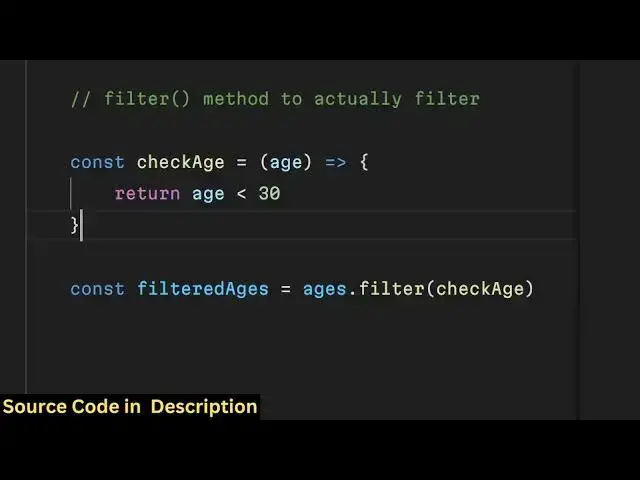
function which is check H so what this
1:26
function will do it will actually take
1:28
the h as an
1:31
argument so one by one if you see we
1:34
have four edes so one by one this array
1:37
each person age will be
1:40
passed using this filter method we have
1:43
body so one by one the ages will be
1:46
passed and here we will write a
1:48
condition that we will simply return
1:50
only those persons whose ages are
1:53
below uh let's suppose
1:56
20 or
1:58
below 30 so we have a condition right
2:01
here return age which is smaller than 30
2:06
so what this condition we
2:11
do so we need to declare this function
2:13
before we use it so we need just need
2:17
to write this before it
2:22
so so now we have written return this
2:24
function check age what this function
2:26
does it actually takes this array one by
2:30
one so all these values will be passed
2:34
so 24 and 28 will get passed because
2:37
they are smaller than uh
2:39
30 but 45 and 39 will not get passed
2:42
because they are not smaller than 30 so
2:45
the output will come if you console log
2:48
this filtered ages so what will be the
2:53
output if you check the console you will
2:56
see only two elements will be there
2:58
which is 24 and 2 28 because the
3:01
condition that we put that the ages must
3:04
be below 30 these two elements are just
3:07
metting these conditions the rest of the
3:09
two edes 45 and 39 they are greater than
3:13
30 so that's why those elements are
3:15
removed from the array so that's the
3:17
sole purpose of this method of filter
3:19
you can filter out various
3:21
elements based upon a condition so this
3:24
function can be anything this function
3:26
you can be having any function any
3:30
condition that you can put and then you
3:32
can filter out those array elements
3:34
using this filter
3:36
method so we can even apply multiple
3:39
filters as well so if you have multiple
3:46
filters
3:50
so you can have multiple filters so we
3:53
are actually now applying two functions
3:56
to this array check Ag and check H2 so
4:01
in this filter let's suppose I
4:03
say they need to
4:07
be uh
4:13
40 so now if you
4:21
check so 39 if you
4:28
check I think I you can only provide one
4:32
filter at a time so the second filter is
4:35
not working but it actually takes a
4:39
function here you pass your filter right
4:42
here check age so what this function
4:44
does it actually removes the elements
4:46
which doesn't met a condition so in this
4:49
case 45 and 39 are completely removed
4:52
because they are greater than 30 so in
4:56
this way this output Comes This is
4:58
actual filter method
5:01
which removes elements based upon a
5:03
condition so that was a very simple
5:05
example of this function that you can
5:07
use so it is widely used in applications
5:10
so I personally use this function a
5:13
lot so thank you very much for watching
5:16
this video and do check out my website
5:18
free mediat tools.com which contains
5:20
lots more audio video and image tools
5:23
and I will be seeing you in the next
5:25
video