Up next in 10

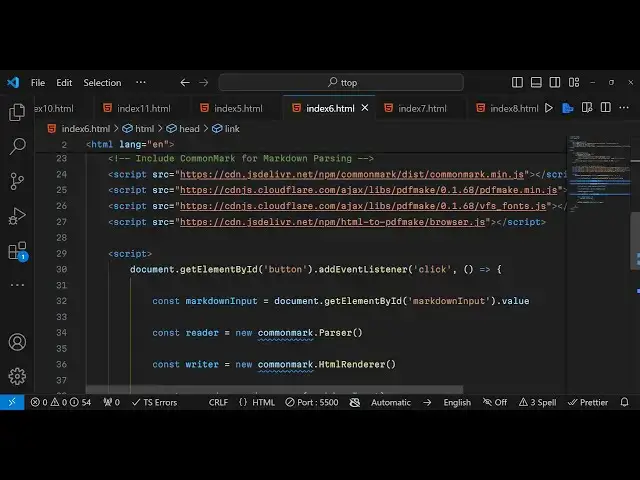
Javascript CommonMark.js Markdown Parser to HTML & PDF Using PDFMake Library in Browser
Jan 9, 2025

Get the full source code of application here:
https://gist.github.com/gauti123456/64f6474c1ce3b7c58f7035d1a28c2125
Show More Show Less View Video Transcript
0:00
uh hello guys welcome to this video so
0:02
in this video we'll be looking at how to
0:04
Parts markdown into HTML and
0:08
PDF in JavaScript using a open source
0:12
markdown parcel Library which is common
0:15
Mark so we have this test text area
0:18
where you enter your markdown sample
0:20
markdown and we have a button to
0:22
actually export that to PDF so first of
0:25
all the process fill the markdown that
0:28
you entered will will be converted to
0:31
HTML and then that HTML will converted
0:33
to PDF so if I click this button you
0:36
will actually see that this mark down
0:38
that we
0:39
entered containing all these elements
0:42
such as bullet points headings paragraph
0:46
everything is been converted first of
0:48
all this markdown has been converted to
0:51
HTML then that HTML is converted to PDF
0:55
so for actually passsing the markdown we
0:58
are actually using the this Library
1:00
which is common mark. JS common Mark is
1:04
actually a markdown parsel Library open
1:08
source library in JavaScript we will be
1:10
using it in the browser using the CDL
1:13
and for then converting that uh
1:15
converted HTML to PDF we are actually
1:18
using the PDF make Library which is an
1:21
open source PDF generation library at
1:23
the client site it's a very it's very
1:26
simple
1:27
Library you can even use it in the
1:29
server site as well so all the source
1:31
code that I will use in this video is
1:33
given in the description so what I will
1:35
do I will simply copy paste the CDM of
1:39
bootstrap and all the libraries that I
1:42
will use common Mark is a markdown
1:45
parcel Library PDF make is actually the
1:49
PDF generation library and one other
1:52
package we are using in order to
1:54
directly insert HTML in the PDF document
1:58
so HTML to PDF make this is also we have
2:02
included the CDM so now for building the
2:05
UI of this
2:07
application we will be using some
2:09
bootstrap I've already included the CDN
2:12
so now we can use some bootstrap classes
2:15
the container class inside this we will
2:17
have a heading mark down to PDF
2:24
app so inside this we will have the div
2:27
tag form group class here will have a
2:31
label and this will be for markdown
2:35
input so here we'll be allowing the user
2:38
to actually enter the
2:41
markdown and for entering the markdown
2:43
will be having a text area so this text
2:47
area will be having a bootstrap class of
2:50
form
2:51
control we will give it an ID here to
2:54
markdown
2:56
input so we'll have rows equal to 10
3:03
and
3:03
then after this we will also have a
3:07
button to export to
3:10
PDF we will give it an ID to it of
3:16
button and in bootstrap class of BTN
3:21
BTN
3:22
primary so if you see the interface will
3:26
look something like this we will have
3:27
the text area and then we have the
3:29
button now for writing the JavaScript
3:33
code after including all the
3:36
CDN we will basically
3:39
Target the button by its ID we will bind
3:42
a on click listener so when we click
3:44
that button this call back function will
3:47
execute and inside this we need to get
3:50
the markdown which is entered by the
3:52
user so we have given the ID to the
3:55
markdown input text area which is
3:57
markdown input we getting the
4:01
value what the value the user has
4:05
entered by using dot value so after we
4:09
get the input marked out we will
4:14
read or we will use basically common
4:18
mark library it contains a parser
4:21
Constructor we will call this initialize
4:24
it and now
4:27
for again this contains a HTML renderer
4:32
method we will use this
4:34
method to actually convert the markdown
4:38
into HTML so we are using the parser and
4:41
then the HTML renderer after this we
4:44
will simply
4:46
say whatever reader dot it contains a
4:50
function which is par and here you'll be
4:52
taking the markdown input this will
4:55
convert the markdown into the past HTML
4:59
now to get HTML content from this past
5:02
variable we will simply say writer.
5:06
render just render this pass input now I
5:09
can simply console log the HTML content
5:13
just to see if it is converting or not
5:16
so we basically paste our markdown here
5:19
and click on export to PDF and if you
5:22
check the console the markdown has been
5:24
successfully converted to HTML you can
5:27
see the HTML tag right here so now
5:30
successfully getting the HTML so now we
5:33
need to Simply insert this HTML to PDF
5:37
so we can actually
5:40
use the library the second Library which
5:44
is HTML to
5:47
PDF
5:52
make this is a library we take we pass
5:56
the HTML content then we will get this
5:59
PDF cont content now we need to
6:06
simply just uh download the PDF document
6:11
we will have the content we will pass
6:12
the PDF
6:19
content and then to download this we
6:22
will simply call PDF make create
6:26
PDF and dog definition
6:29
we will open the PDF file like
6:33
this so This completes the application
6:36
so if I
6:38
now test out paste my mar markdown and
6:42
click on this button you will see the
6:43
markdown will get converted to HTML and
6:47
then that HTML will be converted to PDF
6:51
so in this way you can make a markdown
6:53
to PDF converter right in the browser
6:56
itself using this open-source Library
6:59
which is called common Mark markdown
7:01
parser library and PDF make
7:04
Library so all the source code is given
7:07
in the description if you need this uh
7:10
so also check out my website free mediat
7:13
tools.com which contains thousands of
7:17
free tools that I deploy on a daily
7:19
basis so check out this website as well
7:22
please hit that like button subscribe
7:23
the channel and I will be seeing you in
7:25
the next one
#Programming
#Open Source