Up next in 10


Buy the full source code of application here:
https://procodestore.com/index.php/product/i-built-adobe-acrobat-canva-clone-pdf-editor-saas-app-in-browser-100-per-month-passive-income/
Live Demo of App:
https://freemediatools.com/pdfeditor
Show More Show Less View Video Transcript
0:00
Uh hello guys. In this video, I'll show
0:02
you I built out a ReactJS SAS
0:05
application which can earn you a lot of
0:07
passive income once you deploy this
0:09
application to a custom domain. So if
0:11
you're looking forward for a PDF editor
0:13
like Canva or Adobe Acrobat, I've
0:16
deployed this on my website.
0:19
Uh you can check the full description to
0:21
check the demo link. So once you go to
0:23
this application, the interface looks
0:25
something like this. And if you need the
0:27
source code, you can directly purchase
0:29
it. The link is given in the
0:31
description. This is a full directory
0:33
structure of the project. It's using the
0:35
latest version of React and PDF lib and
0:38
PDFJS test. And we are running this
0:41
project locally here. So once you
0:43
purchase it, it's very easy for you to
0:44
run this application. And uh before you
0:48
purchase it, you can check the live
0:49
demo. So right here, you first of all
0:51
select uh whichever PDF file you want to
0:54
edit.
0:57
After you select the PDF file, the pages
0:59
will render out as you will see. And
1:01
then we have different controls. This is
1:03
the annotation control where you pick
1:06
the phone size and the color of the
1:08
annotation. You basically make the
1:11
change here. As you can just see after
1:13
making the change, click on the save
1:15
button. Navigate to the next page. Then
1:18
we also have control for adding text.
1:22
Here you specify the phone size.
1:25
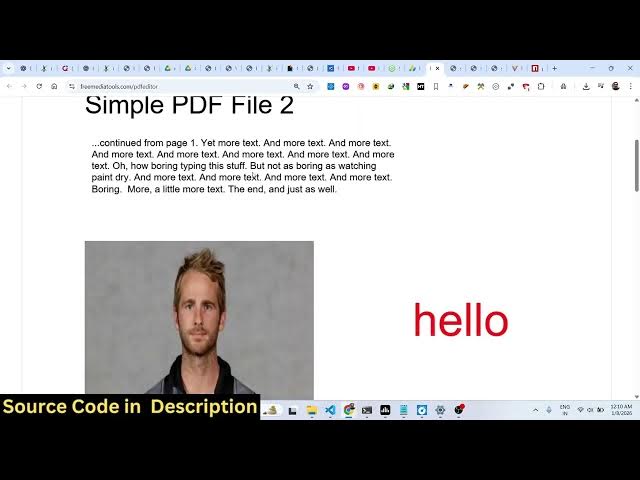
And here you can place it the text.
1:28
Click on save. Then we also have ability
1:30
to embed images as well.
1:42
So here you specify the width and the
1:44
height of the image.
1:49
Click on save. After you do this, click
1:51
on the download button to actually
1:53
download the output file. So, it's a
1:56
very simple single page SAS kind of an
1:59
application where you can deploy this
2:01
and earn a lot of passive income by
2:03
subscription based fees or putting
2:05
advertisement.
2:08
So, this is a great idea. You can earn
2:10
up to I think $100 per month
2:13
because uh many people are looking
2:15
forward for editing their PDF files.
2:18
They make use tools like Canvor, Adobe
2:21
Acrobat. But this project I developed it
2:23
from scratch.
2:25
So it's very easy for you to deploy
2:27
this. Simply need to run the command npm
2:29
run build. This will build out this
2:31
entire project and we'll be able to
2:34
deploy this really easily.
2:37
So before you purchase it, you can the
2:39
link is given. You can definitely try
2:41
out this project. If you're interested,
2:44
this will be the source code you will
2:46
get. And if you still face any problem,
2:48
I will definitely help you. And it's a
2:51
simple SAS kind of application round
2:54
about $100 per month you can earn. So
2:57
it's a Canva or Adobe Acrobat clone kind
3:00
of an SAS app. So definitely check this
3:04
out.