live_tv
Livestream Starting Soon
00
Hours
:
00
Minutes
:
00
Seconds
Up next in 10

How to Setup TailwindCSS 4 in Vue.js 3 Vite Project in Visual Studio Code Full Project For Beginners
Feb 12, 2025

Get the full source code of application here:
https://github.com/gauti123456/tailwindcss4vue3sample
Hi Join the official discord server to resolve doubts here:
https://discord.gg/cRnjhk6nzW
Visit my Online Free Media Tool Website
https://freemediatools.com/
Buy Premium Scripts and Apps Here:
https://procodestore.com/
Show More Show Less View Video Transcript
0:00
uh hello guys welcome to this video so
0:02
in this video I will show you how to
0:03
integrate the latest version of Tailwind
0:05
CSS 4 which is the four version inside a
0:09
simple vuejs project in V development
0:12
environment so just inside my command
0:14
lines so let me create a brand new vuejs
0:18
project so the command is simple npm
0:22
create V at theate latest so we are
0:26
using the latest version of vat and Then
0:28
followed by the Comm and whatever is
0:31
your project name and then d-h
0:36
template view so this is actually the
0:38
command here let me zoom in so npm
0:40
create V at the rate latest so we using
0:43
the latest version of v and then this is
0:45
your project name and then D- template
0:48
view so just execute this command so it
0:51
will ask you for which framework you are
0:53
using so we will select here from View
0:57
and then we will be only be working with
0:59
typescript so just select typescript so
1:02
it will scaffold a sample project so we
1:05
will CD into
1:08
this and npmi so to install the
1:12
necessary packages so it will take
1:15
hardly 15 seconds to install it and then
1:18
we will open it inside Visual Studio
1:21
code so just wait for the
1:25
installation so the installation is
1:27
complete so now we will open it inside
1:29
vs code so you can see this is a sample
1:34
view js3
1:36
project and if I show you the
1:38
package.json file we are using the
1:40
latest version here if you
1:43
see the view
1:45
3.53 at the time of recording this video
1:48
and let me also show you which version
1:50
of node we are using which is the latest
1:52
version 22. 2013.1 and you should have
1:56
the latest version of vat as well
2:03
so now to get started just go to their
2:07
documentation which is Tailwind CSS 4 so
2:10
they have the step by-step instruction
2:12
the very first step you need to do you
2:14
need to install the Tailwind CSS and
2:16
this package by npm so just copy this
2:20
and just go to the command line and
2:21
simply install these two
2:24
packages so it will install it so you'll
2:28
see Tailwind CSS which is 4.0.5 and
2:32
Tailwind CSS /v it's a plugin for
2:35
specifically
2:37
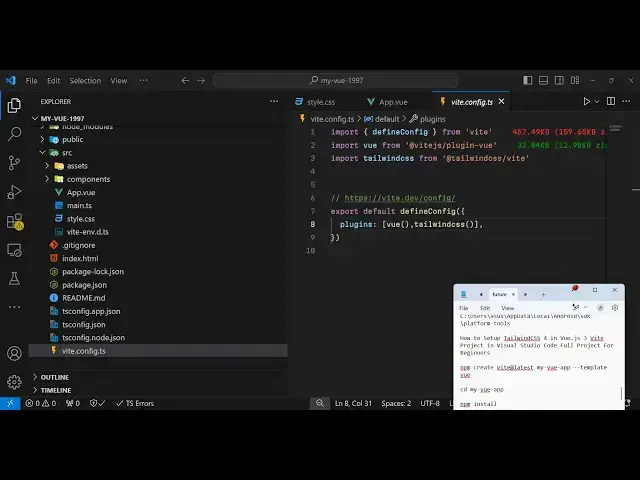
V and after that you want to configure
2:42
inside your vconfig do typescript
2:46
file so you just need to go to this file
2:50
here which is vconfig do typescript just
2:53
open this file and just add this line
2:56
which is import Tailwind CSS from at
2:59
theate tailin CSS V and just in the
3:01
plugin section just add the plugin
3:04
Tailwind
3:06
CSS like this so now you can close
3:10
this and after that step you go to the
3:14
documentation and then you need to open
3:16
your CSS file and add this import line
3:21
so for vuejs application you have this
3:24
file here style. CSS go to this file and
3:28
simply delete everything and write at
3:31
theate
3:36
import Tailwind
3:39
CSS so this needs to be in double codes
3:44
just make sure
3:45
Tailwind CSS and put a
3:50
semicolon so now you just need to run
3:52
the project so you will go to the app.
3:55
view and delete everything from here and
3:58
just paste some
4:02
example Tailwind CSS code here so I have
4:05
basically made a simple GitHub repo
4:08
where I pasted just some sample Tailwind
4:12
CSS classes so we are using these
4:15
Tailwind classes if you
4:17
see we have a simple card-like structure
4:20
so if you want to run this application
4:22
you simply type npm runev it will start
4:25
the development server so Local Host
4:27
5173 so you will see the application is
4:30
running locally and we have are seeing
4:33
this Tailwind CSS nice little card here
4:36
align center of the screen and we have a
4:38
simple card-like structure so the
4:40
Tailwind is perfectly working the latest
4:43
version 4.0 so in this way you can
4:45
configure step by step I showed you in
4:48
VJs 3 in V development environment how
4:52
to integrate the latest version of
4:54
Tailwind CSS 4 so if you want to clone
4:57
this repo you can go to the description
5:00
link I have given my GitHub repo link
5:02
here the link is given in the
5:03
description so you can directly clone
5:05
this repo and start running the Tailwind
5:07
CSS 4 in Vue js3 project so thank you
5:11
very much for watching this video and
5:13
also check out my website as well free
5:15
mediat tools.com uh which contains
5:18
thousands of tools regarding audio video
5:20
and image and I will be seeing you in
5:23
the next video
#Programming