live_tv
Livestream Starting Soon
00
Hours
:
00
Minutes
:
00
Seconds
Up next in 10


Get the full source code of application here:
https://github.com/gauti123456/nodeexpresstailwindcss
Hi Join the official discord server to resolve doubts here:
https://discord.gg/cRnjhk6nzW
Visit my Online Free Media Tool Website
https://freemediatools.com/
Buy Premium Scripts and Apps Here:
https://procodestore.com/
Show More Show Less View Video Transcript
0:00
uh Hello friends welcome to this video
0:02
so in this video I will show you how to
0:05
get started using Tailwind CSS 4 inside
0:09
nodejs and
0:10
express and ejs which is a template
0:13
engine so we will be using this official
0:15
version which is released last month in
0:18
Tailwind CSS 4.0 which is drastically
0:21
different from the previous versions so
0:23
I will show you a very basic nodejs and
0:25
express project let me go to the command
0:28
line and uh just initiate a new
0:34
directory and let me CD into
0:47
this uh CD node
0:53
Express and open it inside VSS code
0:58
so you will see currently the directory
1:01
is empty so first of all we need to
1:03
initialize the package.json file so npm
1:08
init uh
1:09
Dy so this will actually create your
1:13
package.json file and now we need to
1:15
install the express module and the ejs
1:21
module which is used to build out the
1:23
web server and EGS is a template engine
1:25
so install these dependencies
1:30
and after that we need to install the
1:32
latest version of Tailwind CSS as a dep
1:35
dependency so Tailwind
1:40
CSS so this is a command here npmi DD
1:44
for dep dependency and Tailwind CSS so
1:47
as soon as you do this if you open your
1:49
package.json file we are using the
1:51
latest version of Tailwind CSS which is
1:55
4.0.6 and after this now we need to
1:58
initialize some
2:00
files here in the root directory so
2:02
first of all we need to create uh post
2:05
css.
2:07
config.js this is a file here you need
2:10
to create it in the root of the project
2:13
and then you need to paste this code
2:17
here which is module. exports and we are
2:21
using these plugins tailin CSS Auto
2:25
prefixer and after this you need to
2:30
create your
2:32
uh I also given a GitHub repo as well I
2:36
created this GitHub repo I have given
2:39
this GitHub repo in the link description
2:41
of this video
2:43
so you can get all this source code from
2:46
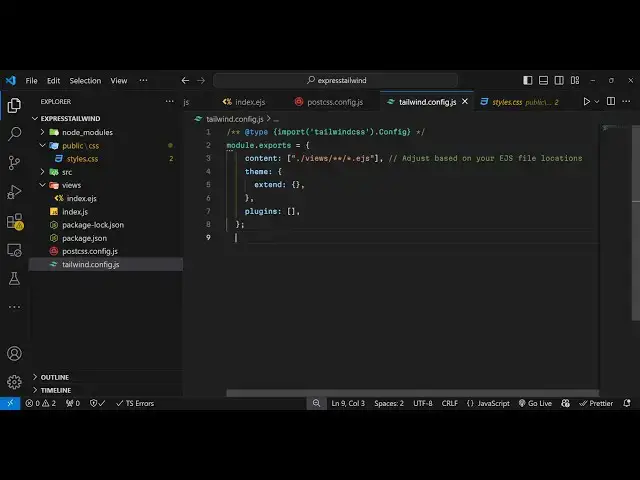
here and then the second file you need
2:48
to create is your Tailwind doc config.js
2:51
file in the root of the project so
2:53
tailin doc config.js
2:56
so just create this file and paste this
3:03
code so module. exports content views
3:07
EGS so we will store all the ejs
3:09
templates in this folder which is the
3:11
view folder and then just paste this and
3:15
after you do this you need to create
3:17
your index.js
3:21
file so here we will actually
3:25
be starting our Express server so for
3:30
this we will require this
3:37
package we make a new Express
3:46
app and we'll require the buil-in path
3:49
module and we will set basically first
3:51
of all the view engine which is ejs
3:55
template engine like
3:57
this and then we all o need
4:01
to make a simple get request so when we
4:05
load the homepage we need to
4:08
load the template here which will be
4:11
index and then I will start this
4:13
application on port number
4:27
5,000 so now here uh we need to create
4:30
this views
4:32
folder right here so inside this we will
4:37
just create this index. ejs
4:40
file this will be a
4:44
simple HTML document right here and
4:49
uh after this you need to create your
4:53
folder
4:54
here a source directory inside source
4:58
directory just create
5:00
another folder CSS and inside this we
5:03
will create a styles. CSS
5:08
file and here you need to paste this
5:11
import this tailent at theate Import in
5:14
double codes tailin CSS semicolon so we
5:18
have importing this tailent CSS and now
5:20
we need to compile this and build this
5:24
because we are not using V in Express
5:27
Express can't compile t EV CSS
5:30
automatically for this we need to write
5:32
a script which will automatically
5:35
compile it for us and for this we do
5:38
need to install a package for this which
5:40
is
5:43
dashd ADD theate
5:45
Tailwind CSS SL poost CSS just install
5:50
this compiler for Tailwind
5:53
CSS enter it and
5:57
the it will be installed if if you see
6:00
this is a compiler for compiling this
6:02
Tailwind CSS post
6:05
CSS we using the same version
6:08
4.0.6 and now go to the package.json
6:11
file and add this two
6:14
scripts so the first script will be for
6:17
building the
6:19
CSS so in double quotes write the build
6:23
command CSS so this will be using this
6:26
post CSS and it will actually compile
6:29
the Cs CS which is stored inside the
6:31
source CSS styles. CSS and it will
6:35
output
6:36
the CSS in the public folder public CSS
6:41
styles.css
6:43
and I will just automate this so
6:45
whenever you make any sort of changes
6:47
inside your typescript or sorry Tailwind
6:50
CSS we will just write this watch
6:52
command so this will do you'll just add
6:56
this watch flag right here at the
7:00
last here dash-w so it will just watch
7:04
for the changes if you make any sort of
7:06
changes inside your Tailwind it will
7:08
automatically compile it to this and for
7:12
this we need to create a public
7:14
folder right here and then create our
7:18
CSS folder right
7:20
here that's all so the file will
7:22
automatically get created and now we
7:26
just need to go to this uh index. EGS
7:29
file file and just include this uh
7:31
output file which which will get
7:34
automatically
7:37
created so right here in the link tag we
7:40
can include this CSS file here which is
7:43
stored inside the CSS folder SL
7:47
styles.css
7:52
so we are including this file here which
7:55
will get
7:58
created so for this we do need to make
8:00
this public folder a static so we simply
8:03
use this Express middleware which is
8:05
express.
8:09
use and uh Express sorry express. static
8:14
public so we just making this public
8:17
folder as
8:21
static so now in this index. ejs we can
8:26
use some Tailwind classes in the body
8:30
so if I use some we simply putting a
8:34
welcome message welcome to Tailwind CSS
8:37
4.0 and we using some Tailwind classes
8:40
if you see these are all Tailwind
8:41
classes and now if I need to actually
8:46
execute two commands so here you can add
8:51
actually open this uh terminal right
8:54
here in vs code and then just execute
8:58
one command here which will be this
9:00
command that we
9:03
execute in right we have written this
9:05
command
9:06
here npm run watch CSS we just need to
9:11
run this command in the background so
9:13
npm run watch CSS as soon as you do
9:19
this it is saying that post CSS is not
9:22
recognized as this error will come and
9:25
to fix this error we do need to
9:27
initialize the post C SS as a Dev
9:31
dependency so post CSS SL CLI so just
9:36
execute this command npmi dasd post CSS
9:41
CLI so add this inside your Dev
9:54
dependency oh sorry let me wait I think
9:58
you do need
10:03
yeah sorry this is actually a command so
10:06
let me show you npm install DT post CSS
10:10
post CSS CLI Tailwind CSS Auto prefixer
10:13
so install all these
10:15
modules and once you do
10:21
this you will not see any kind of error
10:24
so once you install this so now you can
10:26
run your command npm run
10:30
that background command here
10:40
so okay so it is actually if you execute
10:44
this commands I'm just showing you from
10:46
scratch which errors you will come
10:48
across so npm run if you actually run
10:52
this command you will get this
10:58
error and PM
11:00
[Music]
11:01
run watch CSS so if you execute this you
11:05
will get this error it like it looks
11:07
like you are trying to use Tailwind CSS
11:09
directly as a post CSS plugin and for
11:12
this you need to install this plugin
11:13
here add theate tailin CSS so just
11:17
follow the command here so install this
11:20
package tailin CSS SL post CSS
11:30
as soon as you do
11:46
this uh I think I created some kind of
11:49
error so what I will do I will simply
11:53
clone this GitHub
11:56
repo sometimes it can occur this problem
12:00
just clone this GitHub REO and just go
12:03
to the
12:05
folder start easy
12:13
so
12:17
D npmi so just install all the node Chas
12:21
packages so it's that easy for you
12:26
so so that's why I created this GitHub
12:29
that you can't face any sort of Errors
12:32
because sometimes errors can take place
12:36
and then just need to execute uh just
12:40
run the file node more index.js your
12:42
application will start on vode 3,000 and
12:45
then in the background you just need to
12:47
execute open the
12:53
terminal and just execute that command
12:55
in the background npm R watch
13:01
so what it will do it is running in the
13:04
background and uh it will create this uh
13:07
styles. CSS it will compile the Tailwind
13:10
CSS
13:12
automatically and it will create this
13:14
file
13:17
here so if you open the Local Host
13:22
3,000 you will see welcome to Tailwind
13:25
CSS 4.0 with Express and ejs and now if
13:29
you make any sort of change if you add
13:34
some classes here let's suppose we have
13:37
a underline class of Tailwind CSS so
13:41
underline you will see underline will be
13:43
get added so you can change the color of
13:45
the text if you want the red
13:48
color you will see that so in this way
13:51
you can get started with Tailwind CSS
13:53
4.0 in nodejs and express using EGS so
13:58
the setup process is slightly different
13:59
you need to first of
14:01
all uh just install the actual modules
14:04
you'll see that's why I created this
14:07
GitHub repo it will be very easy for you
14:09
to clone this and run this inside your
14:12
system and make sure that you're using
14:14
the latest version of nodejs because
14:17
Tailwind CSS 4.0 works with the latest
14:19
version so I've given the GitHub repo
14:22
link guys you can directly clone it and
14:24
start using Tailwind CSS 4.0 inside your
14:27
nodejs and express
14:30
applications and thank you very much for
14:32
watching this video and also check out
14:34
my website as well free mediat tools.com
14:37
uh which contains thousands of tools
14:40
regarding audio video and image and I
14:43
will be seeing you in the next video
#Educational Software
#Other
#Computer Education