Up next in 10

CodeGPT AI Coding Autocomplete & Assistant in VS Code to Generate Web Apps Quickly
Feb 21, 2025

Watch My Visual Studio Code IDE Setup Video For Fonts,Themes & Extensions
https://youtu.be/Bon8Pm1gbX8
Hi Join the official discord server to resolve doubts here:
https://discord.gg/cRnjhk6nzW
Visit my Online Free Media Tool Website
https://freemediatools.com/
Buy Premium Scripts and Apps Here:
https://procodestore.com/
Show More Show Less View Video Transcript
0:00
uh hello guys welcome to this video so
0:02
in this video I will show you yet
0:03
another AI coding editor inside vs
0:07
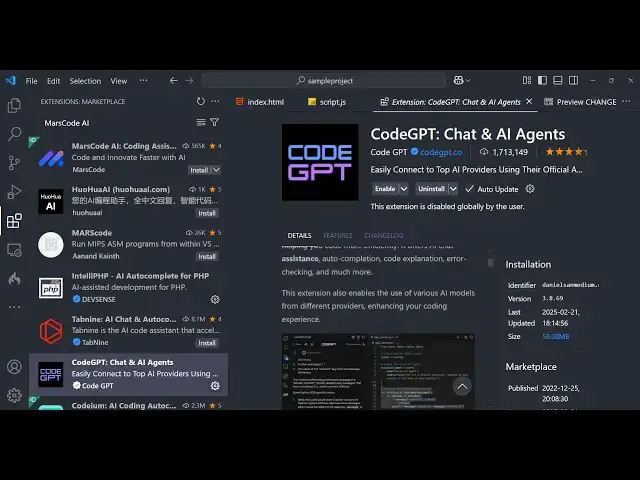
code which is called as code GPD this is
0:10
actually the extension code GPD it has
0:14
also this website as well code code
0:16
gp.com and just create a free account
0:19
using your Google account and after
0:21
authentication you will see this prompt
0:22
here either you can download the code
0:25
GPT extension inside vs code or you can
0:27
create your own custom AI agent as well
0:30
so so here it is telling you to install
0:33
this extension so simply click the
0:35
install button and uh now just install
0:38
this extension so it supports all the
0:41
things it can generate code it can you
0:43
can even select a portion of code and
0:45
then try to make this EXT extensions
0:48
explain that code as well
0:50
so just wait for the installation to
0:53
complete so now it has been successfully
0:55
installed and now you will see that it
0:58
it has added this prompt code GP chat
1:01
and just click this and as soon as you
1:04
click this you will see this prompt will
1:06
here you just need to do the
1:07
authentication so just open this and
1:11
allow the Google account to
1:15
authenticate and just click on this
1:17
button so now the authentication is
1:19
complete so now you can safely use this
1:22
code GPT extension so now just open any
1:25
file here index.html file I have opened
1:28
side by side so here you can ask any
1:30
question to generate the code here and
1:33
the AI models you can use any model here
1:36
by default it is using the cloud model
1:38
you can use GPD GPD 4 mini as well deep
1:42
seek as well all these famous models you
1:45
can use so here you can actually ask a
1:47
question here let's suppose I say build
1:49
a
1:52
simple uh
1:54
calculator in HTML CSS and give
2:01
so we write a simple prompt that we need
2:03
a simple calculator so now you can see
2:06
the speed here how fastly it is
2:08
generating the code for us so with
2:11
syntax highlighting so it is generating
2:14
this calculator so we also see these
2:16
copy to clipboard buttons as well so
2:18
here after generating it you can
2:21
even
2:25
simply so now the code has been
2:27
successfully generated and there is an
2:30
option here insert code so once you
2:32
click this the code will automatically
2:34
get inserted inside your file here so if
2:38
I try to open this index. HTML file you
2:41
will see it has made this nice little
2:43
calculator here which does all these
2:49
operations so this is one thing you can
2:52
do any sort of thing right here any any
2:55
language you can ask
2:57
question and now the second thing thing
3:00
is
3:02
that can click the new chat
3:06
button so here if let's suppose you
3:11
are you can even uh upload a image as
3:14
well from The Prompt for this you just
3:17
need to sign up for this which
3:24
is so we are already signed up so
3:31
so here you can change the model as well
3:33
let suppose you want to select a portion
3:35
of
3:44
code you can search the files
3:55
here so in this way you can see that
4:01
so it also comes with the auto complete
4:03
as well here just need to enable this
4:05
Auto suggestion so now once you write
4:07
your
4:13
code it will also give you autocomplete
4:16
suggestions so let's suppose I writing
4:18
some code
4:25
here so this is all the things that it
4:29
suppos
4:30
guys definitely use it if you want
4:39
to so just create an account here using
4:42
your Google account just do the
4:43
authentication and then install this
4:45
extension it's completely free so thank
4:47
you very much guys for watching this
4:49
video and also check out my website as
4:52
well free media tools.com uh which
4:55
contains thousands of tools regarding
4:57
audio video and image and I will be
4:59
seeing you in the next video
#Programming
#Software
#Multimedia Software
#Web Design & Development
#Clip Art & Animated GIFs
#Intelligent Personal Assistants