Up next in 10

Build a Vue.js Microsoft Word DOCX,Text & Markdown Viewer in Browser Using vue-doc-preview in TS
Jan 22, 2025

Get the full source code of application here:
https://codingshiksha.com/vue/build-a-vue-js-microsoft-word-docxtext-markdown-viewer-in-browser-using-vue-doc-preview-in-ts/
Hi Join the official discord server to resolve doubts here:
https://discord.gg/cRnjhk6nzW
Visit my Online Free Media Tool Website
https://freemediatools.com/
Buy Premium Scripts and Apps Here:
https://procodestore.com/
Show More Show Less View Video Transcript
0:00
uh hello guys welcome to this video so
0:02
in this video I will show you a vuejs
0:04
module which allows you to display Your
0:06
Word documents file from your Microsoft
0:08
account so if you do own a Microsoft
0:10
account then you can display this word
0:12
documents directly from a URL of your
0:16
Microsoft Word document URL so you can
0:18
directly access it display their Word
0:21
documents apart from that you can even
0:23
display normal text and markdown text as
0:25
well using this
0:28
module you can see we are dis playing
0:30
this in a nice
0:32
little you can also convert this into a
0:35
PDF file as well this work document that
0:38
you see it is converted to PDF document
0:41
so it's a Word document but we converted
0:43
to PDF so all these features it supports
0:45
this actual editor you can change the
0:48
file name you can addit as well you need
0:51
to sign in with your Microsoft account
0:53
here obviously
0:55
so so this is actually the module
0:58
specifically built for vuejs application
1:01
if you go to npmjs.com
1:05
and simply search for this module which
1:08
is view doc preview so this is actually
1:12
the name of the
1:14
module I've already installed it this is
1:17
actually the
1:19
command it's almost got 1,00 weekly
1:22
downloads so now to get started it's
1:24
very easy I've given all the source code
1:27
in the description so inside your
1:29
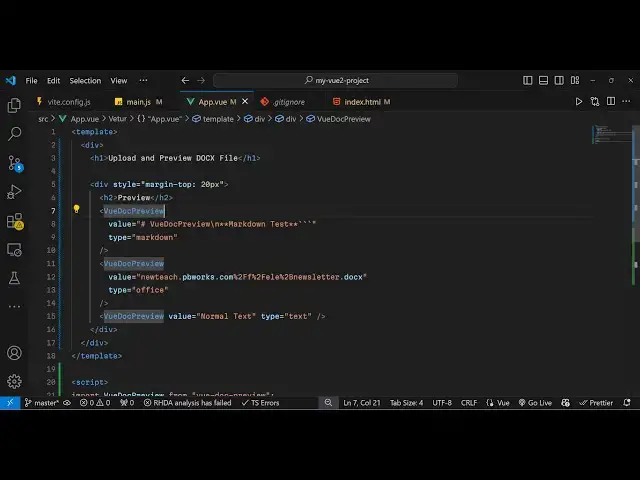
template in app. view
1:33
file and in the script the type script
1:37
we simply import this using the import
1:45
statement so this is we add this import
1:48
statement to import this
1:50
module and then we register it export
1:53
default
2:00
so this is the registration code now
2:02
after that inside the template we can
2:04
actually use this module so now to
2:07
render this word document
2:11
file
2:13
inside the
2:15
browser you simply use this component uh
2:18
which is view doc preview this is the
2:22
name of the component and it actually
2:25
takes a value parameter and here inside
2:29
the value you need need to paste
2:31
whatever is your url of your Microsoft
2:34
Word document URL so directly you paste
2:37
it you will
2:38
see this is the public URL that I'm
2:43
pasting and if you just
2:51
refresh and also you need to just add
2:54
the type parameter it's a Microsoft
2:57
Office file so that's why you need to
2:59
add this parameter that type is equal to
3:02
office so then it will Now display this
3:05
word document file in nice little editor
3:07
provided by Microsoft and then you can
3:09
access all these features you can
3:11
translate this document to any other
3:14
language you can see this language will
3:17
open and then it will translate the text
3:21
into that language
3:37
apart from that we also have the
3:39
functionality to print you will see the
3:41
print window will open and you will able
3:44
to print
3:46
and download as PDF or simply download
3:51
them as a Word document file you can
3:53
even do that as well
3:57
so so this is actually very simple
4:00
package you simply import that and use
4:02
it and pass the URL apart from that you
4:06
can even display normal text as
4:11
well so just type type is equal to text
4:15
and you can display normal text and you
4:18
can even display markdown as well so
4:21
here you need to Simply change the type
4:23
parameter to markdown in the value you
4:25
provide your markdown
4:31
so this is your normal text and this is
4:33
your
4:35
markdown so it supports all these
4:38
features and thank you very much for
4:39
watching this video and also visit my
4:43
website free mediat tools.com uh which
4:45
contains thousands of tools regarding
4:48
audio video and image and I will be
4:50
seeing you guys in the next video
#Programming
#Web Services