Up next in 10

Build a Vue.js 3 Random Wheel Spinner App with vue-wheel-spinner in Browser Using TS
Jan 17, 2025

Get the full source code of application here:
https://codingshiksha.com/vue/build-a-vue-js-3-random-wheel-spinner-app-with-vue-wheel-spinner-in-browser-using-ts/
Show More Show Less View Video Transcript
0:00
uh hello guys welcome to this video so
0:02
in this video I will show you a vuejs 3
0:04
package so if you basically building out
0:07
a website for picking random random
0:10
winners among various choices you want
0:13
to integrate this random wheel spinner
0:16
if you click the spin icon you will see
0:18
it will Spin and then it will pick the
0:20
random winner there is a specific
0:22
package which allows you to do this you
0:24
can even visit my website Ive integrated
0:27
this you can check out the demo it's a
0:30
nice little tool that I developed on my
0:31
website free mediat tools.com which is R
0:35
this random wheel picker tool so we I
0:37
just use the simple this module so we
0:40
have you can add multiple choices right
0:43
here and then you can spin
0:45
it so here you can add choices click on
0:48
spin for random and then it will pick
0:51
the random winner and then it will show
0:53
the winner to use so we are using the
0:54
same package the name of the package is
0:58
uh I I've given all the source code in
1:01
the description of if you need the
1:03
source code you can go to my website the
1:05
link is given in the description so the
1:08
name of the package is view wheel
1:12
spinner so this is actually the name of
1:15
the package the same demo they offer
1:18
here as well
1:21
so so the command is simple you can
1:25
install it by executing this command to
1:27
integrate this inside your and then they
1:29
they have given this full example on
1:32
their GitHub page but I little bit
1:35
customized it so I've just shown you
1:37
very simply how to integrate them so
1:41
inside your script type script code
1:44
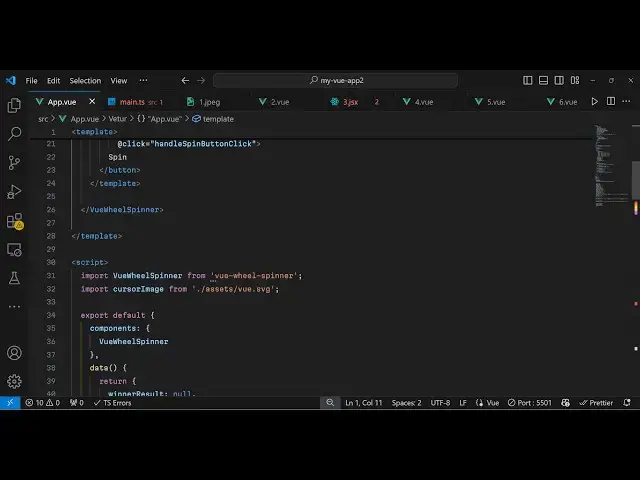
first of all we need to require this
1:47
package so we use import statement view
1:50
wheel
1:51
spinner from
1:54
view3
1:56
Wheel view wheel spinner
2:02
then you can even customize your cursor
2:05
image so mine is present in my assets
2:08
directory to
2:09
SVG and then you can export and register
2:13
this component by using export default
2:16
inside your components array you can
2:18
directly mention
2:20
it view wheel spinner and then inside
2:24
your
2:27
data we can declare a variable which is
2:30
hold the result for us so by default it
2:33
will be null and then we can have
2:36
multiple
2:37
choices that you want to pick winner for
2:39
here you can Define the choices
2:41
alongside with the colors combination as
2:44
well so it will have an aray of object
2:46
each object will contain two properties
2:49
the color and the actual Choice here you
2:53
can customize it and uh then we have
2:56
various variables for spinning purpose
2:59
so I will just paste it so we have is
3:03
spinning is false default winner is zero
3:06
cursor image angle position distance all
3:09
these things you can customize it and
3:12
then we have the different methods in
3:15
the method
3:18
section so in this way guys you can
3:22
directly go to the template now wherever
3:25
you need to embed this wheer
3:28
spinner so so we directly use the
3:31
component name which is view V
3:35
spinner and then it actually takes all
3:38
these parameters that I showed you
3:40
so let me explain to you so what happens
3:43
here so we directly attaching all these
3:48
parameters so these are the call back
3:51
functions when when you spin when the
3:53
spin ends this on spin start on Spin and
3:56
will
3:57
execute so this is actually a button
4:00
which triggers the spin so we have
4:02
attached the button of spin so when you
4:04
click this button this function will
4:06
execute so now we get to the method
4:09
section you can even customize it by
4:11
writing custom CSS as well so when you
4:15
start you reset the winner and then spin
4:18
spinning to
4:20
true and then this contains this
4:22
function spin wheel which will start the
4:24
spinning for us if you go to your
4:27
application now you will see there will
4:31
be a
4:32
button spin having all these choices if
4:35
you click spin the spinning will start
4:37
and then it will pick this random winner
4:39
so you can use this very handy component
4:43
if you are building some kind of winner
4:45
website so thank you very much for
4:47
watching this video and do check out my
4:49
website as well free mediat tools.com uh
4:53
which contains thousands of tools
4:55
regarding audio video and image and I
4:57
will be seeing you guys in the next
4:59
video