Up next in 10

Build a Vue.js 3 Password Meter to Validate With Messages Using vue-simple-password-meter in TS
Jan 17, 2025

Get the full source code of application here:
https://codingshiksha.com/vue/build-a-vue-js-3-password-meter-to-validate-with-messages-using-vue-simple-password-meter-in-ts/
Show More Show Less View Video Transcript
0:00
uh hello guys welcome to this video so
0:02
in this video I will show you a
0:04
application which allows you to detect
0:06
your password as soon as you type the
0:09
password it will show this password
0:10
meter based upon different messages so
0:13
if your password is guessable risky weak
0:17
strong so as soon as you type the
0:19
password this password me meter will be
0:21
there and based upon how you write this
0:25
the colors will change the message will
0:27
also change so there is a specific
0:29
module in inside vuejs we can use view
0:32
simple password meter so if you go to
0:35
npmjs.com
0:37
just need to search for this module view
0:40
simple password
0:42
meter so Ive already installed this so
0:46
This is actually the module here you
0:49
just need to install it by executing
0:52
this command and it's almost got 7,000
0:55
weekly downloads so they do offer a nice
0:58
little demo on their official website of
1:02
the you can check out the documentation
1:04
they given a complete example so now to
1:07
get started here we'll
1:10
be showing you the complete examples so
1:15
for getting started you just need to
1:18
inside your app. view you need to write
1:21
the
1:22
template and I will have a div tag and
1:25
inside this I will allow the user to
1:29
enter the password for this I will
1:32
have a simple input field input type
1:36
will be password and we'll be attaching
1:39
a v model which is a variable for
1:42
keeping track of which password user
1:44
writes so inside your script section we
1:47
will
1:51
attach you will first of all require the
1:53
necessary packages so Define component
1:56
and reference which will be coming from
2:00
and then this third party package which
2:03
is password meter and it will be coming
2:05
from this P package view simple password
2:09
meter so as soon as you require it we
2:13
just need to export default Define
2:16
component and here we need to include
2:19
this third party register it inside our
2:22
components
2:23
array object password
2:26
meter so as soon as you do this now we
2:29
do need to write our setup function
2:31
where we need to declare the variables
2:32
which will be required by this template
2:35
so first of all the password that you
2:37
will write and actually the score that
2:40
will be given by this package
2:42
automatically as soon as the user writes
2:44
the password so reference by default it
2:47
will be null so now we go to the
2:50
template so
2:53
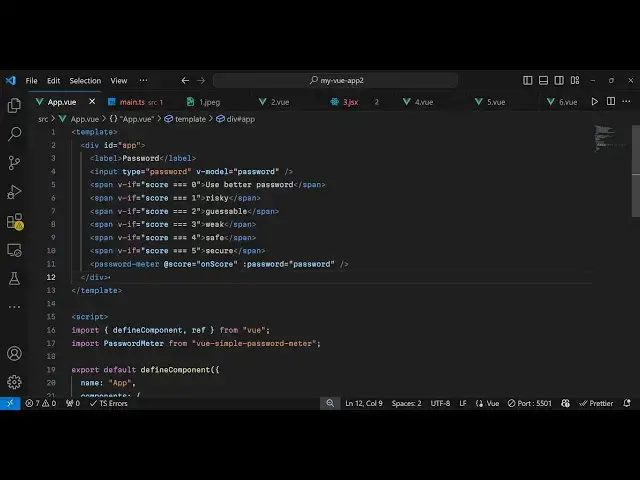
write inside this we will have a span
2:56
tag and we bind a if condition that
3:00
if the score value is uh triple equal
3:05
for condition so if the value of score
3:07
is equal to zero in that case we will
3:10
print out this message that use better
3:14
password so based upon the score value
3:17
we will show these conditional
3:20
messages and same we will repeat it four
3:23
more times depending upon if the score
3:26
value is one then it's risky two is
3:28
guessable 3 four save and five is secure
3:32
so in this way you can show multiple
3:35
messages and then after this we will
3:37
also show a password meter using this
3:40
component and it actually takes two
3:42
parameters first of all the score value
3:46
and this will be a call back function as
3:49
soon as the score changes we can
3:51
actually bind a function on score I will
3:54
write this function and secondly what
3:56
password you are putting your score so
3:59
you need to also provide this variable
4:02
the same variable that we provided here
4:04
we declared this variable right here
4:07
so so now what happens we just need to
4:10
Define all these functions so which will
4:12
be the call back function on score so
4:15
this payload value will be returned the
4:18
actual
4:19
score will be contained inside this so
4:22
we can even console log the score here
4:25
which will be contained inside payload
4:27
score and also it Returns the strength
4:30
value as well payload strength which
4:33
will be the
4:35
message either it will be risky
4:37
guessable weak save secure and now we
4:40
just need to say score. value is equal
4:42
to payload do score and at last we just
4:45
need to return so that we can use all
4:48
these variables and functions in our UJS
4:50
template so we'll just return password
4:54
on
4:55
score and
4:58
score so
5:01
if I refresh the application uh you will
5:03
see this input field appearing and as
5:06
soon as I
5:08
write you will see in the console uh
5:13
zero will be returned and then it's
5:15
risky zero risky
5:17
still so now if I write some better
5:21
password so now it changeed to
5:24
guessable and it now change to
5:28
save and can
5:31
see so in this way you can integrate
5:35
this password meter input field inside
5:39
your Vue js3 application using this
5:41
package you can even customize it by
5:44
writing some custom CSS so they have
5:47
given the CSS code you can go to my
5:50
website the link is given in the
5:52
description so to get the complete
5:54
example so you can customize it by just
5:57
adding the style tag if you want to
6:02
so if you just add you can customize the
6:04
colors as that appears so as
6:12
soon so thank you very much guys for
6:14
watching this video and please hit that
6:16
like button subscribe the channel and
6:18
also check out my website as well uh
6:21
free mediat tools.com uh which contains
6:23
thousands of tools regarding audio video
6:25
and image and I will be seeing you guys
6:28
in the next video
#Other
#Computer Education