Up next in 10

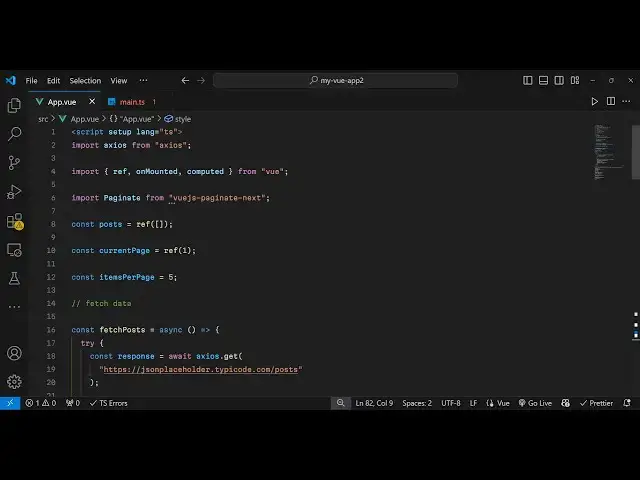
Build a Vue.js 3 Pagination of Data From REST API Using Axios & vuejs-paginate-next in TypeScript
Jan 9, 2025

Get the full source code of application here:
https://gist.github.com/gauti123456/605988a5ff8f887c537a34af08906c9d
Hi Join the official discord server to resolve doubts here:
https://discord.gg/cRnjhk6nzW
Visit my Online Free Media Tool Website
https://freemediatools.com/
Buy Premium Scripts and Apps Here:
https://procodestore.com/
Show More Show Less View Video Transcript
0:00
uh hello guys welcome to this video so
0:03
in this video I will once again show you
0:04
another pag Nation plugin in vuejs 3
0:08
which is kind of using bootstrap in the
0:11
background so for this you do need to
0:13
include the CDN of bootstrap so you can
0:15
see we are fetching data from rest API
0:18
Json placeholder API and we are showing
0:20
five post per page so we have these
0:23
pagination controls out there uh we are
0:25
on the first page so we are showing
0:27
first five post then we can get to the
0:30
second page third page you will see that
0:34
a total of 20 pages are there so if I
0:38
navigate to the 20th page this is the
0:40
last page so we have all these previous
0:43
page next controls are also there for
0:45
the
0:46
pagination so we are using this plug-in
0:49
which is specifically built for vuejs
0:52
VJs pagate next this is the command here
0:56
uh I have already installed this plug-in
0:59
the almost 8,000 weekly downloads are
1:02
there so you just need to install this
1:06
and after installing it just inside your
1:09
app. viw file just come to this file and
1:12
now I will show you from scratch how to
1:15
write so all the source code I have
1:17
given in the description of this video
1:20
so first of all and one more thing we
1:23
are using exos package here so you just
1:26
need to import
1:28
exos just install that exos package
1:33
and here the language will be typescript
1:36
so we are using typescript for building
1:38
this we'll be importing the reference on
1:42
mounted and computed all will be coming
1:45
from the base vuejs package and right
1:49
here uh we will be importing this
1:53
plug-in from vuejs Paget next this is a
1:58
plugin that we imported
2:02
and then we need to now declare some
2:04
variables first of all the post variable
2:06
uh which will be empty by default empty
2:09
array and then how many the current page
2:13
in the pag Nation this will be one and
2:16
then how many items per page you want to
2:18
be showing I will be showing five post
2:21
per page and then I will be writing the
2:25
function for fetching the data and I
2:28
will just call this as fetch
2:31
post and this will be a Asing
2:37
function and inside your TR catch
2:42
block you will fetch the data from the
2:45
Json placeholder
2:46
API using the exos libraries like this
2:50
exos it contains a get method and here
2:54
you pass the full
2:57
address uh Json placeholder type a code
3:00
you can use any API for example I'm just
3:03
using this and then whatever post is
3:07
returning post. value uh response.
3:12
data so we are equaling it to whatever
3:15
is the response
3:17
post and then after this uh here we need
3:20
to Simply execute this function so I
3:24
will use this life cycle method of on
3:27
mounted so we have imported this from
3:29
VJs so whenever your component loads
3:32
this function will execute fetch
3:35
post uh that's all uh and after this now
3:39
we come to the template and where we
3:42
need to display
3:45
this so inside your unordered list we
3:48
will Loop through the paginated post and
3:52
for this I will use the V4 directive in
3:57
VJs to Loop through
4:00
using this for Loop and for this we'll
4:02
be creating this computed property
4:05
paginated post which will simply return
4:08
the pag ined post for us depending upon
4:12
which current page we are
4:13
on and we will be
4:16
displaying the key here and
4:20
then in the H3 tag the post title
4:24
alongside with
4:27
the body of the post so right here now
4:31
we need to compute this property
4:33
paginated post we just need to Define
4:35
this so this is not a function instead
4:38
it's a property which we need to
4:41
calculate every time when we render the
4:44
post so paginated post it's a computed
4:47
property and write here for this we need
4:51
to calculate the starting index and the
4:53
ending index and for this we are simply
4:57
doing some simple mathematics
5:01
to calculate the starting and the ending
5:03
index for the
5:07
pagination and then we simply uh return
5:10
the post using the slice function in
5:16
JavaScript using the starting and the
5:18
ending
5:20
index so now what happens if you refresh
5:23
your page uh you will see the post will
5:26
get displayed only five post because we
5:29
are on the first
5:31
page so five poster display and now for
5:34
showing the page in a
5:37
controls we come to after this diff
5:45
section after this UL tag we embed this
5:49
component which is paging it and it
5:52
actually takes some options first of all
5:54
the page count so this correspond to how
5:57
many pages you want to display
6:00
this will be coming by dividing the
6:02
number of post by the items per page so
6:05
let's suppose you have 20 post and items
6:08
per Pages two so then it comes 10
6:11
pages and then we also want to show
6:16
the previous page so it will say the
6:20
text will be previous same goes with the
6:23
next text you can uh customize the text
6:26
here like this
6:29
I say
6:32
next and then you can attach the class
6:35
here for the pag
6:37
nation which is required for this plugin
6:40
which is pag nation and then the page
6:43
class which
6:45
is also an attribute page item so these
6:49
two classes are necessary for the
6:51
pagination which is part of this plugin
6:53
so we attaching it then this is the text
6:56
for the previous and the next pages and
6:58
these are the total number of pages so
7:01
if you refresh your application now you
7:03
will see uh this is your previous page
7:06
this is next page we are on the first
7:09
page if I navigate to the second page
7:12
nothing changes because we do need to
7:14
bind this click
7:17
Handler so we do this like this click
7:19
Handler so whenever we click any of
7:22
these pages in the page Nation we need
7:23
to write this handle page change this
7:27
call back function we will just Define
7:29
it
7:30
inside the typescript code so this
7:33
function which is handle page change so
7:37
whatever page number that you
7:42
select we will simply change it the
7:45
current page value to this page number
7:48
that's all so now if you
7:51
click on the second page the next setup
7:54
post will display same goes you will see
7:57
that
8:00
so this is the previous page is also
8:02
working so now if you just want to style
8:04
it because the styling is not correct uh
8:07
I have given all the source code and
8:10
just you need to add the Styles here at
8:14
the bottom section just after this
8:15
template just paste it and for this we
8:18
are simply importing bootstrap if you
8:20
see the CDN of bootstrap and just we are
8:23
just customizing the look and feel of
8:24
this P pagination so now it will appear
8:27
in the center position and we are
8:29
highlighting the current page which is
8:30
on the first page and then if you change
8:34
it then also it will highlight so in
8:37
this way you can simply paginate post
8:40
inside Vue js3 you can uh fetch post
8:44
from a rest API and then paginate it
8:47
using this plugin so thank you very much
8:50
for watching this video please hit that
8:52
like button subscribe the channel and
8:54
also check out my website as well uh
8:57
free mediat tools.com
8:59
uh which contains thousands of tools
9:01
regarding audio video and image and I
9:04
will be seeing you guys in the next
9:06
video