live_tv
Livestream Starting Soon
00
Hours
:
00
Minutes
:
00
Seconds
Up next in 10

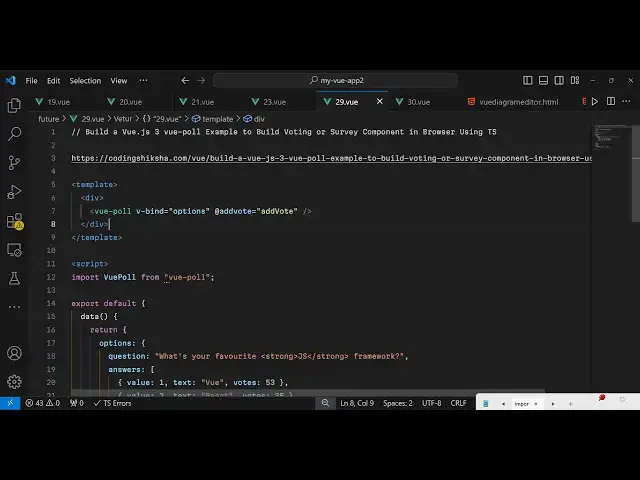
Build a Vue.js 2 vue-poll Example to Build Voting or Survey Component in Browser Using TS
Jan 17, 2025

Get the full source code of application here:
https://codingshiksha.com/vue/build-a-vue-js-3-vue-poll-example-to-build-voting-or-survey-component-in-browser-using-ts/
Show More Show Less View Video Transcript
0:00
uh hello guys welcome to this video so
0:02
in this video I will show you a UJS
0:04
package which is used for voting
0:06
purposes so let's suppose you want to
0:08
run a survey or a poll among people if
0:13
you want to ask a question have multiple
0:15
choice questions so like this what's
0:17
your favorite JavaScript framework we
0:19
have four choices which is vue.js react
0:22
angular and other so we have four
0:24
choices if I vote for react so as soon
0:27
as I do this you will see it will show
0:29
the percentage the number of votes which
0:31
is 129 41% 28% 23% 8 so if you want to
0:37
integrate this polling functionality uh
0:39
you can go to npmjs the name of the
0:41
package is view- pole this is actually
0:45
the name of the package I've already
0:47
installed it
0:52
so the command is simple and it's almost
0:56
called 50 it's a fairly new package but
0:58
still it's uh
1:01
I will show you how to integrate this so
1:04
go to your app. view
1:06
file and write in your template you'll
1:09
write the HTML and then the typescript
1:12
code inside script tag so right first of
1:14
all we do need to register this module
1:17
so right in your script we need to
1:20
import this third party package from
1:23
view
1:24
pole and then simply export default app
1:28
the data variables that we'll be using
1:31
right here so
1:33
return We declaring an options object
1:37
right here so this option object will
1:40
contain a question here which you want
1:41
to make a survey or McQ question so
1:45
what's your
1:48
favorite you can have any
1:51
question JavaScript
1:55
framework and then you can give multiple
1:57
choices questions to make a voting
2:00
application so you provide a question
2:03
and then the second property here will
2:04
be an array
2:06
here answers and you can put array of
2:10
objects so each object will contain the
2:13
value which will be one and the text
2:16
which will be View and number of vots
2:18
you can even attach it so by default it
2:22
will have 53
2:24
vots so you
2:26
can I'm just statically doing it but in
2:30
production level you will be registering
2:32
it to a database and then fetching it
2:35
and then you can Define multiple choices
2:37
right just change the value to two and
2:41
change this to react and then it is
2:44
55 then this is
2:47
angular change this to Let's suppose 40
2:51
and then I think it's uh
2:55
s so this is
3:00
I change this to 70 so now we have four
3:06
choices so after this we do need to
3:09
register this component so inside your
3:11
components array object we need to
3:13
register it view pole and lastly inside
3:17
your methods we will be defining the
3:22
methods so now we come to the template
3:25
part so where we need to render the this
3:28
so we simply go to the D section and use
3:30
this component view
3:32
pole and we simply render it and it
3:34
actually takes two options first of all
3:37
the options that you need to bind which
3:39
is contained in this options object that
3:42
we Define so we directly attaching it to
3:45
this third party component and the
3:47
second option is take is a call back
3:49
function so whenever someone
3:51
votes this call back function will
3:54
execute I have defined a custom call so
3:58
add vote so now we just need to go to
4:01
your method section and write here
4:04
Define the method here so this you can
4:07
call this anything I'm just calling it
4:08
add vote and this gets an object a
4:12
passed automatically and just we can
4:14
console
4:15
log a
4:26
message like this so personally I'm
4:29
using VJs 3 which is the latest version
4:31
but on their website they explicitly
4:34
mention that it only works with the
4:35
vuejs2 version so for running this
4:38
application you need to install vuejs 2
4:41
version not the three version so that's
4:43
why I can't run this application but on
4:45
the demo website it will something look
4:47
like this so if you do want to integrate
4:50
this you do have to have UJS 2 version
4:53
so to integrate this module so thank you
4:55
very much guys for watching this video
4:57
and please hit that like button
4:59
subscribe subcribe the channel and also
5:01
check out my website as well free mediat
5:04
tools.com which contains thousands of
5:06
tools regarding audio video and MH and I
5:09
will be seeing you guys in the next
5:11
video