Up next in 10

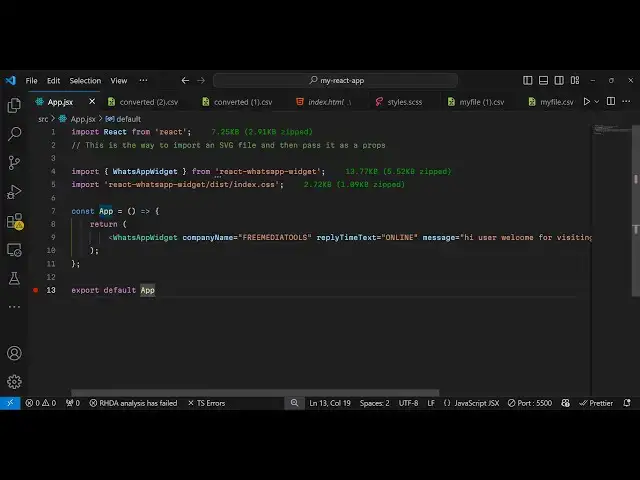
Build a React.js Whatsapp Chat Support Widget to Allow Users to Send Message and Chat in Browser
Jan 9, 2025

Buy the full source code of application here:
Show More Show Less View Video Transcript
0:00
uh hello guys welcome to this video so
0:02
in this video I will show you a react
0:05
WhatsApp support widget specifically for
0:08
react so if the users are visiting your
0:11
website they can chat with you through
0:13
WhatsApp and this WhatsApp icon will be
0:15
floating around in the bottom right
0:17
corner of the screen and if they click
0:19
the this icon this chat window will open
0:22
so the interface will look something
0:24
like WhatsApp you'll see support
0:26
typically replies within a day you can
0:28
change all these options customize it
0:30
you can even provide a welcome message
0:32
to the user hello what can be help for
0:34
you and then they will type the message
0:37
click on send and then it will open
0:39
their WhatsApp app and they will be able
0:41
to chat with you so I will show you a
0:45
complete example of this the package
0:47
name is react WhatsApp widget it's a
0:50
very simple package if you go to
0:52
npmjs.com just search for this package
0:56
react WhatsApp widget
1:00
I've already installed this package so
1:02
it's a WhatsApp chat widget component
1:04
for your
1:05
website fa the new module only
1:08
674 downloads are there so this is
1:10
actually the command so just install
1:13
this I will show you a very basic
1:15
example of it to using
1:21
it so now to use this it's very simple
1:25
you
1:27
basically make a simple functional
1:32
component and then looking at the
1:35
documentation you can
1:37
actually import
1:40
this so using the import statement we
1:43
just write
1:45
import WhatsApp
1:53
widget and this will be coming from
1:55
react WhatsApp
1:57
widget so this module will be imported
2:00
it and
2:01
uh you can see the size is pretty small
2:04
which is 153 bytes very small package
2:08
and we have this function whatsa widget
2:10
component so we can simply display
2:15
it like this and if you just display
2:18
something like this the icon will
2:20
display if you
2:24
see so now to display that icon we do
2:27
need to pass some properties to this
2:29
first is actually the number so this
2:31
number needs to be in
2:34
uh in international format so just make
2:38
sure that you add the country code as
2:41
well plus your number this is my number
2:44
here with country code we actually for
2:46
India we write plus 91 you can replace
2:49
your own country by whatever country
2:51
code that you want to
2:57
do so this needs to be in
3:00
this property is phone number sorry and
3:03
here you provide the phone
3:05
number with international country code
3:08
as well so just make sure that you
3:10
include that so if you refresh
3:18
now sorry we forgot
3:24
to also we do need to import the CSS
3:27
file for this package as well so does
3:30
offer the CSS file we need to include
3:32
that as well so react WhatsApp widget t/
3:35
index.css just a 2.72 kilobyte file once
3:40
you import this you will see the button
3:42
will
3:52
appear uh I think I made a mistake right
3:57
yeah so in this way we do need to put
4:00
these curly brackets that that was the
4:02
mistake just put these curly brackets
4:05
from this package we are importing this
4:07
WhatsApp widget and we are passing the
4:09
phone number you will see that we are
4:10
providing our phone number so now it
4:13
will show this button to us so once you
4:16
click the button you will see these
4:18
welcome message and typically it replies
4:21
within a day so all these messages you
4:23
can change so we have customized this we
4:27
can even provide your own company icon
4:29
as well well it company name as well you
4:31
can change this let's suppose I don't
4:34
want to show support instead I just want
4:39
to my own channel name so I will say
4:42
free media tools so now what happens if
4:45
you open the chat window your website
4:48
name will show you will see you can
4:51
change
4:55
this and also this reply time text
5:00
here you see typically replies within a
5:02
day so you can also change this as
5:06
well you can say online so it basically
5:10
tells the user that you are online so it
5:12
basically sends a positive signal to the
5:14
user that the website owner is online so
5:18
you can see that you can all customize
5:21
this and also the message also you can
5:25
customize
5:28
so there's a message message prop as
5:30
well you can
5:32
say hi user
5:35
welcome for
5:38
visiting my website so you can change
5:41
this message so now if you
5:45
see hi user welcome for visiting my
5:48
website you can even change the button
5:50
text as well all these things you can
5:55
customize so we can see send button text
5:59
you can also check change this as well
6:01
input
6:02
placeholder so essentially guys when you
6:05
when the user sends out a message click
6:08
on send it will open your own WhatsApp
6:10
app and you can chat with this one
6:12
number and you need to open your own
6:14
WhatsApp web and then automatically the
6:17
message will be sent so in this way guys
6:19
you can just show this WhatsApp support
6:23
widget to let users directly chat with
6:26
you so it's a very awesome widget very
6:29
minimalistic size is very
6:32
small and the configuration is very
6:34
simple so it's specifically for react
6:36
CHS and uh thank you very much for
6:39
watching this video please hit that like
6:41
button subscribe the channel and I will
6:43
be seeing you in the next video and do
6:45
check out my website as well free mediat
6:47
tools.com which contains thousands of
6:49
tools regarding audio video and image
6:52
and I will be seeing you in the next
6:53
video
#Business & Productivity Software
#Web Design & Development