0:00
Uh hello guys uh welcome to this video.
0:02
So in this video I'll show you a
0:04
Microsoft Excel clone application that I
0:07
developed in ReactJS. So I'm just
0:09
showing you the demo. Here I'm running
0:10
this application locally. So it started
0:13
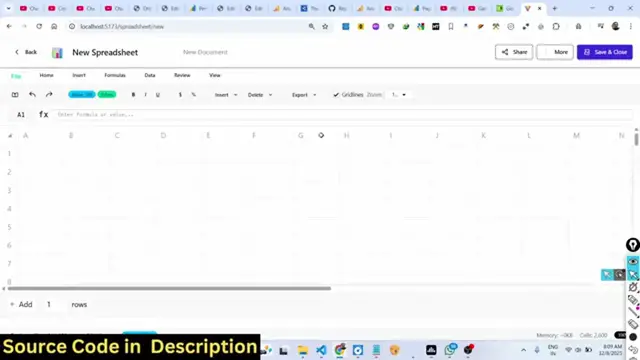
on localhost 5173. This is actually the
0:16
interface. So here you can create Excel
0:18
spreadsheet directly in the browser.
0:21
So you click on the new spreadsheet
0:24
button. So as soon as you click it, you
0:25
will be redirected to the Excel editor.
0:28
So here you can actually fill out the
0:31
information right here. You can fill out
0:33
the columns and run the rows here. So
0:39
the Microsoft Excel but it's available
0:42
directly in the browser. So I built out
0:44
this application in ReactJS. I've given
0:46
the source code if you want you can
0:48
directly purchase it. So once you
0:50
purchase it you will get a zip file from
0:52
Google Drive automatically. So this is
0:55
actually the overall directory
0:56
structure. Every component is divided
0:58
into its appropriate TypeScript file
1:00
here. As you can see each every
1:03
component is divided. So now to run this
1:07
project it's very simple. You go to the
1:09
command line. Simply type the command
1:10
npm rundev. So this will start the
1:13
development server at localhost 5173. So
1:16
I'm just running this application right
1:18
here. So after you fill out your
1:20
necessary information.
1:31
So basically you fill out the
1:33
information after that you have the
1:36
option you can click on the file button
1:38
and you can actually download this as a
1:42
CSV file, Excel file or JSON file. So we
1:45
have all these three options available.
1:46
So if you click download as CSV, so it
1:50
actually export this as as a spreadsheet
1:57
So all the data that you written
1:59
directly is saved here.
2:03
You can just see here and same goes with
2:05
Excel file as well. You can even export
2:08
this as an Excel file.
2:14
So data has been successfully exported.
2:19
So you will see all the data that you
2:21
return is directly exported.
2:24
So this is actually the full Microsoft
2:27
Excel spreadsheet clone that I developed
2:29
in ReactJS. If you are interested, I've
2:31
given the link in the description. You
2:33
can directly purchase it. So for
2:34
building this, we are using the latest
2:36
version of React. So once you get the
2:38
source code, you will able to get
2:40
actually modify the source code or add
2:42
additional features on top of it as
2:44
well. So this is a full directory
2:46
structure. We are also using React
2:49
router, React spreadsheet as well. These
2:52
are some of the third party libraries
2:53
that we are using for this. We are using
2:56
Daisy UI for the user interface. This is
2:59
a complete application. You can even
3:01
save your work as well. Just click the
3:03
save button and it will save. And uh
3:09
so everything will display right here.
3:12
How many spreadsheets you make, you will
3:14
be seeing this on the homepage.
3:18
It will also show you the size as well.
3:20
So you can even actually import your
3:23
Excel file as well. You can edit that
3:26
Excel file by clicking the import
3:35
So you can very easily you can just see
3:38
here you can even write your Excel
3:40
formulas as well. So it's a
3:43
complete editor Excel editor for editing
3:46
Excel files directly in the browser. So
3:48
if you're interested guys, I've given
3:50
the link in the description. You can
3:51
directly purchase it. So this is a
3:56
Excel spreadsheet editor which allows
4:00
you to directly edit your Excel files
4:03
directly in the browser.