Up next in 10

Build a React.js Web Share API to Show Share Dialog in Browser Using react-web-share in JSX
Jan 9, 2025

Buy the full source code of application here:
Show More Show Less View Video Transcript
0:00
uh hello guys welcome to this video so
0:02
in this video I will show you a react CH
0:04
Plug-In or package which allows you to
0:07
share your content instantly so when the
0:11
user clicks on the button uh it will
0:13
open their share window automatically
0:16
from their computer and they will be
0:18
able to share your content on numerous
0:20
number of networks such as they can
0:23
directly email you post to their
0:25
Facebook WhatsApp so automatically it
0:28
will open their sharing window and
0:30
whichever apps at that time that they
0:33
have installed inside the PC which will
0:35
pop in and they will be able to directly
0:38
message you if you if they click the
0:40
Gmail
0:41
button so automatically whatever that
0:44
you mentioned it will be automatically
0:46
be
0:46
written inside their app this is a spe
0:50
specifically a package if you go to
0:53
npmjs.com
0:56
and just search for this package it's
1:00
called as react web
1:06
share so it uses the web share API uh in
1:11
the
1:12
browser inside your react shars it's
1:15
almost called 10,000 weekly downloads
1:17
and this is actually the command here
1:19
I've already installed it so I'll just
1:22
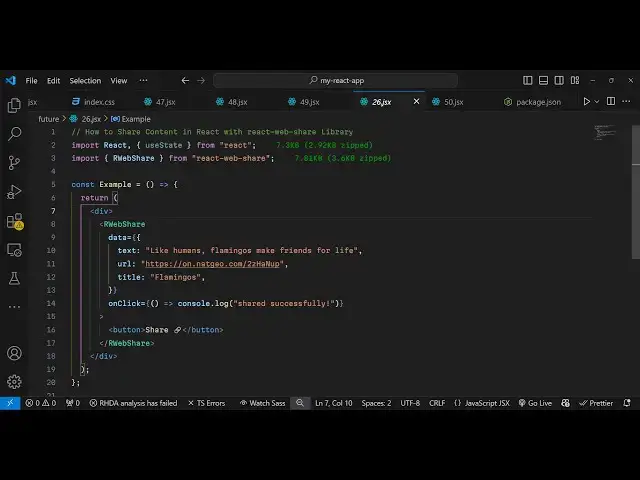
show you a very basic example how to
1:25
configure and use this
1:28
package so just make it simple
1:30
functional component and just we need to
1:32
import this package by using the import
1:35
statement and we just write
1:37
import and we import this package and it
1:41
contains this function or
1:43
component R web
1:47
share it's called as react webshare and
1:51
it's using the web share API if you
1:53
don't know about webshare API uh just
1:57
search on Google
2:00
it's a this API is available for the
2:03
browser you can use it directly in the
2:06
browser it allows you to open that share
2:08
window of the user so that they can
2:11
share your content but you can use this
2:13
package directly in react
2:16
shars so we can directly use this
2:19
component and we can say include this
2:23
wherever you
2:24
want to show the window and we simply it
2:28
takes an data object
2:32
and whatever text or website that you
2:35
want to share so I will say check out my
2:41
website free media
2:43
[Music]
2:44
tools.com
2:46
and then you provide the URL as well of
2:49
that website so free mediat tools.com
2:58
and then the Third option is the actual
3:01
title so you can give the
3:05
title and when the user clicks on that
3:08
we can bind this on
3:10
click so we open that share window and
3:13
we can even console log is
3:18
shared simple console log message so
3:22
this is actually your inside this we can
3:24
have this button
3:26
appearing which is share and you can
3:30
just give it this share icon so the user
3:34
simply knows that this is a share button
3:37
if they click this button they will be
3:38
able to share your content so what
3:41
happens is that if you click now you
3:43
will see this share button appearing
3:45
with this share icon and as soon as you
3:47
click this button you will open your
3:49
share window from your account which is
3:53
from your computer and automatically if
3:57
it will show you all the apps which are
3:59
there ins inside your
4:00
computer and let's suppose if I want to
4:04
share it
4:06
on my Facebook so it will automatically
4:09
post it open the Facebook app and then
4:12
it will automatically write this free
4:15
media tools.com and I will able to share
4:17
this
4:18
content so this is actually your simple
4:22
package which allows the to share your
4:24
content using the web share
4:27
API so thank you very much for watching
4:30
this video and do check out my website
4:32
as well free mediat tools.com uh which
4:36
contains thousands of tools regarding
4:38
audio video and image and I will be
4:41
seeing you in the next video
#Programming
#Web Services
#Web Design & Development
#Photo & Video Sharing
#Photo & Image Sharing
#Video Sharing