live_tv
Livestream Starting Soon
00
Hours
:
00
Minutes
:
00
Seconds
Up next in 10

Build a React.js Tinder UI Clone to Swipe HTML Elements & Images Using react-swipeable-views Library
Jan 9, 2025

Buy the full source code of application here:
Show More Show Less View Video Transcript
0:00
uh hello guys welcome to this video so
0:02
in this video I will show you how to
0:04
design this swiping card like uh
0:07
interface something like Tinder so you
0:10
have seen these interfaces like this so
0:13
you can drag it by your mouse and series
0:16
of images I will show you how to make
0:18
this swiping like interface so Tinder is
0:21
actually a dating website which has this
0:24
UI if you go to Tinder and you will see
0:27
the card likee structure where you can
0:29
swipe the images which are moving so we
0:32
have a series of images and we'll be
0:33
showing you how to do this very simply
0:36
it works on both mobile and desktop you
0:39
can simply with the T of the mouse you
0:43
can swipe your images something like
0:46
this so there's a specific react CH
0:48
package which does this and actually the
0:51
name of the package is react swipeable
0:54
views so if you just go to npmjs.com and
0:57
search for a package which is called as
1:01
react
1:03
swipeable views so this is essentially
1:06
this package I'm talking about and if
1:08
you just search for this package uh the
1:10
very first link which comes
1:13
in this is actually a react component
1:16
for swapable views so I'm essentially
1:18
using this package and it's already
1:21
having a very large number of
1:24
downloads so almost 144,000 weekly
1:27
downloads so this is actually the
1:30
command here I've already installed this
1:32
module so you just need to install it
1:35
and they do offer a website as well if
1:38
you see if I go to their website they
1:41
have a nice little documentation this is
1:43
actually their
1:44
website and I will show you a very basic
1:47
example and just now just make a simple
1:50
functional component and first of all we
1:53
need to require this so using the import
1:55
statement we just simply write import
1:58
swipeable views and it will be coming
2:01
from this package react swipeable views
2:05
you can see that and now we have a
2:07
series of images in my source directory
2:09
in my assets directory so you can see
2:12
all these six images I will use it so
2:15
directly I will import these images so
2:18
one by one so you will simply say import
2:21
image one and it will be coming from
2:23
your
2:25
assets then we import the second
2:28
image again with the same path to
2:36
dot so we just copy
2:40
this 3 4 5 6 so these are six images so
2:44
I will just change the
2:51
name and then we will change the name
2:54
here like
2:58
this so now I imported all these six
3:01
images with their names and after this I
3:05
will use this component wherever I need
3:08
to put it so I will simply use this
3:10
swipeable views
3:12
component and here you will see the
3:15
opening and the closing tag and here you
3:17
need to
3:19
specify the images so we will have a
3:21
diff and I will just give it a simple
3:24
styling to this diff
3:32
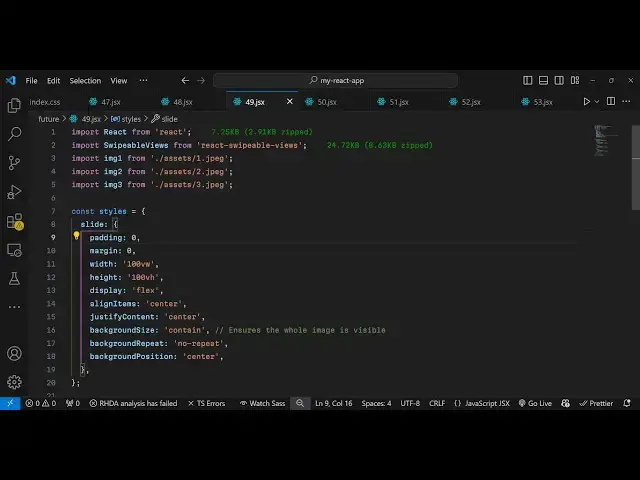
and for this I will just declare a
3:34
simple Global variable here Styles which
3:38
will hold the simple styles for this for
3:41
each slide I will have an object here
3:44
which will have some styling to it
3:46
padding zero margin is zero and width
3:50
will be 100 vertical width height will
3:55
be 100 vertical
3:57
height and I will just display
4:00
them in a flexx like
4:03
structure and align items will be Center
4:07
and justify content to make everything
4:09
in the center position I'm just giving
4:11
this styling simple
4:14
Styles
4:16
and
4:18
also the background of the image needs
4:21
to be contained so
4:24
background size I will say contain so it
4:29
ensures that the the whole image is
4:30
visible and also background
4:35
repeat I will set it to uh no
4:40
repeat and then background
4:43
position these are just a stylings I'm
4:46
giving for the images to align the image
4:48
perfectly so just copy these Styles and
4:51
create this Global variable and now I
4:53
will apply these Styles so you'll simply
4:55
say dot dot dot
4:58
styles do slide
5:00
and I will just give it a background
5:02
image so I give it a background image
5:06
which is stored
5:07
inside URL and here you will specify
5:10
your
5:18
image so this is actually the backtick
5:21
symbol for dynamically inserting this
5:24
image we have already this variable
5:26
present image one if you see we are
5:30
dynamically inserting it so now we have
5:32
one image one
5:34
slide so inside this div
5:38
tag so what we can do is that we can
5:40
have this closing
5:43
tag so if you now see uh if you refresh
5:46
your application we have the single
5:49
image now in the similar way I will just
5:52
copy this and repeat this five more
5:58
times so here
6:00
we are applying the same
6:02
styles for each slide if you see this is
6:05
the third Image Fourth image I just need
6:07
to change actually the path image two
6:11
this is image three this is image 4 this
6:15
is image
6:17
5 image
6:19
6 so now we have six images but now to
6:24
enable the mous Mouser pointer because
6:26
we can't move it we are on desktop so we
6:29
need to allow the Mouser pointing events
6:32
so this package has a special property
6:35
because it only works in mobile devices
6:37
by default if you see if you align it if
6:41
you inspect element and just now it
6:44
works on the mobile devices but it
6:46
doesn't work by default on desktop
6:48
devices for that we have a special
6:50
attribute that you can enable inside
6:53
this package so right here inside the
6:56
parent tag you enable this option which
6:58
is enable Mouse events so what does it
7:02
does offers you so now if you are on
7:05
desktop you can use Mouser pointers
7:08
simply tap on the mouse and just you can
7:12
swipe to go to the next SL you can see
7:15
that so all the six images you can swipe
7:18
it go to the previous next so in this
7:20
way you can make this tinter like
7:22
structure swiping interface and go to
7:24
the next image and you can do this for
7:27
any element it need not have to be a
7:29
image let's suppose I have a H1 heading
7:32
here so I will say this is a heading you
7:36
can have any HTML element that you can
7:38
swipe so after these six images The
7:41
Heading will come and let's suppose
7:44
after
7:45
this you put a comma and then we have a
7:48
paragraph So This is a paragraph so you
7:51
can have as many elements as you want it
7:54
can contain headings paragraphs images
7:58
so in this way you can swipe
8:02
it you can see that so in this way uh
8:06
you can
8:07
easily make this swiping little
8:09
interface using this nice little package
8:12
which is uh react swipeable views so
8:16
thank you very much guys for watching
8:18
this video If you like this video please
8:20
hit that like button subscribe the
8:21
channel I'll also do check out my
8:24
website as well free mediat tools.com uh
8:27
which contains thousands of tools wring
8:29
audio video and MH and I will be seeing
8:32
you in the next video
#Online Media
#Programming
#Skins, Themes & Wallpapers