Up next in 10

Build a React.js react-js-pagination Example to Implement Pagination With Controls in JSX Bootstrap
Jan 9, 2025

Get the full source code of application here:
https://gist.github.com/gauti123456/4c4e846e519f4e73382bfab9e4f85b2f
Hi Join the official discord server to resolve doubts here:
https://discord.gg/cRnjhk6nzW
Visit my Online Free Media Tool Website
https://freemediatools.com/
Buy Premium Scripts and Apps Here:
https://procodestore.com/
Show More Show Less View Video Transcript
0:00
uh hello guys welcome to this video so
0:02
in this video I will show you your
0:04
another package inside react chers which
0:07
allows you to do this front end
0:09
pagination so this time the name of the
0:11
package is react CHS pagination so it is
0:15
somewhere using bootstrap as well so
0:18
bootstrap will also be required for this
0:21
so we imported the CSS file of bootstrap
0:24
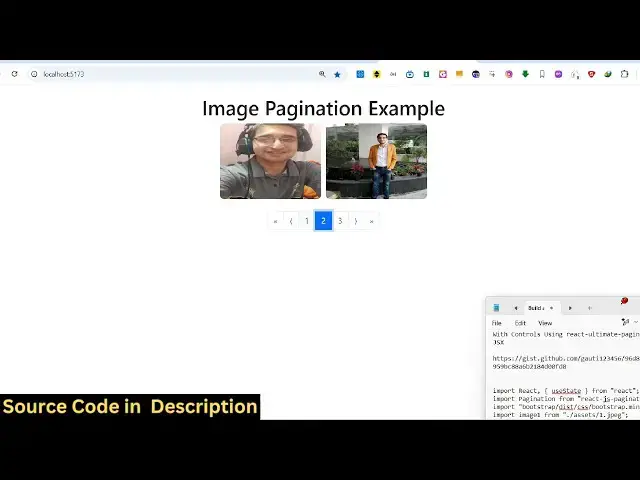
so in this example you can see we are
0:25
looping through the images we are
0:28
displaying six images across three pages
0:31
so on each page we are showing the two
0:33
images and when I navigate to the second
0:35
page I show the next two images so these
0:39
are the paging Nation controls you can
0:40
see right here the page is
0:44
highlighted and we have these previous
0:46
page controls as
0:48
well so if you go to npmjs.com uh just
0:52
search for this package which is reactjs
0:56
pag Nation this is the name of the
0:58
package I've already installed it so
1:02
this is actually the command
1:04
here it's almost got 33,000 weekly
1:08
downloads so now to get started uh just
1:12
make a simple functional
1:15
component and you just need to import
1:18
this package so I just say import
1:21
pagination from reactjs pagination and
1:25
then you also need to import bootstrap
1:27
as
1:28
well CSS file so you just need to also
1:32
install the bootstrap module as well so
1:35
npmi bootstrap after that you can
1:37
include this and now we'll be looping
1:40
through the images so my images are
1:42
stored inside the assets directory so
1:44
six images are
1:46
there so I can easily import them using
1:49
the import
1:51
statement so imported the six images
1:54
after that now in the state we need some
1:57
State variables first of all the images
2:00
array so one by one I will paste all
2:03
these
2:09
images so after this we will also say
2:13
how many images you want to display per
2:16
page so I will say two and then we also
2:18
need a variable for keeping track of the
2:21
active
2:22
page so initial value will be one we
2:27
will be on the first page when you load
2:30
the application now we need
2:32
to declare some three variables namely
2:37
the index of last image first page and
2:41
the current images so what this mean in
2:44
pagination uh inside pagination you want
2:46
to calculate the index of the last image
2:50
shown and the first image so we
2:53
basically do it using the simple
2:54
mathematical
2:56
formula and then we inside these Corr
3:00
images based upon your page number we
3:02
are returning the images so let's
3:04
suppose you are on the first page if you
3:07
are configuring to only show two images
3:09
per page so the index
3:12
becomes uh 0 to two and then on the
3:16
second page it will become 2 to 4 and
3:19
then on the third page it will become 4
3:21
to six so for this also we are using the
3:25
slice function which is a JavaScript
3:27
function so now after having all these
3:30
variables now we come to the jsx here we
3:33
need
3:34
to actually display the pagination
3:37
controls but before that we need to Loop
3:39
through all the images so we will
3:46
simply inside this diff
3:52
section so I will say current images and
3:55
I will use the map
3:57
operator image index and and for each
4:00
image I will inside this image tag I
4:04
need to pass some the key parameter
4:06
which will be index Source will
4:09
be the actual
4:12
image and then we will just give it a
4:14
style to each
4:16
image which is the width and the height
4:19
border radius as well so I will just
4:23
copy these six three CSS properties so
4:26
if you try to refresh your application
4:28
you will see two images is being
4:30
displayed because we are on the first
4:32
page
4:34
so now for embedding this page ination
4:38
component we
4:40
will just make it in the center position
4:43
so I will just give it a display
4:46
property of flex and uh justify content
4:51
to be Center just to Center
4:55
this and then we use our component and
4:59
it takes some parameters first of all
5:02
the active page so you declared this
5:04
variable then the items count per page
5:08
so this is how many items you want to
5:10
display per page so we have this
5:12
variable total items
5:16
count this means how many total images
5:19
that you want to display so we have this
5:20
images array so we'll calculate the
5:23
length so
5:26
page range displayed I will say five
5:30
pages I want to
5:33
display at most then we also need to
5:38
bind this item class which is a plug-in
5:41
class page item and Link
5:45
class page link so these are two classes
5:48
supported by the plugin which will do
5:50
the styling for
5:52
us so if you refresh now you will see
5:55
these pagination controls but I can't
5:57
navigate to the second page for that we
5:59
need to B an attribute which is on
6:02
change which is supported by this plugin
6:05
so whenever you go to a certain page I
6:08
will just bind an
6:10
onclick listener here handle page
6:14
change so just make some Break Tag here
6:17
right
6:20
here so right here we'll be declaring
6:22
this function handle page
6:25
change and inside this we just call the
6:28
Set current
6:30
set active
6:31
page to that desired
6:37
page so if you navigate now the pag
6:40
nation is working you will see that so
6:42
in this way you can implement this
6:44
package for pag nation in react
6:46
CH so if you need the full source code
6:49
uh the link is given in the description
6:51
so thank you very much for watching this
6:53
video and uh please visit my website
6:57
free mediat tools.com if you want free
7:00
tools regarding audio video and image
7:02
and I will be seeing you guys in the
7:04
next video
#Educational Software
#Computer Education