Up next in 10

Build a React.js Project to Split UI into Multiple Pane and Layout Using react-split-pane Library
Jan 9, 2025

Buy the full source code of application here:
Show More Show Less View Video Transcript
0:00
uh hello guys welcome to this video so
0:02
in this video I will show you a react
0:05
CHS package if you want to design UI and
0:08
interfaces if you want to split your UI
0:11
into multiple sections such as
0:12
horizontal vertical you can use this
0:14
package which is called as react split
0:17
pain which is a very handy react CH
0:19
package and if you just go to npmjs.com
0:22
and just search for this package react
0:24
split
0:26
pain so it's a specific react just
0:30
plugin uh which can be used to design
0:32
interfaces so it's almost got 131,000
0:35
weekly downloads and this is actually
0:38
the command so just you can install this
0:41
I've already installed it so let me show
0:45
you a very basic
0:48
example so what this package is all
0:51
about it basically you can split your
0:54
interfaces and you can see I'm just drag
0:57
and drop you can see I can move my
0:59
interface
1:01
is horiz in the horizontal direction or
1:04
in the vertical direction as well so
1:06
this is the vertical Direction this is
1:09
for the horizontal you can have as many
1:12
space uh space as you want you can just
1:15
divide the interface into
1:19
multiple uh directions and you can see
1:24
so it it is movable so you can move the
1:28
interface so that that's the important
1:30
thing you can
1:33
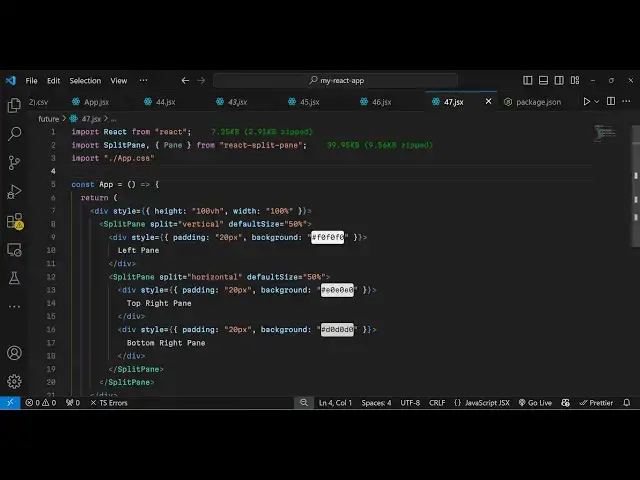
see so now to actually get started using
1:36
this plugin I will show you the complete
1:39
example so just make a simple functional
1:41
component and the very first thing you
1:43
need to do you need to include this
1:45
package using the import statement so
1:47
right here you write import split pan
1:51
and it will be coming from this package
1:53
uh only 39 kiloby of size react split
1:56
pain and we also need one more thing
2:00
from it from pan Which is also a class
2:03
so you just need to import this package
2:06
and now in the js6 you just need
2:09
[Music]
2:10
to first of all I will just give it a
2:13
height of
2:15
100 vertical height and also a width of
2:19
100% so that it takes the entire space
2:22
and now we will use this component of
2:24
split pain and this
2:28
component actually
2:30
split splits your user interface splits
2:33
the screen and here you will provide the
2:35
direction in which direction you want to
2:37
split the screen so there is this
2:39
property it takes as split either it can
2:42
be horizontal or vertical so I will
2:44
divide this into
2:46
vertical Direction and then here you can
2:49
also specify a default size as well of
2:52
the split how much size each section
2:55
will take so I will just say each
2:57
section will take 50% and inside this we
3:00
will provide whatever thing that you
3:02
want to write here it will be the first
3:05
we have the left pan and here we can
3:09
give some custom styling to it so I can
3:11
just give it a style of padding of 20
3:17
pixel and a background
3:21
of this gray color
3:30
so if you see now we have this left
3:35
pan so we have this left pain here
3:40
50% so in the similar way we can
3:43
have the next
3:47
pain I can have this right pin as well I
3:50
can just call it right so what happens
3:53
here if you refresh now uh there will be
3:55
two pins splitted across 50% and 50% so
3:59
this is actually in the right direction
4:01
this is in the left Direction so we have
4:03
splitted this into the vertical
4:04
Direction and
4:08
uh now what we need to do if you want to
4:11
scroll also you can basically
4:14
put another split pane right here after
4:17
this you can have another
4:20
split so at any location if you want to
4:22
split your screen you use this component
4:25
and this time we will provide the
4:28
direction which will be
4:31
horizontal and here you provide the
4:33
default size to
4:35
be
4:39
50% and make sure you also need the
4:42
custom Styles just you need to write
4:44
these custom lines of code which is I
4:50
think let me just include this
4:54
import all the source code will be given
4:56
in the descriptions so what happens if I
4:59
refresh you will see so now to add these
5:04
these capabilities to actually
5:06
scroll the UI you just need to write
5:09
some custom CSS so I've just pasted this
5:12
inside my app. CSS so let me just
5:14
summarize you so we have this resizer
5:17
class right here which is part of this
5:19
component Library so we just need these
5:23
classes cursor so just paste it pause
5:26
the video just write this classes inside
5:29
your app
5:30
CSS we don't need
5:33
this we only need this which is this one
5:37
so just pause this and write these
5:40
custom Styles so this will be needed for
5:43
this so now when you apply these Styles
5:45
you will be able to move your interface
5:48
like this so similarly uh we have put
5:52
this uh restriction on the horizontal
5:54
way so now in the horizontal we can do
5:57
the same thing we can have two div
6:01
tags one in the top right position and
6:04
one in the bottom position so same
6:06
background we have given so this is the
6:08
top right position and this is the
6:10
bottom section so in this way now you
6:13
can move your
6:15
interface so this is a very handy
6:17
package by which you can design any sort
6:20
of interface and the the user can also
6:22
scroll the interface as well it is all
6:25
scrollable in any direction vertical
6:28
horizontal
6:30
so this is actually the package which is
6:33
react split pain so you can install it
6:36
and directly use it
6:40
and so this was the tutorial about this
6:43
package this is just used for user
6:46
interface or designing the UI so thank
6:49
you very much for watching this video
6:51
and do check out my website as well uh
6:53
free mediat tools.com uh which contains
6:56
thousands of tools regarding audio video
6:58
and image and I will be seeing you in
7:00
the next video
#Programming
#Computer Education