live_tv
Livestream Starting Soon
00
Hours
:
00
Minutes
:
00
Seconds
Up next in 10

Build a React.js Project to Integrate VSCode Coding IDE Icons Using react-vscode-icons in JSX
Jan 9, 2025

Buy the full source code of application here:
Show More Show Less View Video Transcript
0:01
uh hello guys welcome to this video so
0:03
in this video I will show you a react
0:06
CHS package which allows you to import
0:08
Visual Studio code icons directly inside
0:11
your reactjs application Visual Studio
0:14
code as you all know it's a text editor
0:16
very popular code editor and they do
0:19
offer a dependency for react CH
0:21
application where you can import all
0:23
these icons which you can see right here
0:26
from the name itself we can import all
0:29
these icons so there is a package that
0:32
you can use inside reactjs if you simply
0:34
go to npmjs.com and simply search for
0:38
this package react vs code icons so this
0:44
package will come in
0:46
so let me just open my zoomit tool just
0:50
to zoom on a particular element just
0:55
wait so this is actually the dependency
0:58
uh if you go to
1:01
just search for this react vs code icons
1:04
so this is essentially this package I'm
1:06
talking about and you need to install
1:09
this I've already installed it actually
1:12
this is the command here so once you
1:14
install it it's uh fairly new package so
1:18
I will show you step bystep instructions
1:20
so just first of all make a functional
1:22
component and first of all now we need
1:25
to import this
1:28
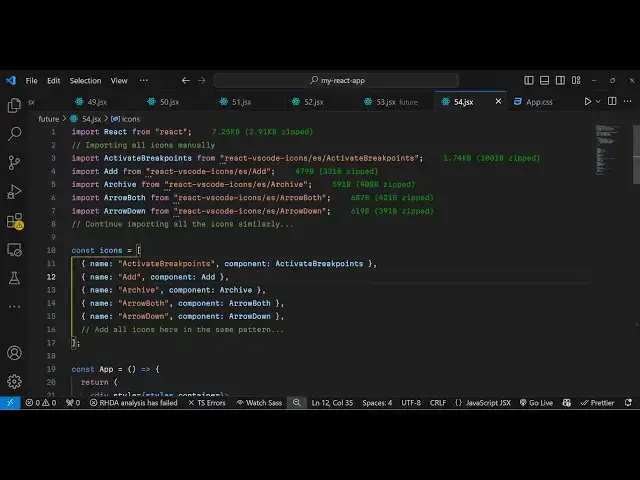
module we write this line which is
1:30
activate break points which will be
1:33
coming from
1:34
this react vs code icons yes activate
1:38
break
1:40
points and manually you need to import
1:42
all the icons
1:45
so we also have the add icon which will
1:48
be coming from this react vs code icons
1:51
add similarly we have more icons import
1:55
Arch which is also another icon
2:00
Arrow if you want to have Arrow both
2:03
arrow down all these icons are there in
2:07
vs
2:08
code so one by one you can simply import
2:11
this using these import statements and
2:14
then you can actually create a simple
2:16
array where you mention all these icons
2:19
one by one
2:24
so I can create an array of objects for
2:28
each icon we can create an object
2:30
object the name of the icon then the
2:33
component respective component that we
2:35
imported you will
2:37
see we are simply doing that and now we
2:41
come to the jsx where we need to embed
2:43
this so we simply
2:47
write like this and here we need to
2:50
import import our
2:53
icons so I have given all the source
2:56
code in the description of this video
2:58
you can copy paste it so I have written
3:00
these Styles here custom CSS styles for
3:03
styling the
3:04
icons and you can actually
3:10
now basically use these CSS classes to
3:13
import these
3:15
icons so we are having this icon
3:18
component component and here we are
3:20
styling it and showing this component we
3:23
are mapping through all the icons which
3:25
are present in this array of objects for
3:29
each icon we are using this map
3:32
operator so we are embedding this icon
3:35
component if you try to see this inside
3:38
the browser you will see each icon will
3:40
be displayed with its respective name
3:43
and the actual icon that you see so if
3:46
you try to go to their official
3:50
website so this is you can even go to
3:52
their website as well theact vscode
3:55
icons. veral doapp here you can search
3:57
for any particular icon that you want to
4:00
search if you want to search for a
4:03
particular icon you can see inside their
4:05
website they have all the icons
4:06
available of vs code so this was a
4:11
tutorial guys on how to import vs code
4:13
icons directly inside your react
4:15
application using this module so thank
4:18
you very much for watching this video
4:20
and do check out my website as well free
4:23
mediat tools.com uh which contains
4:25
thousands of tools regarding audio video
4:27
and image and I I will be seeing you
4:30
guys in the next video
#Programming
#Computer Education