live_tv
Livestream Starting Soon
00
Hours
:
00
Minutes
:
00
Seconds
Up next in 10

Build a React.js Project to Display Analog Clock UI Animation & Time Using react-clock Library in JS
Jan 9, 2025

Buy the full source code of application here:
Show More Show Less View Video Transcript
0:00
uh hello guys welcome to this video so
0:02
in this video I will show you how to
0:04
make and display a clock inside react CH
0:08
analog clock so you can see it will
0:11
display the current time in a nice
0:13
little animated structure so we have a
0:16
physical clock right here you'll see
0:18
which is displaying in the browser which
0:21
has this
0:23
minute so it's a full full full fledged
0:27
clock which is displaying and is
0:30
animating and displaying the current
0:31
time which is 8:30 in the morning so you
0:34
will
0:35
see so in this way you can display it if
0:39
you want to using a package if you go to
0:42
npmjs.com and just search for this
0:45
package react
0:46
clock so this is actually the package
0:50
that I'm using right here I've already
0:53
installed it this is actually the
0:55
command and it's almost got 81,000
0:58
weekly downloads so so now to use this
1:02
first of all you make a simple
1:03
functional
1:10
component and then you simply use the
1:13
import statement to import the module so
1:15
you simply write import clock and it
1:18
will be coming from the react
1:22
clock package so it's almost 20
1:25
kilobytes it's a size here so it also
1:29
needs to import the CSS file as well
1:31
this package react clock it is present
1:34
in the dis folder and then we have the
1:37
clock. CSS so it's almost 700 bytes a
1:41
custom CSS for the clock to display and
1:45
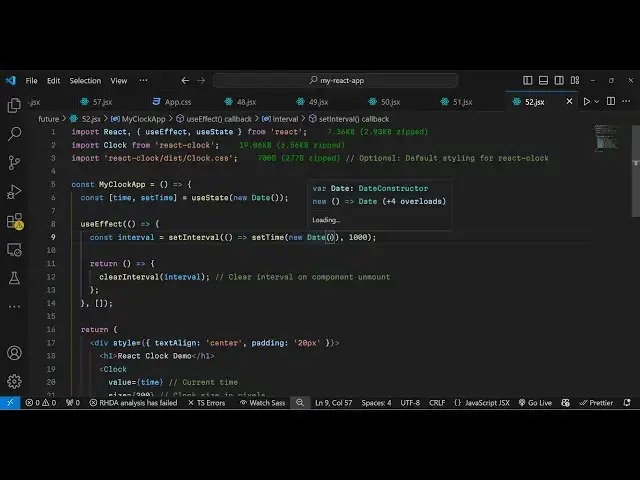
now we come to the application let me
1:47
declare a simple State variable for the
1:51
time
1:52
so the current time it will show so we
1:57
will take the new date Constructor which
1:59
returns
2:00
the the date and the
2:02
time so whenever this application
2:05
executes and render it so this use
2:08
effect hook we execute and here we
2:12
will calculate using the set interval
2:16
function and here we will call this set
2:19
time function and pass it the new date
2:24
Constructor and then after 1,000
2:27
millisecond which is essentially after
2:30
second it will automatically update so
2:32
this is actually we have return a simple
2:33
interval function and we'll be returning
2:37
this and calling clear
2:40
interval and passing interval right here
2:45
so so what this function does it
2:47
actually Returns the current time after
2:49
1 second so it will execute after 1
2:53
second automatically so now we come to
2:55
the jsx where you need to display the
2:57
clock
3:02
so I will just display it right in the
3:04
center position so I will say text align
3:06
to
3:08
Center and I will just give it a padding
3:11
of 20
3:12
pixel and we'll have an H1 here which
3:15
will say react clock demo and then we
3:20
embed this clock interface this
3:23
component so if you pass no option just
3:26
pass you will see this the clock is not
3:30
moving uh you need to pass some options
3:32
the current time which takes the
3:35
value now if you pass you will now see
3:38
the current time is
3:40
displaying but you can't see the numbers
3:42
appearing for the numbers you can even
3:45
adjust the size of the clock providing a
3:47
size property which takes integer Valu
3:51
let me pass 300 so now the clock is
3:54
bigger and if you want to style this
3:56
clock you can even give it a custom
3:59
class as as well you can Define custom
4:02
Styles in the CSS file and just give it
4:04
a custom class right a custom
4:07
clock and then you can control the local
4:10
information I will pass here English and
4:13
us which is a language of the
4:18
clock which is used for formatting
4:20
purposes and then we have a series of
4:22
option if you want to render the our
4:27
Mark then you will pass it to true
4:30
so now what it does it actually renders
4:33
the second
4:36
hand and a
4:38
numbers if you want the numbers here you
4:41
will put here render numbers to be true
4:43
so now you see in the clock numbers
4:46
physical numbers from 1 to 12 will
4:49
display so 1 2 3 4 5 6 so exactly what
4:52
you see the current time and if you also
4:56
want the render minute hand you will put
4:59
it to true
5:00
render secondhand all these options are
5:04
available let's suppose if I don't want
5:06
the overclock I can change from True to
5:10
false so in this
5:15
way so in this way you we will have all
5:20
these options available to
5:28
us so you can control the width as well
5:31
length of the hand of the clock
5:35
so so at last it will look something
5:38
like this
5:40
so this is a great way to display a
5:43
custom physical analog clock inside your
5:47
react CH application using this package
5:49
so thank you very much for watching this
5:51
video and do check out my website as
5:54
well free mediat tools.com uh which
5:57
contains thousands of tools regarding
5:59
regarding audio video and image and I
6:02
will be seeing you in the next video
#Programming
#Clocks