Up next in 10

Build a React.js Project to Add Parallax & Tilt Animation to HTML Elements & Images in JSX
Jan 9, 2025

Buy the full source code of application here:
Show More Show Less View Video Transcript
0:00
uh hello guys welcome to this video so
0:02
in this video I will show you how to add
0:05
a paress or tilt effect inside your
0:08
react Chas application so uh if you want
0:12
to add the parallels effect something
0:14
like this so if you hover onto the image
0:16
or paragraph or any text element HTML
0:19
element you will see the image will be
0:21
tilted and you will add this parallels
0:24
effect so there is a specific package
0:26
inside react CH where you can perform
0:28
this operation very easy easily and
0:31
actually the package name is react
0:34
parallx if you just go to npmjs.com and
0:38
just search for this package react
0:41
parallx PR this is actually the
0:46
package which allows you to tilt the
0:49
image or component in any direction and
0:52
it is almost got 18,000 weekly downloads
0:56
and this is actually the command so
0:57
simply install this package I've already
1:00
installed it so I will just show you a
1:02
very basic example so just make a simple
1:05
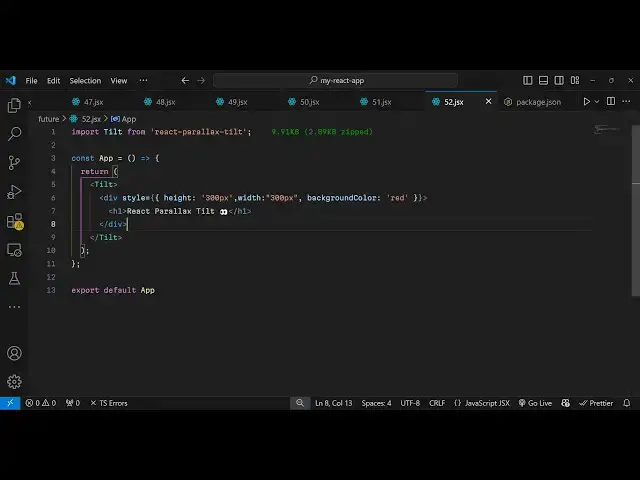
functional component and just import
1:08
this package by using the import
1:11
statement from
1:14
react the package name you will write
1:16
react paralic built just a 9
1:21
kiloby size of this package so imported
1:24
this line here and now you need to wrap
1:28
everything inside this tilt component
1:31
that you imported so here you basically
1:34
we put these opening tag and the closing
1:36
tag inside this you will put your
1:40
component or HTML element that you want
1:42
to tilt so we have a simple div element
1:46
where we'll be just giving giving an
1:48
height of let's suppose 300
1:53
pixel and a I will just make it in the
1:57
center position display Flex just ify
2:00
content to be Center and I will just
2:02
give it a background color of let's
2:05
suppose blue so now what happens this
2:08
div tag will be there and you able to
2:11
move this in any direction so it
2:13
actually added this nice little parallx
2:16
effect you can
2:18
tilt move it in any direction XY Z in
2:22
all the three directions you can do it
2:25
by simply scrolling it up so it's a nice
2:28
package uh very little configuration is
2:31
needed so whatever element that you want
2:33
to tilt you will wrap everything inside
2:36
these tags so we just import this so now
2:39
it can even contain HTML headings so you
2:43
can have a heading
2:47
here so you will have this heading
2:50
appearing and you can even have images
2:53
as well so if you have a image that you
2:55
want to display
3:00
so this image is present in my assets
3:02
folder so I will just import this
3:10
image so you
3:13
actually display you can add the
3:16
parallel effect to any HTML element
3:18
using this package it can be heading it
3:21
can be image div element so in this way
3:24
you can add this effects using this
3:26
package parallx effect so simply install
3:30
this and use it so I've shown you a very
3:32
simple example so thank you very much
3:35
guys for watching this video and do
3:37
check out my website as well uh freem
3:40
mediat tools.com uh which contains
3:42
thousands of tools regarding audio video
3:44
and image and I will be seeing you in
3:47
the next video