Up next in 10

Build a React.js PrismJS Syntax Highlighter With Different Themes and Languages in JSX
Jan 9, 2025

Get the full source code of application here:
https://gist.github.com/gauti123456/f58e43c8e5ef07a58638c8a5f310da43
Show More Show Less View Video Transcript
0:00
uh hello guys welcome to this video so
0:02
in this video I will show you how to
0:04
integrate uh prism uh syntax highlighter
0:08
inside your react Chas application so
0:11
prism is a very popular syntax
0:13
highlighter Library so you can add any
0:16
support for any programming language
0:18
that you have JavaScript CSS HTML PHP so
0:23
you can see on your screen we have
0:24
integrated this uh text editor where the
0:27
user can directly write JavaScript code
0:31
and automatically the code will be
0:33
syntax
0:35
highlighted and you can see I'm directly
0:37
typing the code and in this way you can
0:42
directly copy paste any JavaScript code
0:46
so if I just copy this code and paste it
0:48
inside this text area you will see the
0:50
code will be highlighted
0:53
so the package is very simple in react
0:56
CH uh it is called as react simple code
1:00
editor if you go to npmjs.com
1:03
and just search for this
1:06
package react simple code
1:10
editor so essentially this is actually
1:12
the package uh this is the command here
1:16
Ive already installed it and it has got
1:18
almost
1:20
284,000 weekly downloads it's a popular
1:25
package and this is using prism
1:30
JS if you don't know about prism JS it's
1:32
a lightweight syntax highlighting
1:40
Library so they do offer their official
1:43
website as well go you can go to prism
1:45
j.com and they do have a good
1:48
documentation as
1:50
well so specifically you need this
1:53
package alongside that we also need the
1:56
prism package as well so you also need
1:59
to install the base prism JS Library as
2:02
well alongside with this package so you
2:06
also need this package as well so you
2:08
just install this
2:10
also so now to get started just make a
2:13
simple functional
2:15
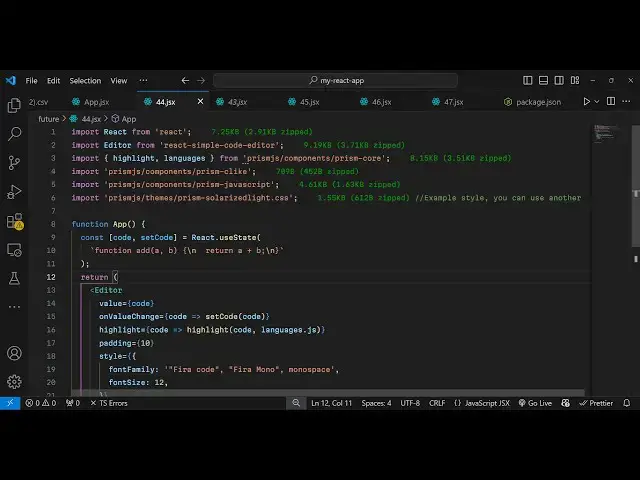
component and first of all you need to
2:17
import the actual
2:20
editor which will be coming from this
2:22
package react simple code editor uh
2:26
secondly we also need to import the
2:30
highlighting features from Prism JS so
2:34
highlight and the languages it will all
2:38
be coming from this uh prism JS and it
2:42
actually com contain this components and
2:45
we need to import the core package of
2:54
prism so you can see prism core it is
2:57
called so we import the highlight
2:59
highlighting and languages features from
3:02
it and for any language that you want to
3:05
highlight you do need to import their
3:07
CSS file which is contained inside
3:11
this
3:14
prism and also in this case we are
3:18
highlighting JavaScript code and for
3:20
this we need to import the CSS file for
3:24
this so first of all we import the prism
3:27
JavaScript plugin and
3:30
alongside we import which theme that you
3:33
want to use so prism has multiple themes
3:37
so I'm using this theme right here which
3:39
is prism solarized light we importing
3:42
the CSS file of this theme so you can
3:45
check the docs uh to find out the themes
3:48
which it
3:49
supports and then you can replace your
3:51
own themes so we have a function we have
3:55
a variable here to keep track of which
3:57
code the user will write for the we'll
4:00
be using the UST State
4:02
hook and we'll just have initial
4:08
value we will just add this custom
4:11
JavaScript
4:13
function so by default in the text area
4:16
this code would be present so we have
4:18
just used this use
4:20
State now to embed the component we use
4:23
actually the
4:25
editor and it actually takes the code
4:27
that you want to highlight in inside
4:30
value
4:31
parameter so we actually pass this code
4:34
that needs to be
4:35
highlighted so if you refresh your
4:40
application so just go to
4:45
the so you don't see the text area for
4:48
showing the text area we do need
4:52
to bind a highlight function so when we
4:56
highlight this code
4:59
we just need to use the Highlight
5:01
function which we are importing it from
5:03
Prism JS so inside this you pass the
5:06
code and the language so the language
5:10
here will be
5:12
JavaScript so now if you see this code
5:16
is being
5:18
highlighted and apart from that you can
5:21
even provide a custom padding uh this
5:23
will be I will provide 10 so it will
5:26
have some
5:27
space and then you can even change the
5:30
font size as
5:32
well you can provide the font family you
5:35
can change it to any font family and you
5:38
can even change the phone size as well
5:40
in this
5:44
way can give your own custom font as
5:46
well so you can see the font has also
5:48
been changed so in this way you can
5:52
directly use this component to highlight
5:54
any code that you want to use let's
5:56
suppose in this you want to highlight
5:58
PHP you will write PHP right
6:01
here so you can highlight any language
6:05
and for that language you do need to
6:06
import this this
6:08
import and if you want to change the
6:11
theme as well you can use any theme of
6:13
your
6:15
choice if you just go to the prism
6:18
GitHub page you
6:20
will see all the themes which are
6:22
supported if you go to the
6:26
themes so there is this uh
6:31
components folder and inside the
6:34
components folder you will find out all
6:36
the themes which they
6:39
support so there is a folder right here
6:42
where you can see the themes which are
6:53
supported so this is I think is the
6:56
themes folder and here you can see all
6:58
the themes which are supported
7:05
so I can replace just change it to prism
7:08
funky
7:12
CSS so now it has changed the theme
7:15
right here if you see the colors have
7:17
been
7:19
changed so if you want to see uh you can
7:22
paste any code of your choice in this
7:24
text
7:26
area so whenever we paste we do need
7:29
need to define a function right here
7:31
whenever the value is changed you can
7:33
Define this on value change function so
7:36
when the code is copy pasted we can set
7:38
the
7:40
code to the code which is submitted so
7:43
now you can directly paste your code so
7:46
in this way the highlighting will work
7:49
so each theme has different color
7:51
combinations so that's why you are
7:53
seeing this yellow color so you can
7:54
change any
7:57
theme using this and we can change let's
8:01
suppose I want the Dark theme so prism
8:11
dark so now what happens if you see this
8:14
is having a different color combination
8:17
so you can try out your own themes just
8:19
replace whichever theme that you like
8:21
you can replace it right here I've given
8:24
the code example in the description of
8:26
this video you can get started by using
8:28
this example
8:30
so thank you very much for watching this
8:31
video and if you like this video please
8:34
hit that like button and do check out my
8:36
website as well uh free mediat tools.com
8:39
uh which contains thousands of tools
8:41
regarding audio video and image and I
8:44
will be seeing you in the next video
#Programming
#Computer Education