live_tv
Livestream Starting Soon
00
Hours
:
00
Minutes
:
00
Seconds
Up next in 10

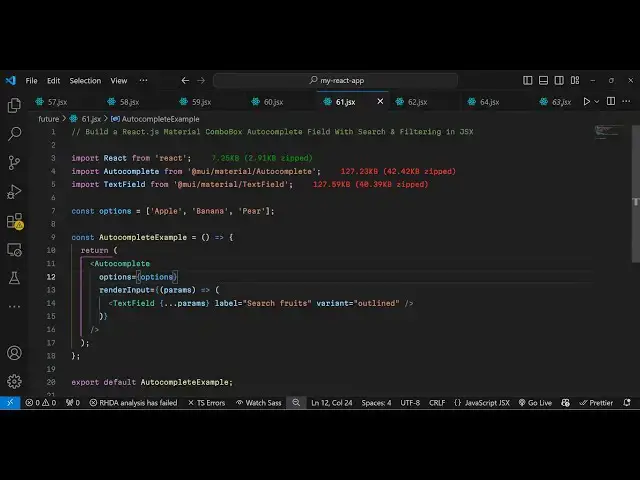
Build a React.js Material ComboBox Autocomplete Form Input Field With Search & Filtering in JSX
Jan 9, 2025

Buy the full source code of application here:
Show More Show Less View Video Transcript
0:00
uh hello guys welcome to this video so
0:02
in this video I will show you how to
0:04
make this material autocomplete combo
0:07
box widget so if you have multiple
0:10
options you can have this auto complete
0:12
field where the user can select multiple
0:15
options and you will see the drop down
0:18
and you will see auto complete as the
0:20
user
0:22
right you will see this auto complete
0:24
appearing and this is a simple component
0:28
you can install so
0:31
the command is really simple if you go
0:33
to npmjs.com and just search for this
0:38
material atate
0:40
mui and slash material
0:44
slash you just need to install this mui
0:48
which stands for material material
0:52
design so this is material UI which is
0:55
an open source react component library
0:58
and they do offer a autocomplete widget
1:02
so this is the command here you need to
1:04
install this and it's almost CAU 1.8
1:08
million weekly downloads so inside this
1:11
you first of all import this by using
1:13
the import statement and they do offer
1:16
this
1:17
autocomplete widget which will be coming
1:20
from atate mui SL material and we have
1:26
this auto
1:28
complete so we import this and also we
1:31
have this text field as
1:34
well which will be coming
1:37
from the text field
1:42
widget so it's almost 127 kilobytes
1:50
so so after this you just need
1:54
to embed
1:57
this in your jsx
2:00
so wherever you uh need to show this
2:03
autocomplete field use this component
2:06
autocomplete and it actually takes some
2:09
options so whatever the autocomplete
2:12
options that you want to configure it
2:14
can even be coming from a database or
2:16
API for this example I will just have an
2:20
items array and I will have three
2:22
items apple banana Pier so we have these
2:25
three items in this array so we need to
2:28
directly pass this array as an options
2:31
right
2:32
here like
2:34
this and then we have the second option
2:37
of render
2:38
input so this means that whatever the
2:42
user writes in this input field you will
2:46
have a text
2:51
field material text field and here we
2:54
allow the user to
2:57
write whatever that they want to write
2:59
and and depending upon you will give it
3:01
a label that search
3:06
fruits and the variant will be of
3:10
outlined that's all that we need need to
3:12
do and if you refresh your application
3:15
you will see this nice little
3:16
autocomplete widget appearing and as
3:18
soon as you the user tries to write they
3:21
see these three autocomplete options and
3:24
now they can easily either write or
3:27
either select directly
3:32
this is your material UI autocomplete
3:35
combo box text field form field where
3:38
you can have multiple options and you
3:41
will see this autocomplete options
3:42
appearing very easily so you can
3:45
configure this so This is actually the
3:47
package so you can directly use it
3:50
configuration code is very
3:52
simple so thank you very much for
3:54
watching this video and also check out
3:57
my website as well uh free mediat
4:00
tools.com uh which contains thousands of
4:03
tools regarding audio video and image
4:05
and I will be seeing you in the next
4:07
video
#Programming