Up next in 10

Build a React.js Markdown Viewer App to Render Markdown Files Using react-markdown in Browser
Jan 9, 2025

Get the full source code of application here:
https://gist.github.com/gauti123456/4b77b546a55d45bf392047886c71a384
Show More Show Less View Video Transcript
0:00
uh hello guys welcome to this video so
0:02
in this video we will look at how to
0:04
build out a markdown editor and preview
0:07
inside the react CH an application which
0:10
where you can actually write markdown
0:12
and side by side see the result on the
0:14
right hand side so this is actually the
0:16
application we building we have the live
0:18
demo we have a text area right here so
0:21
here if you write the mark down you will
0:23
see the right preview section as well so
0:26
let let me just paste some sample
0:27
markdown and simply paste it and you
0:30
will actually see the live preview side
0:33
by side and markdown is a special kind
0:36
of file which we can actually write
0:38
documentation or you can write resume
0:41
you can see it contains uh formatting
0:44
and tables images headings each and
0:47
every stuff so we have you can make
0:50
changes right here and it will auto
0:53
automatically update in the right hand
0:55
section so it's a complete editor and
0:58
you can make this using a very simple
1:00
package which is there in react Chas I
1:02
will show you the package name is react
1:05
markdown and if you just search for this
1:07
package on the npmjs.com website just
1:11
search for this package which uh right
1:14
in this react markdown this is actually
1:17
the name of the
1:19
package the very first package which
1:22
here it's react component to render
1:24
markdown in the browser it's a very
1:28
popular module almost three million
1:30
weekly downloads are there it's an open
1:32
source
1:33
module and uh now to use that I'll show
1:36
you step by step so the very first step
1:39
you need to do you need to install this
1:41
module so
1:42
npmi react markdown so this is actually
1:45
the
1:47
command so just install this I've
1:50
already done so I will start the
1:52
development
1:55
server so now just make a simple
2:00
react component I will just make
2:03
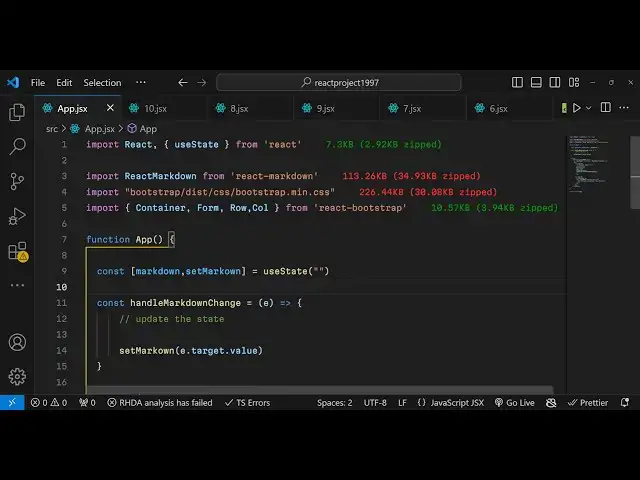
it and inside this we need to import
2:07
that package so we will import this
2:09
package which is react
2:15
markdown and it will basically come from
2:17
this react
2:19
markdown
2:23
package and for building it this
2:27
application we are also using the
2:28
bootstrap
2:31
we can import bootstrap uh bootstrap
2:34
this
2:38
CSS min. CSS so you can install
2:41
bootstrap it's not mandatory but still
2:43
it's look good for the user interface so
2:47
we are using react bootstrap for this
2:51
and also the Base Library of bootstrap
2:53
so install these packages as well if you
2:56
need bootstrap but it's not mandatory
3:00
so now we're building the jsx we will
3:02
actually be inside this we will use the
3:05
container element or bootstrap it will
3:09
import it from react bootstrap and we
3:11
will actually be giving a bootstrap
3:15
class which is
3:16
M and inside this we will have an H1
3:19
heading which will simply say
3:24
markdown previewer and we basically be
3:27
giving
3:32
a text Center class so just to align
3:35
this heading in the center position and
3:37
then inside the row
3:40
tag we will have a simple
3:45
column and we give it a attribute on
3:47
medium devices it should be six we just
3:51
making that interface so inside this we
3:53
will allow the user to input the
3:55
markdown markdown and input and for this
3:57
we will actually have a text area and
3:59
we'll
4:01
have inside the we'll have a form
4:08
control and the type of this it will be
4:12
as a text
4:15
area and total number of rows will be
4:20
290 and the value here we need to give
4:23
it a state variable so for this we need
4:25
to declare a state variable just to keep
4:28
track of which markdown the user will
4:31
write so we'll have the markdown set
4:33
markdown and we'll be having a UST State
4:36
hook it will be imported from react CH
4:39
initial value will be empty and we will
4:41
just align whatever is the we will
4:44
just have the value here mark
4:50
down so the input field is connected now
4:53
with the
4:54
state so if you refresh your application
4:57
just go to and you will actually see a
5:00
text area
5:02
and it is saying that uh column is not
5:05
defined we do need to import column as
5:09
well from react bootstrap so you just
5:13
see a simple text area there and here
5:15
you will paste your
5:18
markdown so you'll also be giving an
5:21
onchange event handler so when you paste
5:23
your markdown this function will execute
5:26
so handle markdown change so just we
5:29
need to Define this function so what
5:32
happens when we do paste the markdown so
5:36
here e parameter will automatically be
5:38
passed here to this function because
5:40
it's a onchange function so right here
5:43
we'll just uh update the
5:46
state using that hook function which is
5:49
set markdown we'll call that function
5:51
and just pass whatever the value is
5:53
there in the input field which is e.
5:55
target. value that's all that we are
5:57
doing right here
6:00
and now to show the markdown preview so
6:03
just after this side by side we will
6:06
have
6:07
another interface the column tag and
6:10
again this be
6:12
6x6 interface so that's why this will
6:15
also take
6:17
six spacing and we'll have this heading
6:21
given to it it's preview so if you see
6:24
side by side a preview section will get
6:27
added and now inside this section we
6:29
will show the whatever is the preview of
6:33
whatever markdown that you will paste
6:35
and inside this you will give it a class
6:38
name of
6:40
markdown preview
6:42
and we will have this component which is
6:46
react markdown
6:50
and inside this you need to actually
6:53
paste the
6:56
markdown so here we are simply pasting
6:59
the markdown State variable so it is now
7:03
connected and now you can actually write
7:05
any markdown so let me just
7:10
take sample markdown
7:13
and so what does website is doing it's
7:16
exactly will do if you paste it you will
7:19
see the actual preview happening on the
7:21
right hand side so as you add it as you
7:24
change anything here you can see the
7:26
result happening
7:31
so in this way uh you can actually
7:33
integrate this module inside react
7:36
chairs and it's specifically for react
7:38
CH applications this module which works
7:41
react mark down and if you are building
7:44
a react CH application if you want to
7:46
have a markdown editor you can use this
7:48
module and the code is really minimal
7:51
you will see the process only takes a
7:54
couple of minutes to integrate this
7:56
module and to actually integrate the
7:58
markdown preview section with live
8:00
editing
8:02
functionalities so thank you very much
8:04
for watching this video If you like this
8:06
video then please hit that like Buton
8:07
subscribe the channel and do check out
8:09
my website as well free mediat tools.com
8:11
which contains thousands of free tools
8:14
regarding audio video and image and I
8:16
will be seeing you in the next video
#Educational Software
#Computer Education