live_tv
Livestream Starting Soon
00
Hours
:
00
Minutes
:
00
Seconds
Up next in 10

Build a React.js JSON to CSV Converter Web App in Browser Using react- json- to-csv Library
Jan 9, 2025

Buy the full source code of application here:
Show More Show Less View Video Transcript
0:00
uh hello guys welcome to this video so
0:02
in this video we will look at an app how
0:05
to convert your Json data into C CSV
0:09
file comma separated value file so we
0:12
will be building a web application
0:13
inside react CH uh using a specific
0:16
module that I will show you I'm running
0:18
this application on Local Host so we
0:21
have this interface where we have a text
0:23
area here you can paste your Json this
0:26
Json can be anything it can be coming
0:28
from an API or if you have
0:31
some so Json as you all know it's a
0:35
JavaScript object notations so let me
0:39
paste this sample
0:42
Json so you will have this button right
0:44
here you can change the file name as
0:46
well as I click the button you will see
0:48
CSV file will be created and now you'll
0:51
be able to see comma separated value so
0:54
we have you can see six columns ID name
0:58
username email address forone website
1:02
so so all the data Json data has been
1:05
converted to CSV so we will be looking
1:08
at this module which is react Json to
1:11
CSV if you just search for this module
1:14
which
1:17
is react Json to CSV
1:31
so it's a react button component and it
1:34
has almost
1:36
8,688 weekly download so this is
1:38
actually the command to install this Ive
1:41
already installed it so now to actually
1:44
make this we will look at step by step I
1:47
will show you so first of all just make
1:50
a very simple functional component and
1:53
right at the top we will import this
1:55
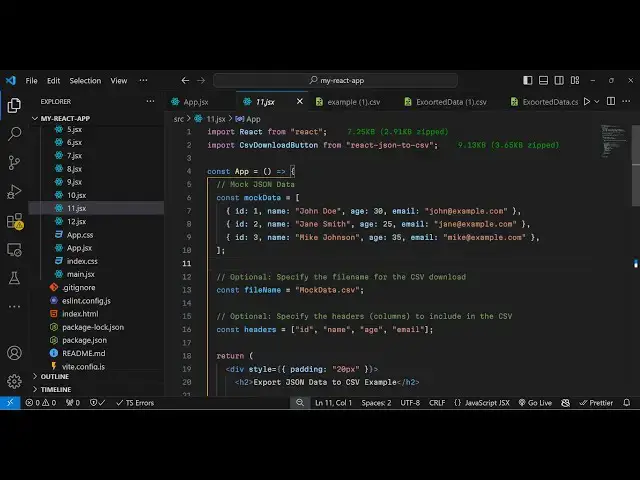
module so inside this we have this CSV
1:59
download
2:01
button and this is coming from react
2:03
Json to CSV module so now we can need to
2:08
declare some State variables for this
2:10
application first of all input
2:13
text so this needs to be keep keeping
2:16
track of whatever Json data that user
2:19
submit so we'll be using the UST State
2:21
hook initial value will be nothing then
2:23
we will have the
2:25
output Json data as well so whatever
2:28
Json data users submits we will have a
2:31
state variable for that also initial
2:34
value will be empty array and then we
2:37
will keep track of which file name the
2:39
user enters so we have one variable for
2:42
this also file name set file name
2:46
initial value will be
2:48
exported data.
2:53
CSV and then we will have one more
2:56
variable for keeping track of any error
2:59
which takes takes place so error set
3:02
error so this U state will be initial
3:06
value will be empty so these are the
3:08
four state variables that we have so one
3:10
by one we will use it so now coming back
3:13
to the jsx we will simply
3:19
have here we have h2 tag we will simply
3:22
say
3:25
Dynamic Json to CSV converter
3:31
so inside this uh we will
3:44
actually have this interface let
3:49
me so if you refresh it you will see
3:52
there will be this simple label which is
3:54
showing enter Json data array of objects
3:58
so now we'll be allowing the user to
4:01
Simply input it inside the text
4:06
area so there will be this text
4:19
area so what we have done we have given
4:22
an onchange event handler to this text
4:24
area so whenever you submit anything
4:25
inside your text area this function will
4:27
execute so this handle input change
4:29
change this is a custom function that I
4:31
will Define and we are providing this
4:34
value parameters so this is actually our
4:36
state
4:38
variable and apart from that we have
4:40
given some custom CSS to it and the
4:43
placeholder text so now we need to
4:45
Define this handle input change function
4:49
which
4:52
will execute e parameter will be
4:54
automatically be passed to it so now
4:56
we'll be getting whatever data the user
5:01
submit we can get that using uh e do
5:06
target. value so this will get
5:08
everything the user submits and then we
5:11
can set this input text to this user
5:14
input which is submitted and then we can
5:17
set the error to
5:19
nothing and then inside the TR catch
5:22
block we will carry out the conversion
5:24
from Json to
5:26
CSV so if any sort of error take place
5:28
we can console of the message so right
5:31
here first of all we need to pass the
5:35
Json so for passsing it will be using
5:37
this buil-in function which is json.
5:40
pass and we will pass
5:42
this
5:44
Json and then we will compare it that if
5:49
it's an array using the is array
5:54
function then in that case we need to
5:57
set the Json data
6:01
so here we are simply checking in this
6:02
if condition that if it's a valid Json
6:05
then only we are submit storing it in
6:08
the else block what we will do we will
6:10
basically set a error message that your
6:13
Json is not correct that Json must be an
6:18
array of
6:22
objects
6:24
so also we can set the Json data to be
6:28
empty array
6:35
so that's all so after you do this
6:40
now we will actually
6:43
use so what will happen now if you
6:46
basically submit an invalid Json we also
6:48
need to display error message for
6:50
displaying that error message right
6:53
after this we can display
6:57
this this error message
7:00
in the
7:01
paragraph color will be red mess so if
7:05
you submit any
7:07
invalid you will see error message as
7:10
well so just after
7:15
this we will allow the user to actually
7:18
input the file name as
7:21
well so this for this we will have a
7:24
separate diff
7:26
section so here we allow the user to
7:28
enter the file name we have input field
7:31
type text so the initial value will be
7:34
exported data. CSV but if the user wants
7:37
to change it we will execute this handle
7:40
file name change we have given on change
7:42
event handler to it so we
7:45
can Define this function as
7:52
well so they can even change the file
7:55
name as well so lastly we will have the
7:58
component for car and carrying out the
8:00
conversion from Json to CSV for this we
8:02
will be using this module CSV download
8:06
button and this library takes some
8:10
attributes first is the actual data that
8:12
we want to provide so this is contained
8:14
inside Json data variable and then the
8:17
file name so file name is actually
8:19
stored in the file name variable so if
8:22
the file name is not defined in that
8:24
case we will go with the default name
8:25
which is exported data. CSV
8:29
third option is your D limiter as you
8:32
all know in CSV file the default D
8:35
limiter is comma so it's called as comma
8:38
separated value so you'll put comma here
8:41
but you can provide any
8:43
delimiter and then the fourth option is
8:45
the custom Styles you can even
8:50
give to actually style your Json so we
8:55
will give some custom Styles right here
8:59
adding background color color of the
9:01
text border border radius cursor so just
9:03
copy these Styles if you want to and
9:06
last property is your disabled button so
9:08
we will disable this button
9:10
conditionally so if the Json data is the
9:14
length of the data is zero the button
9:16
will be disabled so you need to write
9:18
something in that input field then only
9:21
this button will be enabled
9:25
so so now you can see the button is
9:28
disabled by default so now if you
9:30
provide something right here if I copy
9:33
and paste so now the button is
9:35
enabled click on you will see CSV file
9:39
has been created so this is your comma
9:42
separated
9:44
value so in this way you can carry out
9:47
the conversion and convert your Json
9:49
into CSV and one more thing we can do we
9:51
can change the D limitter option here so
9:54
we can change this from
9:57
comma we can provide any D limiter a
10:00
dash so now what happens if you submit
10:03
the same
10:06
data so if you see in the you will see
10:10
dash symbol in the D limiter so by
10:12
default it is comma but you can change
10:14
these D limiter symbols as well so this
10:17
was a tutorial on how to convert your
10:18
Json into CSV using this Free reactjs
10:22
Library so thank you very much for
10:24
watching this video and do check out my
10:26
website as well free mediat tools.com
10:28
which which contains thousands of free
10:30
tools regarding audio video and image
10:33
and I will be seeing you in the next
10:35
video