Up next in 10

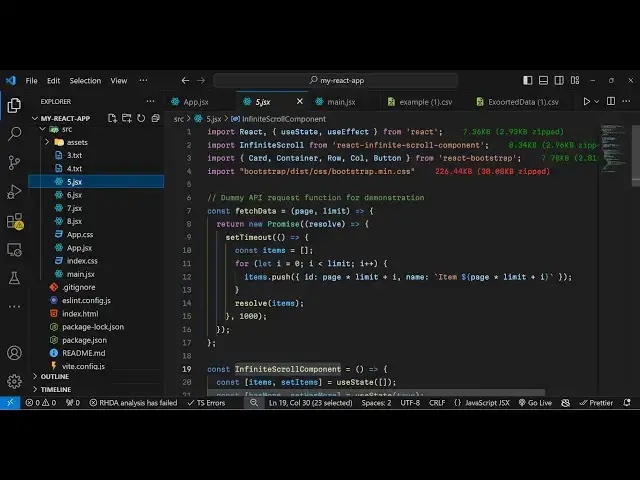
Build a React.js Infinite Scroll Component to Lazy Load Dynamic Data on User Scroll in Browser
Jan 9, 2025

Get the full source code of application here:
https://gist.github.com/gauti123456/4843333cfc22f6a71fb9928a97b0edae
Show More Show Less View Video Transcript
0:00
uh hello guys welcome to this video so
0:02
in this video I will show you the
0:05
infinite scrolling component inside
0:07
react Chas if you want to load some data
0:09
from an API or website and display it in
0:12
the react Chas application there is a
0:14
specific module that you can use which
0:16
is react infinite loader so if you just
0:19
scroll right here you will see as I am
0:21
scrolling the data is coming dynamically
0:24
so you can see as I'm scoring to the
0:26
bottom of the page more data is coming
0:29
dynamically
0:30
so this is actually this component so we
0:33
have a list of items that we are
0:35
displaying so as we are scrolling using
0:38
our Mouse the dynamic elements are
0:41
simply loading more so it is a endless
0:44
infinite scrolling component which is
0:47
available in react CH so this is helpful
0:49
in those situations when you have a lot
0:51
of data to display on the web page and
0:54
then you just need to display it as the
0:57
user scroll the page so this component
0:59
will be very much useful for those
1:01
purposes so if you have a lot of data
1:03
coming from an API or database you can
1:06
use this infinite scrolling lazy loading
1:10
technique so the actual module here that
1:14
I'm using which
1:16
is if you go to npmjs.com just search
1:19
for this module react infinite scroll
1:22
component it's a fairly new component
1:25
library for react ch
1:31
so this is actually the it's almost very
1:34
popular you will see it's almost 6 98
1:39
weekly
1:41
downloads let me just open my zoom in
1:44
tool to zoom in on particular elements
1:47
on the screen so you can see it has
1:50
almost
1:52
7,000 700,000 weekly downloads it's a
1:56
pretty awesome module so this is
1:58
actually the command here
2:00
to install this I've already installed
2:03
this so now to use this it will step
2:06
show you step by step so now to use
2:15
this so first of
2:19
all you need to load the library so for
2:22
loading it we will actually import the
2:25
library first of all just make a simple
2:28
functional component
2:34
so right at the very top we will include
2:37
this module so we'll actually write
2:40
import and then this infinite scroll
2:44
will be available from react infinite
2:47
scroll component this is your
2:49
component and uh for building this inter
2:52
interface we will also be using
2:54
bootstrap so you just need to install
2:57
bootstrap as well so specific Al we
3:00
using react bootstrap and the bootstrap
3:03
main. CSS so you need to install these
3:06
packages so react bootstrap and also the
3:10
bootstrap package so also install these
3:13
two packages as well so after doing that
3:18
now for actually this application we
3:22
will have some State variables so first
3:25
of all the number of items that you want
3:26
to display you will have this variable
3:29
you use the UST State hook initial value
3:32
will be empty array then we have the
3:34
Boolean parameter has more and set has
3:37
more this is
3:39
actually it is useful to keep track
3:42
whether more data is available or not so
3:46
by default it will be true so if the
3:49
data is over then you can put it to
3:54
false and then we will keep track of
3:57
which page the user is on
4:00
so for that we need a use State and
4:03
initial page number will be one so these
4:06
three variables we have items has more
4:10
and Page this is has more
4:14
sorry so now we need to have our jsx the
4:18
interface which will look something like
4:20
this we have the container
4:24
Tab and we'll be having this bootstrap
4:27
class of margin top
4:31
four so inside this you'll have this H
4:35
H2 heading which is
4:37
infinite scrolling with the react
4:43
bootstrap so now we'll be using this
4:46
component which is
4:48
infinite scroll and this component
4:51
actually takes some options the first
4:53
option is our data length which is the
4:58
number of items length
5:00
so items is an array so you'll be
5:02
putting the length of the items so
5:05
number of items then we have the call
5:07
back function which we need to this next
5:11
function so this is actually your actual
5:14
call back function which will execute we
5:17
will set the page number to whatever is
5:20
your previous page we will increment
5:22
this with one so you'll simply say what
5:25
is the previous page just increment it
5:28
by one so it will load the next page so
5:31
this is actually call back function when
5:33
you scroll down this function will
5:35
execute automatically and here we are
5:37
setting the page and increasing it by
5:39
one the next property is again this has
5:42
more which is a Boolean parameter we
5:45
have this variable initially it is set
5:47
to true you can see that when we load
5:49
the application so when the data is over
5:52
then we can reset this value to false
5:54
and then we have the
5:56
loader option as well inside this libr
5:59
so if you want to display something to
6:02
the user that the data is loading you
6:05
can put this text directly and the end
6:09
message this actually tells the user
6:12
that no more data is available so when
6:14
the data is over we can simply say no
6:17
more data so these all are options of
6:20
this infinite scroll component the items
6:23
length the next call back function has
6:25
more loader and message so if you
6:29
refresh your application just go to
6:32
the you will see uh loading is showing
6:36
right here because the data is loading
6:39
that's why this text is showing to us
6:41
this is now to load the data what we
6:45
need to do we need to display some data
6:47
so right inside this infinite scroller
6:51
component we will Loop through our items
6:54
so we'll use the row
6:56
tag and here we will Loop through the
6:59
item
7:00
so we will map through Items Map and for
7:04
each
7:05
item what we will
7:09
do we will have the
7:14
column and inside this we will have a
7:17
card like
7:20
structure card
7:23
body and we basically give it a title to
7:27
each item so we'll use the card title
7:30
class of bootstrap and here we'll be
7:33
embedding our item
7:36
name so these items that we are
7:38
displaying it we just need to declare it
7:40
globally somewhere else so for the sake
7:43
of this tutorial I'm just showing you a
7:45
very basic example where we declar the
7:47
data right here at the very top so we
7:52
have this let me have a use effect hook
7:54
function so when you load your
7:56
application this use effect will execute
7:58
and here we will
8:00
load the data B basically make a
8:03
function and we'll pass the page number
8:07
so here this is actually
8:11
your so we just need to Define this
8:14
function which is load
8:18
data and it will be getting our page
8:20
number passed as an
8:26
argument so inside this function what we
8:29
need to do we need to get the new items
8:33
await so this will be a asyn
8:39
function so we'll basically use the
8:41
fetch API sorry fetch data function and
8:45
we'll pass the page number and 10 so 10
8:47
items need to be displayed on a single
8:49
page and then we'll be set the items to
8:52
whatever is your previous
8:54
items previous items and here will will
8:58
be
9:00
adding it to the previous items so
9:03
whatever is your new
9:05
items like
9:07
this and then we will simply check right
9:10
here in this if condition that if new
9:12
items length is smaller than 10 in that
9:15
case we can simply show this message
9:18
that set has more variable to be false
9:21
because there is no more data available
9:24
for now for this tutorial as already
9:26
told you uh I will basically
9:30
have the data coming right here not from
9:32
an API or database in real life
9:35
situation the data will be coming from
9:36
the API or
9:38
database that you not want to display
9:42
like this so for this we'll just have
9:45
some basic data returning promised right
9:48
here we'll be using the set timeout
9:50
function and right here we will have a
9:54
set of items array it will be empty by
9:57
default and then you'll be simply a
9:59
simple loop I is equal to Z and I will
10:04
limit so whatever is your limit pass
10:08
i++ and then we will push the item in
10:11
the items array and here it takes uh the
10:15
property of ID which will be page
10:18
multiplied by limit plus I and the
10:22
second property is the name property so
10:25
backtick symbol and you'll dynamically
10:27
be putting page multip mply by limit
10:31
plus
10:35
I so we have this now we can Now display
10:39
this data if you can see in the jsx we
10:41
are displaying the item name in the card
10:46
title and similarly in card
10:52
text we will have a bunch of
10:58
text so you can design the interface
11:00
accordingly I'm not forcing you to use
11:03
bootstrap I'm just showing you if you
11:05
refresh now you will actually
11:20
see I paste it I think there is some
11:24
kind of typo mistake and if you
11:26
refresh so the items will display if you
11:29
see as I scroll down a new bunch of new
11:31
items will display the data is loading
11:34
this is essentially the infinite scroll
11:36
component library in react Chase it
11:39
takes these options here that I already
11:41
told you the data length which is your
11:43
items next a call back function where we
11:46
display the next page and load the next
11:48
set of data has more loader and message
11:52
and here we are displaying our data by
11:54
using the map function and each data has
11:57
a card-like structure which contains the
11:59
item name card description and the
12:03
button so this is you can build out a
12:06
very basic infinite scroll component in
12:10
react chairs to load Dynamic data inside
12:12
your
12:14
application uh by lazing load lazy
12:17
loading you can say you're not
12:19
displaying the entire data at once you
12:22
are letting the user scroll down and
12:24
then loading that data so this is a very
12:27
good module you should def Ely use it
12:30
and please hit that like button
12:31
subscribe the channel and do check out
12:33
my website as well free mediat tools.com
12:36
which contains a large set of audio
12:39
video and image tools and I will be
12:41
seeing you in the next video
#Programming
#Software
#Education