Up next in 10

Build a React.js Iconify Library to Render SVG & Vector Icons in Browser Using JSX
Jan 9, 2025

Buy the full source code of application here:
Show More Show Less View Video Transcript
0:00
uh hello guys welcome to this video so
0:02
in this video I will show you a react
0:04
Chase package for getting nice little
0:07
icons so if you're building any sort of
0:10
application if you need a set of icons
0:12
for your application so this library is
0:15
more than enough for you you can see we
0:17
are showing a series of icons this is a
0:19
home icon search profile email cart all
0:23
sort of options are available to you
0:25
icons so the library name is icon
0:28
iconify and it specifically designed for
0:31
reactjs application so just go to
0:33
npmjs.com and just search for this
0:36
package uh if you just search it atate
0:41
iconify SL react so this is actually the
0:46
react component for getting these icons
0:48
so command is very simple simply install
0:51
this and it's almost got 203,000 weekly
0:56
downloads so it's pretty popular package
0:58
and this is their official website
1:00
iconify or design and it's open source
1:04
uh that's important you can use these
1:07
icons for totally free inside your
1:10
application they do offer a great
1:12
documentation as well you can read more
1:15
about
1:16
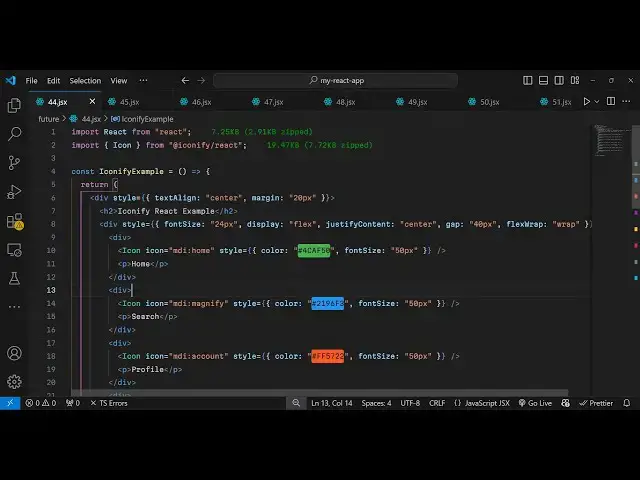
it so now to actually use these after
1:21
installation just make a simple
1:23
functional component and first of all we
1:26
need to import the icons package so so
1:30
we include the icon which will be coming
1:33
from icon IFI
1:36
react
1:38
simply
1:40
1947 kilobytes is the size of this
1:42
package so it's a very lightweight
1:45
package and uh now we just need to
1:49
inside your jsx if you em if you want to
1:52
embed a icon so first of all I will just
1:55
make it everything in the center
1:56
position so I will say text align to
1:59
Center and I will just give it a margin
2:01
of 20 pixel and inside this we will have
2:04
an H2 tag which will simply say iconify
2:08
and react
2:10
example so I will just embed some icons
2:16
so so I will just make it everything in
2:20
the center position this is not
2:22
necessary I'm just writing some CSS so
2:25
that the icons are displaying it
2:27
properly so justify content
2:31
just G have a gap of 40 pixel in between
2:35
icons Flex wrap I will give it wrap
2:40
that's
2:41
all so inside this now if you want to
2:44
show the
2:45
icon you put your icon we are simply
2:48
using the icon right here and uh icon
2:55
component and it actually takes some
2:57
options so first of all which icon that
2:59
you want to show so I will show MDI home
3:06
icon so if you just refresh now uh you
3:08
will see this home icon appearing in
3:10
black color and now you can customize
3:13
the look and feel of this Icon by
3:14
providing a style object to it so this
3:17
object contains some properties such as
3:20
the color you can customize the color
3:22
here you can provide a hexad decimal
3:24
code right here which is 4C a F50 Zer so
3:31
it will add a green color to
3:33
it and then you can customize actually
3:36
the phont size you can control the size
3:38
of the
3:41
icon uh then I can put 50 pixel right
3:44
here so now it will simply make it
3:47
larger so this is your home icon so same
3:51
goes with you can select any color of
3:53
your
3:56
choice so I will just say this is
3:59
actually your home
4:07
icon and then I will show you another
4:09
icon you use the same component but here
4:12
the icon will change so MDI magnify so
4:16
if you want to show the magnify
4:19
icon then again you put you can change
4:23
the color like this provide unique hexad
4:26
decimal code
4:31
so now it will be blue color and phone
4:34
size will again be 50
4:43
pixel so in this way you can show your
4:46
icons very easily uh this is your I
4:48
think search icon
4:59
so in the similar way uh we also have
5:02
the profile icon so you simply
5:05
say it's your profile icon which is the
5:09
MDI MDI is the extension so MDI is
5:13
common and then you change the icon name
5:15
this is magnify this is account this is
5:18
home so now this is your profile icon
5:21
same goes if you want to show now email
5:25
icon so the format is very simple
5:28
configuration part is very simple simple
5:30
you provide the icon inside this
5:40
component so wherever you need to show
5:42
the icon you provide the icon the name
5:45
of the icon then you can provide a sty
5:47
style object and just provide the color
5:52
that's
5:53
all same
5:58
goes so so if you are building any kind
6:01
of shopping website then you if you want
6:02
to show the cart icon so this is your
6:05
cart this is email
6:08
so so it's a very unique neat library
6:12
for showing
6:13
icons and the icons look
6:17
good the color combination you can all
6:21
customize it
6:26
accordingly it's a good Library you can
6:28
use it directly so in this way this is
6:32
your settings
6:36
icon and lastly for notification uh
6:39
there are more icons available on their
6:41
website you need to just check out the
6:43
documentation and uh find out which icon
6:46
that you want and then you can show it
6:49
so this is actually the library guys I
6:51
shown you from scratch how to configure
6:54
it so thank you very much for watching
6:57
this video and do check out my website
6:59
and as well free mediat tools.com uh
7:02
which contains thousands of tools
7:04
regarding audio video and image and I
7:07
will be seeing you in the next video
#Programming
#Online Goodies
#Skins, Themes & Wallpapers
#Open Source
#Other