Up next in 10

Build a React.js HTML Form Validation Using Formik and Yup to Show Error Messages on Form Submit
Jan 9, 2025

Get the full source code of application here:
https://gist.github.com/gauti123456/c583ecb410431190c1a038aa8474aaa1
Show More Show Less View Video Transcript
0:00
uh hello guys welcome to this video so
0:02
in this video I will actually show you
0:04
the form validation example inside react
0:08
chers application using a specific form
0:11
validation Library specifically made for
0:13
react CH which is formic and yep so
0:16
these are two different libraries formic
0:18
is used for displaying the error
0:19
messages so if I have this form right
0:22
here which we have developed using react
0:24
bootstrap so we have these fields right
0:26
here name email address password confirm
0:29
password if you don't write these files
0:31
you will see you will receive these
0:32
error messages appearing at the bottom
0:35
site name is required email is required
0:38
if you write these ma uh the it will go
0:43
instantly and it will change the error
0:46
messages dependent upon whatever you are
0:49
writing so it will show invalid email
0:51
address because we haven't included at
0:53
theate symol so if you just see now it
0:55
is
0:56
correct but you can even see the
0:59
password must be at least six
1:02
characters if I don't confirm the
1:04
password it will say passwords must
1:06
match so all these are messages I will
1:08
show you how to configure this
1:11
and let me submit the same
1:16
password click on submit you will
1:19
receive your data form data in an object
1:23
so this is a complete example that I
1:25
will show and uh let me show you the
1:27
libraries that we are using for this so
1:30
I already told you we are using formic
1:33
which is a library useful for displaying
1:36
error messages in react
1:38
CH so it is a react form validation
1:41
Library so almost 3 million weekly
1:44
downloads so this is actually the
1:47
command they do have their own official
1:50
website as well so build forms and react
1:53
without you can see it's an open source
1:56
library for react and react native and
2:00
there is a second package we are using
2:01
which is Yap
2:04
y it is specifically used for schema for
2:09
specifying whatever schema that you have
2:11
inside your form so it basically have
2:14
name must be a string age must be a
2:17
number email must be a email so it has a
2:20
pre-built methods available it has
2:23
almost got 8 million weekly download so
2:25
this is a command apart from that we
2:28
also need to install
2:30
react bootstrap for building the user
2:35
interface so these four packages are
2:37
required react bootstrap bootstrap
2:40
formic and yep I've already installed
2:43
these four packages so now I will start
2:46
building the example just make a simple
2:49
functional
2:51
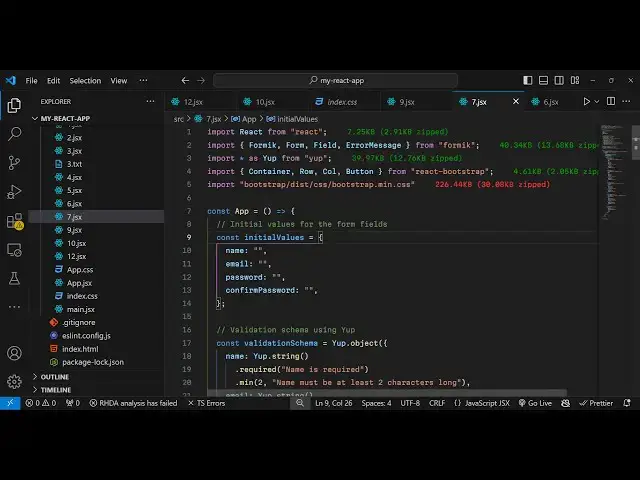
component and we will import the modules
2:55
first of all we'll be importing formic
2:57
which will be imported from form Library
3:01
it also has form field and also it has
3:05
error
3:06
message these four components are there
3:09
and secondly then we need to import the
3:11
whole Library we say import Star as yep
3:16
from
3:17
yep then also we need to import
3:20
bootstrap there are components available
3:24
from react bootst importing it and the
3:27
CDN file that's all all the source code
3:30
will be given in the description so now
3:32
we need to in our react CHS we do need
3:35
to initialize some variables first will
3:38
be an
3:40
object which will be keeping track of
3:43
the initial values so inside our form we
3:46
will have four Fields first is the name
3:49
then we have the email
3:51
address and then we have our password
3:54
and confirm
3:56
password for the sake of the simplicity
3:59
we are taking these example
4:03
here so all the things will be uh empty
4:06
you will see all these four variables
4:08
will be empty whenever you load the
4:11
application now we just need to inside
4:13
your jsx we just need to make the simple
4:16
form inside the
4:20
container we will give it a class name
4:24
of so these are all bootstrap classes
4:27
and inside your H1 you will simply say
4:29
re react form
4:33
validation with formic and yep and
4:37
inside this we will Design the form so
4:41
inside this row
4:46
tag so we'll align it in the center
4:49
position so we'll give this bootstrap
4:51
class to it justify content Center
5:00
so we give it a property of medium to
5:04
six and inside this we'll use the formic
5:08
tag so this takes three options so first
5:13
whatever is your initial values so I've
5:16
defined this object secondly it takes
5:19
the validation schema validation schema
5:22
refers to which Fields you are storing
5:26
inside your form and then it takes the
5:28
third property on subm
5:30
so whenever you submit your form we do
5:32
need to define a custom function so we
5:34
will need to Define this function and
5:36
this validation schema so inside
5:42
this this is not close it inside this we
5:45
will Define the actual
5:50
form
5:51
so now we need to Define these two
5:54
things right at the top so this
5:57
validation schema
6:01
so this will be a yep object so it
6:04
contains this method
6:08
object and here we need to specify the
6:10
fields which we are storing so we
6:12
storing the name which will be a type of
6:19
string and it should be required it be
6:22
Loop chaining this and the error message
6:25
when it is not submitted name is
6:28
required and we'll also be attaching one
6:30
more validation method minimum
6:33
correctors should be two so it will show
6:36
that the name must be at least two
6:40
characters log so in this way you can
6:45
chain different validations for your
6:47
Fields then we'll be having the email
6:50
which will be of type string once again
6:54
and we'll be having this email
6:57
validator so it should be a valid email
6:59
address so if it is not then we showing
7:01
invalid email address and it should be
7:04
required so it is saying email is
7:07
required then we have the Third Field
7:10
which is uh
7:13
password so again it will be
7:15
a string field and it should be required
7:20
so password is
7:23
required and also it will have minimum
7:26
method so password must be at least six
7:28
correctors
7:31
so these error messages we are just
7:33
defining it in this validation schema
7:36
and then we have the fourth field
7:38
confirm password once again it will be a
7:40
string value
7:42
and one of is actually a function inside
7:46
this we provide the reference so
7:50
whatever is your name parameter we have
7:52
defined
7:53
so we are checking that this should be
7:56
matching
8:01
so this
8:03
actually means that both the password
8:06
should match so we are defining this
8:08
reference and then if it doesn't match
8:10
then we should dis display this error
8:13
password must match and then it is
8:14
required confirm password is required
8:17
these are the four fields which we are
8:19
having in the validation schema and then
8:21
we need to Define this custom function
8:23
on submit so when we submit the form we
8:26
will get the values in this variable and
8:29
we will get this reset form property as
8:33
well in order to reset the form when the
8:35
form is
8:36
submitted so this is actually
8:40
your call back function which will be
8:44
called so now inside this we do need to
8:47
define the actual form because if you
8:50
refresh your browser you will receive
8:53
nothing nothing will be displayed we do
8:55
need to define the actual form so right
8:58
here we will have
9:01
the property which is is
9:04
submitting
9:08
pass and here we will Define this actual
9:12
form so a submitting is actually a
9:15
property which is automatically passed
9:18
in this formic
9:20
object it is automatically handled by
9:23
formic and yup so this variable will
9:25
automatically be passed and inside this
9:28
we will have the actual form so we are
9:30
using react bootstrap components for
9:32
building it so first of all we having a
9:35
simple
9:39
field this is all HTML so I will just
9:42
paste
9:44
it not waste time in so it is just
9:48
having a simple field we have given a
9:50
name parameter which is
9:53
required and these are all bootstrap
9:55
classes so we have a simple form label
9:59
so it is now appearing it this is a
10:04
name and now to show the error message
10:06
we will have to use this error message
10:09
component which is imported from we
10:12
importing it from formic and here we can
10:15
Define the name parameter the same
10:17
parameter that you given right here this
10:19
needs to match so I will just type name
10:23
and whatever component we need to render
10:25
out the error so this will be a simple
10:27
div
10:28
component simp simply div tag and we'll
10:31
be attaching this danger class of
10:35
bootstrap that's all
10:37
so this is all and similarly we will
10:42
have a second
10:48
if and the error message is associated
10:51
with it so we'll repeat this for the
10:53
email address same thing we doing the
10:56
same thing right here we given the name
10:58
parameter now this this is email type is
11:00
email and for the error messages name
11:03
parameter is same if you
11:07
see and we are again rering out in the
11:11
diff so now we have the email as
11:14
well same goes with the password confirm
11:17
password as well so what I will do I
11:19
will just
11:20
simply paste it
11:29
so two more fields are added password
11:31
confirm password lastly we just need to
11:33
have a submit button to actually submit
11:35
the form
11:40
so so just give it text Center just to
11:44
align the butter in the center position
11:46
so
11:47
button using the bootstrap button
11:51
component and type parameter will be
11:54
submit variant will be the primary
11:57
button which is a blue color and and the
11:59
button will be disabled depending upon
12:01
the property is submitting it's a
12:03
Boolean parameter either it can be true
12:05
or false so when you submit the form the
12:08
button will be automatically be disabled
12:10
so the label of the button will be
12:12
submit so we have the submit button
12:14
appearing in the center so if you don't
12:17
write anything try to submit the form
12:19
you will actually see automatically
12:21
these error messages will
12:23
show like
12:25
this if I write the M theor message will
12:28
go
12:29
you can see invalid email address so if
12:31
I write the valid email
12:34
address and write password must be at
12:37
least six
12:41
characters 1 2 3 4 5
12:44
6 3 4 five
12:54
six so I think this is the validation
12:58
schema that we
13:09
declared so password is minimum six
13:12
character if you
13:28
see so now if I click the submit button
13:31
if you want to show the information as
13:33
well uh in the on submit what you will
13:37
do you can basically alert the
13:40
information convert this into Json json.
13:44
stringify and basically pass the actual
13:47
values like this and then we can reset
13:49
the form clear out the fields this
13:53
function is provided right here in this
13:55
can see we you can call this and all the
13:58
fields will be reset it after you submit
14:01
the form so in this way you can do very
14:04
easy form validation using formic and
14:07
yoke so all the data will be printed out
14:10
whenever the User submitted data this is
14:13
a very handy Library guys for make and
14:16
yep you can specifically build for react
14:19
CH form validation I've shown you a
14:21
complete example from scratch in this
14:23
video so thank you very much for
14:26
watching this and do check out my
14:28
website as well free mediat tools.com
14:30
which contains thousands of tools
14:32
regarding audio video and image and I
14:35
will be seeing you in the next video