live_tv
Livestream Starting Soon
00
Hours
:
00
Minutes
:
00
Seconds
Up next in 10

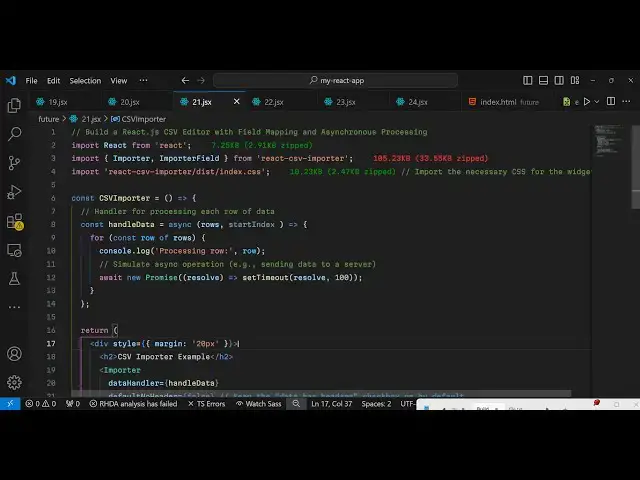
Build a React.js CSV Editor with Field Mapping and Live Preview Using react- csv-importer Library
Jan 9, 2025

Buy the full source code of application here:
Show More Show Less View Video Transcript
0:00
uh hello guys welcome to this video so
0:02
in this video I will show you a CSV
0:05
editor with live preview inside the
0:08
react CH application so there is a
0:10
package which allows you to preview your
0:13
CSV comma separated value files so I'm
0:16
just running this Local Host application
0:18
so we have this CSV importer where you
0:21
can import your drag and drop your CSV
0:24
files so I will drag and drop this CSV
0:27
file if you see it has four columns ID
0:30
name age email so if you want to see it
0:33
in the browser you just need to select
0:37
your so I'm selecting and as you select
0:40
your CSV file you will see the content
0:42
of the CSV
0:44
file with live preview you will see the
0:46
column names which is it contains four
0:49
columns ID name age and this email so
0:53
this is a complete component react
0:56
widget for previewing your CSV comma
0:59
separated value files it's a complete
1:01
editor where you can actually select The
1:03
Columns of the CSV files you can see the
1:06
content of the CSV file in the browser
1:08
so it's a great react component
1:11
library and actually the name of this
1:13
package
1:15
is if you go to npmjs.com and just
1:18
search for this package react
1:21
CSV importer this is actually the name
1:24
of this package the very first link
1:26
which
1:28
appears this is actually the the
1:32
module so almost 5,000 weekly downloads
1:35
are present this is actually the command
1:38
so just install this so I will just show
1:42
you this is actually the widget for this
1:44
drag and drop widget you can perform all
1:47
these operations
1:49
very so once you install this I will
1:52
show you the very basic example so just
1:54
make a simple functional component and
1:57
now to use this we first to need to
2:00
import this so we import the actual
2:05
package so two methods are available
2:08
importer and importer
2:10
feied so it is coming from react CSV
2:14
importer and also we do need to include
2:16
the CSS file for this to include their
2:19
styles of the
2:20
library for the necessary widget and
2:23
right here now to include this widget
2:27
it's very simple just go to your jsx
2:29
part
2:30
and inside the div we will align this
2:33
everything in the center position so
2:35
I'll just give it a margin of 20 pixel
2:38
and inside this we will have an H2
2:40
heading which will say CSV importer
2:44
example and we will basically be
2:47
importing this widget which is importer
2:51
you can see we are including this so
2:53
this takes some options first of all
2:55
which data that you want to
2:57
show and we will execute a callback
3:02
function whence if you want to handle
3:04
this data so this actually provides you
3:07
this callback function so I just need to
3:09
Define this handle data I can call this
3:12
anything this is just a call back
3:14
function if you want to handle this data
3:17
this is actually a call back and there
3:19
is also a option to if you don't want
3:22
the default header then you can set it
3:24
to false restartable again it's a
3:27
Boolean property it means that if it
3:30
allows the users to restart and upload
3:32
another file so I will set it to
3:34
true and there is also the on call back
3:38
function so it basically executes
3:41
whenever you start uploading any file
3:43
CSV file in this fidget so this actually
3:46
contains these actual file and the
3:49
preview of the file fields and column
3:53
Fields so these all variables are there
3:56
and here we
3:58
can simply console log a simple message
4:02
on the console that imported
4:07
successfully so this on start function
4:09
will execute and if you want to see more
4:11
information about the file that you
4:13
imported or you can console Lo these
4:16
messages the actual file and the
4:19
preview and similarly we do offer a on
4:22
clip complete as well call back function
4:25
which automatically executes when the
4:29
import process is successful
4:32
complete this is also a call back
4:34
function all these things are also
4:36
passed so we are simply showing this
4:39
console log messages and at last we also
4:42
have the on close event handler as well
4:45
so when the file is closed then we can
4:49
simply console log message import
4:52
process
4:54
closed this is actually the widget and
4:57
now you can test it out in the browser
4:59
it will look something like this drag
5:01
and drop widget is there you can drag
5:03
and drop your CSV
5:05
file so it needs to be a CSV
5:09
file so once you do this you will see
5:11
the actual content of the file the
5:14
extension the raw file content comma
5:17
separated value and also you see the
5:19
Tableau structure as well so it clearly
5:22
shows the headers the rows of
5:25
data so in this way it's a complete
5:28
wiget
5:30
and here you can choose whatever column
5:32
that you want to like
5:38
this it's a complete editor so in this
5:42
way you can import your CSV files and
5:44
view it in the browser very efficiently
5:46
using this reactjs package which is
5:49
react CSV importer so thank you very
5:52
much for watching this video and do
5:54
check out my website as well free mediat
5:56
tools.com which contains thousands of
5:59
tools regarding audio video and image
6:02
and I will be seeing you in the next
6:04
video