live_tv
Livestream Starting Soon
00
Hours
:
00
Minutes
:
00
Seconds
Up next in 10

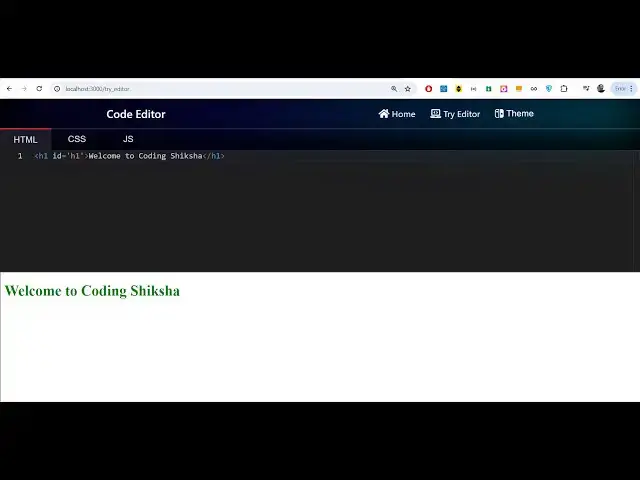
Build a Next.js W3Schools & Codepen HTML CSS & JS Code Editor Clone With Syntax Highlight in Browser
Jan 9, 2025

Buy the full source code of the application here:
https://procodestore.com/index.php/product/build-a-next-js-w3schools-codepen-html-css-js-code-editor-clone-with-syntax-highlight-in-browser/
Check out the Live Demo of the Code Editor Here:
https://freemediatools.com/shikshaeditor/
Buy Premium Scripts and Apps Here:
https://procodestore.com/
Show More Show Less View Video Transcript
0:04
uh hello guys welcome to this live
0:06
stream so in this live stream I will
0:08
basically talk about a next JS project
0:11
that I developed which is actually a
0:14
code editor HTML CSS and JavaScript code
0:17
editor in browser something like
0:20
w3schools.com or codepen so Cod pan or
0:24
W3 schools clone code editor I have
0:27
developed guys which is HTML CSS Java
0:29
JavaScript you can basically execute
0:31
HTML code CSS code and JavaScript code
0:34
right here in the browser itself let's
0:36
suppose if you want to do some coding
0:38
right here if you basically open this
0:41
application it will open something like
0:43
this I have also deployed this inside my
0:47
machine
0:48
guys uh in my website which is free
0:51
mediat tools.com you can check out the
0:53
live demo I have given the link in the
0:55
description of this live stream you can
0:57
go to this link and basically try out
0:59
the live Dem more so this is actual you
1:01
can change the theme you can s like this
1:04
and
1:05
basically yeah I'm just running it on
1:07
Local Host 3000 as well if you want to
1:10
check out the live demo the link is
1:11
given in the description of the live
1:13
stream you can check out the my it is
1:16
deployed on free media tools sl6 editor
1:19
so basically as you make changes
1:21
automatically it will reflect let me
1:23
change this text
1:25
to you will see automatically as I am
1:28
writing here the text text is
1:32
changing so now if I want to edit this
1:35
change
1:37
this heading color let's suppose I want
1:39
to change it to
1:41
Blue this is actually the ID here so I
1:45
just need to give it an ID which is this
1:50
selector so we have given this ID which
1:52
is H1 so let me just change this
1:58
H1 so
2:03
H1 just change it so color you can see
2:06
color is changed to blue color and we
2:09
can basically give it a background color
2:11
as well so
2:13
just we can write CSS code right here
2:17
you can see so we can be give any
2:19
background color of your choice so it's
2:22
a simple code editor something like vs
2:25
code or code
2:28
pen you can see that so you can give it
2:31
a
2:35
padding you can see that guys it is
2:38
really helpful it works entirely in
2:42
browser if you need this source code
2:44
guys of this project it is entirely
2:46
built in next CH it's a fully client
2:49
side application and uh the link is
2:52
given you can directly purchase the full
2:53
source code you will get the zip file
2:55
after you purchase it from my website
2:57
from Google Drive automatically you will
3:00
get the zip file you just need to
3:01
extract it this will be the directory
3:03
structure you will get after you
3:05
purchase it and get the zip file and
3:08
basically I'm running it on Local Host
3:10
3,000 so first of all as you extract it
3:13
you just need to npmi this will install
3:16
all the packages which are required for
3:18
this uh project so npmi so this will
3:22
install all the packages and then you
3:24
need to npm run Dev this will start the
3:27
development server of NE sh project and
3:30
it will start your application on Local
3:32
Host
3:33
3000 and uh it will basically compile
3:36
your project and just Local Host 3,000
3:40
so it will redirect
3:42
you so just wait for the compilation to
3:46
finish if you're running it for the very
3:49
first time it will take some five to 5
3:51
Seconds to compile successfully so this
3:54
is actual homepage which will be there
3:56
you need to go to the try editor tab
3:59
right here and this is your code
4:01
editor by default it will look something
4:04
like this and you can actually write any
4:07
HTML valid HTML right
4:10
here we can write a
4:15
paragraph you can see automatically as
4:17
I'm writing here it is automatically
4:20
reflecting so we can
4:22
change the color to be
4:26
green paragraph color to be red
4:30
and let's suppose if I write some some
4:33
JavaScript code as well alert statement
4:35
you will see alert statement will come
4:37
right here uh let's suppose I make a
4:41
button right
4:43
here so I give it a
4:46
button so I will simply say say
4:50
hello so what I will do is that I will
4:53
simply bind The onclick Listener so on
4:56
click so whenever I click this button I
4:59
will actually make a function hello so I
5:04
will call this function so need to
5:06
Define this inside of a Javas script so
5:09
inside this you can basically write this
5:11
function and inside this High Vol so we
5:15
defined this function it will only
5:16
execute whenever we click this button so
5:19
this function will automatically execute
5:21
so now if I click this button you will
5:23
see say hello and this alert statement
5:25
is printing out hi world so in this way
5:28
guys you can actually
5:30
code inside this application in online
5:35
it's a free online editor that I
5:37
developed entirely in browser it
5:39
executes your HTML CSS and JavaScript
5:42
web web development code so if you are
5:44
developing any web application this
5:46
editor will be very beneficial for you
5:49
it comes with its own syntax
5:51
highlighting autocomplete you will see
5:54
all these JavaScript statements have
5:57
also been autocom completed similar to
5:59
vs code so whenever you write some code
6:02
inside VSS code we get these automatic
6:05
suggestions so we also get these same
6:09
suggestions in our web editor code as
6:12
well you will see that we can basically
6:14
all the syntax highlighting is there for
6:16
the JavaScript code CSS code and for the
6:18
HTML code if you are interested in
6:21
purchasing the source code the link is
6:23
given in the description you can
6:25
directly go to it and purchase it source
6:27
code so you can basically
6:33
see you can see
6:38
that you can give it a background color
6:41
to this
6:43
also so you can see that so how easy it
6:46
is
6:49
guys you can play with
6:54
this so if you are a web developer this
6:57
code editor will be very benefit IAL to
7:00
you because you no longer need to use
7:02
third party software you can entirely do
7:04
your coding so this is very similar guys
7:07
various websites are available something
7:10
Cod pen you have already used these
7:12
websites which also provides developers
7:15
to actually execute source code so it is
7:20
similar to codepen and W3 schools also
7:24
has its own code editor so I basically
7:27
develop this project in next years
7:31
so HTML online editor they also have
7:36
similar but it is a realtime editor guys
7:40
you can try out the live demo before
7:42
purchasing the source code I have given
7:43
this this editor link you can try out
7:46
this editor the link is given on my
7:49
website you can try out this basically
7:51
code editor before purchasing it the
7:55
purchasing link is also given in the
7:57
description link so you can basically
8:00
try
8:01
out can see live preview is also
8:04
available then you can write your CSS
8:06
code JavaScript code any code that you
8:09
want to all these things are
8:13
available you can fetch data from an
8:16
API you can make a fetch
8:19
call let's suppose I go to Json
8:24
placeholder API and fetch some data so
8:27
it's a free fake rest API so let's
8:29
suppose I want to fetch some data so I
8:32
will copy this code paste
8:39
it
8:46
so I will Define a function right here
8:49
which is
8:51
fetch data so this function will
8:55
execute it will make a fetch call
9:05
and right
9:07
here we can basically alert the data
9:10
which is coming so right here we will
9:13
actually have a
9:16
button we can simply call this fetch
9:19
data so whenever someone clicks this
9:22
button we will actually
9:24
basically call this function fetch data
9:28
so this function will get executed you
9:30
will fetch the data so click on that and
9:33
you will basically get an object which
9:35
is essentially you will get a Json
9:38
response back from this API if you go to
9:41
this browser just open this copy and
9:45
paste it you will actually get an object
9:48
so you will basically see it contains
9:50
four properties and
9:52
uh you can basically print out the title
9:56
so let's suppose I want to access this
9:58
property so I can simply say json. title
10:02
so click on now you will see the title
10:05
is printed out so in similar way you can
10:08
basically see we can U print out on
10:15
the we can have a div tag we can give it
10:19
an ID here of result so if you want to
10:22
print this you can simply say document.
10:25
getet element by ID which is result
10:29
do inner HTML is equal to json. tile
10:33
that's all so now it will print out the
10:36
detail if you
10:38
click the title will be printed right
10:41
here instead of alerting the user we
10:44
will print the title right here
10:45
dynamically you will basically see guys
10:48
it is fetching the data from this API
10:50
Json placeholder API displaying it in
10:52
the browser and it is all doing it
10:56
inside the browser we are writing the
10:58
code in the browser testing it out this
11:01
is you can see that it makes it very
11:03
much easy for us to get this data you
11:06
can basically build any web application
11:08
make a calculator fetch some data from
11:11
API you can practice it is good for
11:13
practice if you are a web developer
11:15
programmer if you want to test your
11:16
codes online you can just test your code
11:20
practice it's very good for practice if
11:23
you doing some coding interview it is
11:26
also very good you can take interviews
11:28
with this code editor and it's very
11:31
beneficial and it's comes with its own
11:34
syntax highlighting it comes with autoc
11:36
complete similar to vs code W3 schools
11:41
and code pen code editor so looking at
11:44
the code guys we are using next CH and
11:47
we have different components for
11:49
different types
11:50
of sections right here we have this
11:55
component section we have this editor
11:57
component footer loading bar and
12:00
navigation bar so this is a overall
12:03
application if you are interested the
12:04
link is given in the description you can
12:06
directly purchase it you will get the
12:08
zip file then you need to extract that
12:10
zip file and this will be the actual
12:13
four commands this is a Dev command to
12:16
actually start the development server if
12:18
you want to build this application you
12:20
can even build this application by
12:22
running this command which is mpm run
12:25
build this will actually build your
12:27
project into a build folder so that you
12:30
can actually deploy
12:32
this so it will actually create a build
12:35
folder
12:37
and using this build you can
12:42
actually it will actually create that do
12:45
next
12:47
folder so it is actually generate your
12:50
static Pages for your next year
12:52
application so that you can deploy this
12:54
on a real domain name real hosting so
12:57
you can see it has created that next
13:00
folder and
13:04
uh so this next folder is created so
13:10
static so if you're interested guys in
13:13
purchasing this uh source code you can
13:16
go to the description it's a fully
13:18
fledged code editor in the browser and
13:20
you can check out the live demo as well
13:22
I've given the link and the purchase
13:23
link as well thank you very much guys
13:25
for watching this video and I will be
13:27
seeing you in the next live stream
#Fun & Trivia
#Flash-Based Entertainment
#Programming
#Web Design & Development
#Scripting Languages