live_tv
Livestream Starting Soon
00
Hours
:
00
Minutes
:
00
Seconds
Up next in 10

Build a Next.js jsPDF-Autotable HTML to PDF Web App to Export REST API Data to PDF in Browser
Jan 9, 2025

Buy the full source code of application here:
Show More Show Less View Video Transcript
0:00
so guys this is a starting project here
0:03
if you see we have a Hello World next CH
0:06
project it is compiled successfully if I
0:09
open my project on Local Host 3000 you
0:13
will see this is actually the project it
0:15
has got a simple heading next CH convert
0:17
HTML to PDF and uh we have already
0:21
installed these modules we do need to
0:22
install these two
0:24
uh npmi jspdf and jspdf auto table so so
0:30
I've already installed these packages so
0:32
jspdf jspdf D Auto table so you just
0:35
need to install these two packages so it
0:38
will be mentioned inside your
0:39
package.json if you
0:41
see uh this jspdf and jspdf auto
0:46
table so we are using next CH you will
0:50
see that so now to get started after we
0:54
install these packages just start this
0:56
application and PM run Dev so it will
0:59
start your development server the very
1:02
first file we need to edit is in the
1:04
Pages directory so this is actually your
1:06
directory structure you need to go to
1:07
the Pages directory of your next year's
1:09
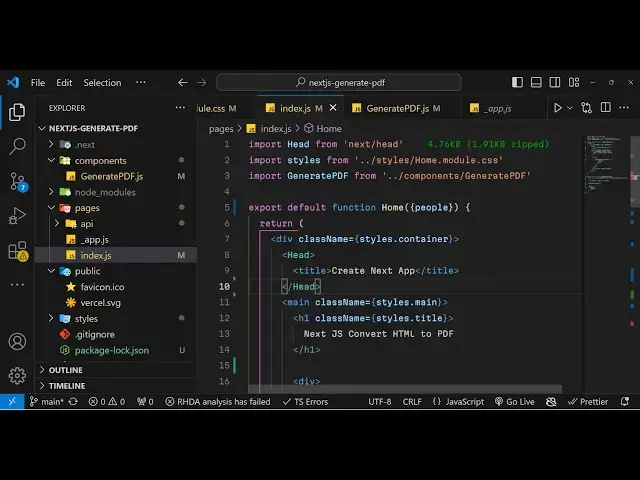
project and just open this main file
1:11
which is index.js so right here this is
1:14
containing your head tag the title tag
1:18
the main tag inside that we have just a
1:21
H1 heading which will say an X CH
1:23
convert HTML to PDF after that we just
1:25
need to
1:27
Simply uh create an API route so right
1:32
in the Pages directory what we will do
1:34
we will create a API folder and inside
1:37
this API folder we will create any API
1:41
route uh let's suppose we create
1:44
people you can call this anything I'm
1:47
just calling people dot followed by the
1:50
JS this is a JavaScript route so here we
1:54
simply be creating a API route which
1:57
will
2:00
uh export set of users as Json response
2:05
so for doing that we just need to write
2:07
export default and then we need to say
2:10
the request and the
2:12
response so it's a API route file that
2:15
we are writing so it's Arrow function
2:17
and inside this we need to exactly tell
2:21
what response that we will be sending
2:23
from this API route so you'll simply say
2:26
response. status and here you need to
2:28
tell that status here which is 200 and
2:31
then we need to tell the Json so we'll
2:34
be returning Json from this file so it
2:37
it will return an array of users so
2:40
you'll Simply Be Square just putting
2:42
this square bracket and uh a set of
2:45
objects you will be returning here the
2:47
name property which will hold the name
2:49
of the person then we will have the
2:52
actual age so it will be numeric and
2:56
then we will have the
2:58
country which will again NBS string
3:03
value so what we need to do we just need
3:05
to copy this several times more we can
3:08
simply put a
3:18
comma so we just need to
3:24
change the data here
3:35
so we have S we have this data so what I
3:38
will do I will simply copy paste it just
3:40
to save some
3:49
time so we actually have written this
3:52
APR out what if you want to open this
3:55
now what you need to do this is your
3:58
homepage Local Host 3,000 if you want to
4:01
try this you just need to say/ API SL
4:06
people so if you hit this
4:08
URL Local Host SL 3000 SL API SL people
4:13
sorry this needs to be
4:17
slash so now if you see it's a API route
4:20
that we have made server side route
4:22
which are returning actually the list of
4:24
users that we have written it can either
4:27
come from a external API as well if you
4:31
are storing it in a database as well you
4:33
can just do it in in this example we are
4:36
just listing users in a particular file
4:39
and returning at as a Json response just
4:42
for showing this as a example purpose if
4:45
you so this is actually a API route that
4:47
we have written in nextjs and now to
4:50
consume this we just need to go to our
4:52
index.js file and now for doing this for
4:55
consuming this inside your application
4:57
we do need to use get static prop
5:00
so here in this you will simply say
5:02
export async function and then you'll be
5:06
using this get static props function to
5:09
actually access this uh API route so for
5:15
this we will making a simple fetch
5:17
request so you simply
5:20
say it will be a Asing function you will
5:23
say a wait and then we'll make a simple
5:25
fetch call to the
5:30
actual API rout so it is located at
5:34
Local Host 3000 API SL
5:38
people so the exact URL that we opened
5:42
so we are simply making a fetch call to
5:45
retrieve those users so after that we
5:48
just need
5:50
to again make a fetch call again await
5:54
and this time we need to get the Json
5:55
response so response. Json so now it
5:59
will will retrieve those Json users you
6:02
can even console log it as well so this
6:05
request will automatically happen
6:08
because this get static props function
6:11
will automatically if you open this
6:15
Local Host 3000 if you your St get
6:18
static props function did not return an
6:20
object D you forgot to add a return oh
6:24
we do need to add a return statement
6:26
guys because get static props just want
6:29
this return statement to
6:31
happen so just add this return
6:35
statement and uh we do need to pass it
6:38
as a prop as well so we do need to pass
6:40
a prop which is a information to the
6:43
component so this time we'll be passing
6:45
it the people which we are fetching it
6:47
if you see we are fetching these people
6:50
and we are just passing it as a property
6:52
as a prop in the return statement from
6:54
get static props so if you have studied
6:57
next year you will know what I am doing
6:59
if you go to inspect element just see in
7:03
the so this is a browser console guys
7:07
you don't need to be confused there are
7:09
two types of console in the server s
7:11
side console and the browser s side
7:13
console so here we are making we are
7:15
writing the server site code because we
7:18
are just making a simple call to the
7:20
user to make a fetch
7:22
call so right here this will come in
7:27
the uh server
7:31
uh site console so here you can see all
7:33
these data is
7:36
coming so the result of get static props
7:38
is shown in the terminal of the server
7:41
site so here this is at the server site
7:44
all this data is coming right here if
7:46
you see we have getting these users
7:49
and from the fetch call and now we just
7:52
need to pass this data as a prop so now
7:56
how we can dynamically do this so we
7:58
need to go to the home comp component
8:00
and just consume this so we can simply
8:02
destructure it and just call it
8:04
people and after we do this we can
8:08
actually have H after this heading we
8:10
can have a div inside this
8:19
div so inside this div we can have a
8:22
unordered
8:24
list and inside this unordered list we
8:28
can actually have Calli bracket and just
8:31
say people and this is actual an array
8:33
here we can use the map operator and
8:36
then we can destructure the name and the
8:39
index variable and then we can
8:44
simply in the list item we can simply
8:48
put a key
8:52
parameter and inside this lii tag we can
8:55
simply show the name of the user and we
8:57
can simply print it using the curly
8:59
bracket name so if you refresh now your
9:03
application you will see these users
9:04
names coming so this data is coming from
9:07
the server s side
9:08
route from get static props and we are
9:11
showing this information on the web page
9:13
so in this way you can show this and now
9:16
the objective is to convert this into
9:18
PDF into tabular structure using JS PDF
9:23
so after this we will write a simple
9:24
custom
9:26
component this component I will call
9:28
this as generate PD so just go to the
9:31
root directory and just make a
9:34
components
9:36
folder so inside this components folder
9:39
we will simply make a component which I
9:41
will call this as generate PDF JS so
9:45
inside this
9:47
component we
9:50
will write the export statement export
9:54
function export default
9:57
function and we'll call this as generate
10:09
PDF and uh it will return
10:18
actually generate
10:20
PDF this is a simple uh functional
10:23
component that we have written now we
10:25
can simply include this so in the Pages
10:28
directory we can
10:32
simply have a generate PDF component so
10:36
automatically it will be included from
10:38
the
10:39
components by U vs code so in this
10:43
component guys we do need to pass a
10:44
property which is person so whatever
10:48
people it will be
10:51
passed so I will call this as person so
10:54
we are actually passing this people
10:57
object as a property to this component
11:00
generate PDF so we are calling it as
11:02
person so now going to the this
11:05
component we need to actually
11:07
destructure this information coming so
11:10
you'll be destructuring it as an object
11:13
of
11:15
person so now inside this uh
11:18
component instead of having this we'll
11:21
have a
11:22
button this button will simply say
11:26
download PDF
11:29
and we'll be binding a onclick listener
11:31
to the button so you call a generate
11:34
you'll call this as you call this
11:38
function and the button
11:40
type it primary
11:45
button so after you do this we do need
11:48
to write this function which is generate
11:52
when we click the button so we call
11:55
function
11:57
generate so inside this function
12:00
we do need to import jspdf and jspdf
12:03
auto
12:06
table so just at the top we can
12:16
import jspdf from jspdf and then we do
12:21
need to import jspdf auto
12:27
table same imported all this
12:31
dependencies so now we can make a new
12:33
document using this Constructor of jspdf
12:37
and then it contains a function Auto
12:46
table so inside this dises an object
12:49
first property is the head of the
12:52
table and it actually takes uh
13:00
so here you will
13:01
provide the column
13:06
names name
13:08
age and
13:12
Country you need to put a comma right
13:15
here and after that it takes the body of
13:17
the table so inside the body we will
13:20
simply
13:22
say whatever is the person which is
13:25
passed here and we need to map it so
13:28
again we'll be using the same concept
13:30
you will destructure the property name
13:32
Age
13:34
Country the three properties available
13:36
and what we will do we will
13:41
simply Loop through we will
13:46
return name Age Country
14:04
so this is a
14:08
thing so after we do this we just need
14:11
to save this document so you can call
14:14
the save
14:15
function we call this as result.
14:19
PDF that's
14:21
all so if you just refresh your
14:24
application guys you will see this
14:26
button appearing if you click this
14:27
button you will see
14:29
your PDF document will get downloaded
14:32
and you will see name Age Country and
14:35
all these records which are there it is
14:38
actually downloading it as PDF document
14:41
in next CH so we have written complete
14:43
project guys from scratch uh it's a very
14:46
mini project but still you got to know
14:48
about more things in next years how to
14:50
make server side routes how to convert
14:53
PDF using JS PDF so quite a thing quite
14:57
a lot of functionality we built in this
14:59
video uh so if you like hit this if you
15:02
like the video then please hit that like
15:04
button subscribe the channel and uh do
15:08
visit my website as well guys free media
15:11
tools if you just open this in the
15:14
browser it actually contains free tools
15:17
regarding audio video and image and I
15:21
will be seeing you in the next video
#Programming
#Web Design & Development