Up next in 10


Buy the full source code of the application here:
https://procodestore.com/index.php/product/build-a-ffmpeg-wasm-audio-converter-in-browser-using-html5-css3-and-javascript/
Buy Premium Scripts and Apps Here:
https://procodestore.com/
Show More Show Less View Video Transcript
0:04
uh hello guys welcome to this live
0:06
stream so in this live stream I will
0:08
basically introduce to a new application
0:11
that I developed which is actually a
0:14
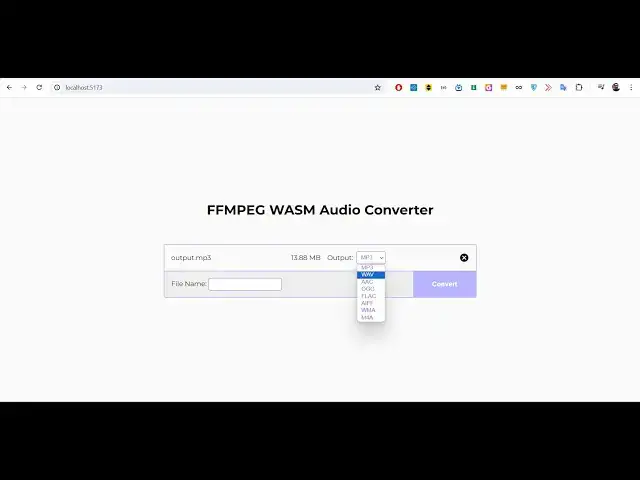
fmpg uh web assembly audio converter
0:18
application so you can basically see on
0:20
your screen uh I developed this
0:22
application in HTML CSS and JavaScript
0:26
vanilla JavaScript no thirdparty library
0:28
is used we have just use fmpg which is a
0:33
uh audio and video processing library
0:36
and we have used uh web assembly to
0:39
actually run fmpg directly in the
0:42
browser you don't need fmpg installed
0:45
inside your computer you can directly
0:47
run this application without internet
0:49
connection it is fully client side 100%
0:51
client side it works in the browser and
0:54
it is a single page application if you
0:56
just refresh here this will look
0:58
something like this fmpg web assembly
1:00
audio converter and here you will
1:02
actually drag and drop either you can
1:04
drag and drop the audio file all
1:06
extensions are supported MP3 wave all
1:09
the extensions which are there of audio
1:12
file so I will take a very simple
1:14
example I will simply convert my audio
1:16
file which will be a MP3 file so as you
1:19
basically click on this button choose
1:21
file you can actually select your uh
1:24
audio file so I will actually select
1:26
this file guys which is a MP3 file you
1:29
can see that it is almost 15 minutes 32
1:33
second long audio file and as I select
1:36
this file you will basically see guys
1:39
this uh it shows you the size of this
1:41
file which is 13
1:44
megabytes and here you can select in the
1:47
drop- down you can have various option
1:49
MP3 wave double AC o g Flac a i WF W ma
1:56
M4 a so all these uh options are present
2:00
right here you can basically select any
2:03
option let's suppose I want to convert
2:05
This MP3 to wave format I will simply
2:07
select that after you can even provide
2:10
the custom file name let's suppose you
2:12
want it to be result so you will provide
2:15
result and plus the extension name it
2:17
will automatically embedded so if you
2:19
don't provide the file name it will
2:21
automatically do the conversion and have
2:24
a default file name if I click convert
2:27
so there will be this alert message that
2:29
audio version is successful and now it
2:31
will change it to a download button so
2:34
if you click the download button your
2:36
wave file will get downloaded so you can
2:38
basically see the MP3 file has been
2:41
converted to wave file and now I can
2:44
play this file as well if I click
2:47
that uh hello guys welcome to this video
2:50
so in this so you will see Chase it from
2:54
so you can basically see
2:57
right we basically convert ConEd our MP3
3:00
to wave file and similarly we can
3:03
convert this to double AC click on
3:06
convert
3:08
and click on download and you can
3:10
basically
3:14
see output. double AC so you can see
3:18
that now this is a double AC file and
3:21
you can basically play with any Media
3:22
Player supported media player uh hello
3:25
guys welcome to this video let me show
3:28
you so all these these are different
3:30
audio extensions guys different
3:32
extensions
3:34
AAC wave and OG Flac aouf so I this is a
3:40
very simple application if you want this
3:43
application guys the link is given in
3:44
the description I basically made this
3:47
application and uh if you need this the
3:51
link is given you can directly purchase
3:53
it from my website and after you
3:55
purchase it guys you will automatically
3:57
be redirected to Google Drive where you
3:59
you can actually download the zip file
4:02
and after you extract that zip file it
4:05
will see this directory structure you
4:08
just need to extract the zip file to get
4:10
this directory structure so this will
4:12
actually have this index. HTML file
4:14
right here and you can see that I'm
4:17
running this on npm run Dev so V server
4:21
has started HTTP Local Host
4:23
5173 so after you extract it you just
4:26
need to run this command which is npm
4:28
run Dev this will start the development
4:31
server which will be running this
4:32
application on the Local Host server
4:34
which is HTTP Local Host
4:37
5173 if you want to deploy this
4:40
application it's very simple there is a
4:42
build command as well you can run this
4:43
build command which will build out this
4:46
application it will actually create a
4:47
disc folder you will basically see it
4:50
will actually create this disc folder
4:52
and uh now you can directly deploy this
4:56
application we have the minified CSS
4:58
code and the minified Java script code
5:00
and you can basically deploy this
5:02
application anywhere you can purchase a
5:04
domain name just embed this application
5:07
and you can earn a lot of Revenue as
5:08
well because people are looking forward
5:10
to convert their audio files from one
5:12
format to another and it's a very
5:14
minimalistic very good application runs
5:16
in the browser they will select the file
5:19
and the prime advantage of this
5:20
application is that guys it can handle
5:23
unlimited number of conversions and the
5:26
people files are not uploaded to any
5:28
server so there is no server involved in
5:30
this application it's fully client side
5:32
it handle inside the vanilla JavaScript
5:35
and these files are not getting uploaded
5:38
anywhere these are staying in the
5:39
browser just processing it and then
5:41
after processing they are automatically
5:44
being deleted so once you select your
5:45
MP3 file just select it from the
5:48
drop-down to whichever format that you
5:50
want to convert your file you can even
5:52
give a custom file name let's suppose I
5:54
give it result click on convert so audio
5:57
conversion will be successful click on
5:59
download downlo and now it will look
6:01
something like this result. aouf so you
6:05
do you need to have a media player
6:08
associated with
6:10
this which will actually play this file
6:12
for You Hell guys welcome to this video
6:14
so in this video I just want to show you
6:17
a download so all these extensions are
6:19
supported guys WMA as well you can see
6:23
that so it will change it to WMA you
6:26
will see that
6:44
there will be this download button you
6:45
can do this m4a you can even add some
6:49
more extensions if you uh if you just
6:52
know the extensions you can uh add more
6:54
extensions as
6:56
well like this uh just go to index HTML
7:00
and you can add some more extensions if
7:02
you want to add some more extensions you
7:05
can edit here this HTML code right here
7:08
if you just edit this automatically it
7:10
will change it you will see
7:16
that this is in the production level so
7:20
I'm I'm developing this application so
7:22
this is my development code so I can now
7:24
change this code right here if I delete
7:26
these options it will automatically
7:29
reflect select you will see that all
7:31
these options are now gone if I again
7:34
add these options it will again come you
7:36
will basically see automatically the
7:39
application will refresh if you make any
7:40
sort of changes you will see that so if
7:42
you know more audio extensions let's
7:44
suppose audio
7:47
extensions you give it a all the major
7:50
ones are supported guys MP3
7:53
aacg F laac AAC wave aouf so all these
7:58
audio formats are there in this
8:01
application you will see that so it's a
8:02
very good fmpg web assembly audio
8:04
converter guys if you need this
8:06
application the link is given in the
8:08
description you can directly purchase it
8:09
this basically you can see it's using
8:12
vanilla JavaScript HTML and CSS no
8:14
server s side code is involved your
8:16
files are not getting uploaded somewhere
8:18
else it's a very simple application
8:20
fully client side it works in the
8:22
browser and it's a single page
8:24
application
8:26
and if you don't know about fmpg guys so
8:29
open Source cross platform audio and
8:31
video processing library and typically
8:33
it works in the command line I already
8:36
have fmpg installed it also works in the
8:38
command line you will see that fmpg is
8:40
installed but we we don't have to
8:44
install fmpg you can directly execute it
8:48
in the browser using fmpg web assembly
8:51
this is actually a package which allows
8:53
you to actually run fmpg directly in the
8:55
browser using web assembly so this is a
8:58
GitHub repo you can read more about it
8:59
in the documentation so we are actually
9:01
using this concept fmpg web assembly to
9:04
actually run this to make this
9:06
application and run this code in the
9:08
background so if you need this code guys
9:10
the link is given in the description it
9:12
will be a very good project if you are
9:14
developing if you're going for a job and
9:16
if you want to attach this project for a
9:19
resume you can even study this code
9:21
after you purchase it you will get full
9:22
commercial rights to actually use this
9:24
software and resell it as well and you
9:26
can even earn a lot of Revenue as well
9:29
by putting advertisements as well if you
9:31
are deploying this to a real domain name
9:33
so it works in all the apartments so so
9:36
a real widget you will see that as you
9:38
select it you can have various you can
9:41
select you can convert it to various
9:43
formats MP3 to wave and you can see that
9:47
so let's suppose if I now select the
9:50
wave
9:58
format so if I select the wave format I
10:01
can simply convert it to MP3 I can do
10:04
the reverse process as well converting
10:06
wave file to MP3 you can just do any
10:09
format from any format to another using
10:11
this application if you are interested
10:13
guys you will get this full source code
10:15
and this HTML code you will see that you
10:18
can edit this source code study it how I
10:20
developed this you can even deploy this
10:22
using simple command npm run build it
10:24
will actually build out this application
10:26
and you can deploy this thank you very
10:28
much guys if you are interested the link
10:30
is given in the description you can
10:32
purchase it thank you very much for
10:33
watching this video and I will be seeing
10:35
you in the next live stream
#Music & Audio
#Music Streams & Downloads
#Software
#Multimedia Software