live_tv
Livestream Starting Soon
00
Hours
:
00
Minutes
:
00
Seconds
Up next in 10

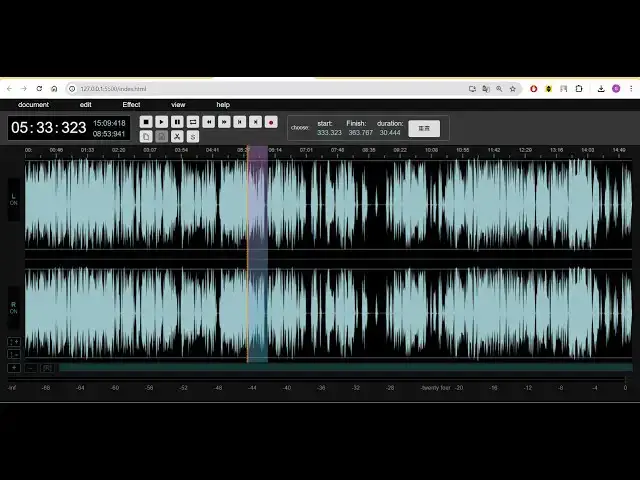
Build a FFMPEG Timeline Audacity Clone MP3 Audio Editor in Browser Using Wavesurfer.js in Javascript
Jan 9, 2025

Buy the full source code of the application here:
https://procodestore.com/index.php/product/build-a-ffmpeg-timeline-audacity-clone-mp3-audio-editor-in-browser-using-wavesurfer-js-in-javascript/
Buy Premium Scripts and Apps Here:
https://procodestore.com/
Show More Show Less View Video Transcript
0:03
uh hello guys welcome to this video so
0:05
in this video I will basically introduce
0:07
to a new audio editor application that I
0:10
developed inside browser which actually
0:12
uses fmpg wave surfer JS library and
0:16
lame JS Library so this is actually a
0:19
timeline audio editor something like
0:22
audacity audacity is a very popular
0:24
desktop software which allows you to
0:26
edit your MP3 audio files so this is
0:30
actually a web version that I developed
0:32
guys which works fully client side
0:35
application no server side code is there
0:37
it basically runs without internet
0:39
connection you can run it in the browser
0:41
itself it's a very fast sound editor if
0:44
you load this application for the very
0:45
first time it will look something like
0:47
this you can drag and drop your audio
0:49
file MP3 file all extension files are
0:51
supported it can be web audio MP3 all
0:55
files are supported which is of for
0:57
audio files there is this menu out there
1:00
you can basically apply any effects to
1:03
your audio you can uh download it after
1:06
applying the effects so there are two
1:09
options guys either you can drag and
1:11
drop or you can select it from the menu
1:13
so what I will do is that you can even
1:15
use a demo file so what I will do is
1:18
that I basically have already a demo
1:21
output file available so what I will
1:23
simply drag and drop so I will simply
1:26
drag and drop this MP3 file so it will
1:29
basically
1:30
process this MP3 file and now it will
1:33
basically form a web form of this uh
1:36
audio file so it is similar to audacity
1:39
guys you have used a popular software
1:41
called as audacity which is a Sound
1:43
Processing software which allows you to
1:45
have edit your sound files so this
1:48
application allows you I can now play
1:50
this file using the play button uh hello
1:53
guys welcome to this 56x 250 and you can
1:56
control all you can even control the
1:58
call you can see we have various buttons
1:59
out there actually play the file pause
2:01
the file and this is actually created a
2:04
simple timeline where you can actually
2:06
edit your files you can trim or cut any
2:09
portion that you don't want inside this
2:10
audio or you if you want to export a
2:13
specific portion inside this audio file
2:15
you can easily do this so this is a
2:17
complete project guys that I developed
2:19
you can directly purchase this the link
2:22
is given in the description of the video
2:24
after you purchase it guys you will
2:25
actually get this source code the link
2:29
will be given in the description you
2:30
will actually get a zip file after you
2:32
purchase it you will be automatically be
2:34
redirected to Google Drive and you will
2:36
be able to download the zip file from
2:38
that and then you just need to extract
2:40
it the zip file which will actually
2:42
contain this directory structure and uh
2:45
it will actually contain JavaScript code
2:47
CSS and HTML this basically it's a
2:50
client side application guys a static
2:52
application it works without internet
2:54
connection it doesn't contain any server
2:56
s side code and it is very useful you
2:58
can deploy this application in your own
3:00
website after payment you will get full
3:02
commercial right to actually use this
3:04
application and resell the code as well
3:06
or you can make modify the application
3:09
and uh also you will get full source
3:12
code plus this application now let me
3:14
just show you play the audio you will
3:16
see this timeline by using the slider if
3:19
you want to decrease the quality of the
3:20
image if you want you can pause it play
3:22
it and let's suppose I want to cut this
3:25
portion from this audio so what I can do
3:27
is that simply I will select it by uh
3:29
clicking this portion just selecting
3:32
this portion right here you can select
3:34
any portion let me select this portion
3:36
so in in the timeline it is highlighted
3:38
by this blue color I basically selected
3:41
this portion so as you basically select
3:43
guys you will see the start time and the
3:45
finish time and the duration will
3:47
automatically change so as you can as
3:50
you are moving your mouse it is
3:51
automatically changing so these things
3:54
are in seconds 291 second 367 is the
3:57
finish time and the starting time is 29
3:59
91 second so you are basically selecting
4:02
whichever uh thing you want to trim in
4:05
the video in the audio file so let's
4:07
suppose I want to trim this portion the
4:10
audio file size will be 202 so let's
4:13
suppose I want to trim this portion 21
4:16
second so I will simply
4:19
now there is these options right here
4:22
you can apply any effects in in this
4:25
also guys various effects are also
4:26
available something audacity we have B
4:29
basically clone this is a complete
4:31
audacity clone web version of it you
4:34
don't require desktop software to
4:35
actually edit your MP3 files you can
4:37
directly use the software which is built
4:39
inside HTML CSS and JavaScript and you
4:42
can apply all these awesome effects
4:43
right here gain fade in Fade Out
4:47
compress normalization graphic equalizer
4:51
hard limiter delay Distortion all these
4:53
effects special effects and uh now there
4:57
is an export option you can basically
4:59
export this uh selected portion so there
5:03
will be this window will open you can
5:05
basically select if you want to have
5:07
this in wave file you can select wave or
5:09
MP3 and you can even bit rate change
5:13
from bit rate 128 to 256 you can even
5:16
update this so we are actually using
5:18
fmpg Library guys to actually do this
5:21
processing so you can also select mono
5:24
or stereo and if you want to export
5:26
entire file or you want to only export
5:28
the selected portion so I will simply
5:30
select this option I only want to select
5:33
that selected portion that I selected
5:35
and then simply I will click the export
5:37
button so you will see this progress
5:39
file will show right here automatically
5:42
once it reaches 100% it will
5:44
automatically the file will get download
5:46
it if I play this audio download your
5:48
file automatically once it is done it
5:50
will as well you can or you can select
5:53
300 height so the video so the audio was
5:56
successfully trimmed from the location
5:58
that we selected guys the timeline and
6:00
you can just see the length of the audio
6:02
file is 21 second so whatever it is
6:06
showing right here which is 21 second so
6:08
this is exactly very good application
6:10
guys you should definitely purchase it
6:13
uh if you want to gain knowledge in how
6:15
to basically I build this applications
6:18
these complex applications you will get
6:19
full source code and this is a really
6:22
good project guys if you are in a
6:24
university if you want to get a job you
6:27
can basically show this as in job resume
6:31
so that you will get full commercial
6:33
right after payment you can just show to
6:35
your boss that I developed this
6:37
application awesome application you can
6:38
check out so this this will be a great
6:40
project and uh I think uh not entire
6:44
YouTube doesn't contain these project
6:46
related videos so I make these videos
6:49
for you guys so that you like it please
6:51
hit that like button subscribe the
6:53
channel if you're watching it for the
6:54
very first time and you can just see
6:56
here if you want to apply some effects
6:58
as well let's suppose if I want to apply
7:01
some effect so I will select the effect
7:06
section right here let's suppose I want
7:08
to reverse the audio so I will simply
7:10
select the reverse
7:12
option so you will see applied the
7:14
reverse
7:30
you can see that the audio is simply
7:33
reversed you can't understand the
7:34
language what I'm speaking so basically
7:37
what I did I just reversed my audio so
7:40
this that way if you just now listen
7:43
right
7:45
here you can't understand a single word
7:48
that I'm speaking right here because the
7:49
audio is reversed so if you want to
7:52
download this uh you can simply export
7:57
this only export the selected portion so
8:00
it will actually apply that effect and
8:02
it will download that exported portion
8:06
and if I now listen this audio you will
8:09
simply
8:18
see you can see that guys how beautiful
8:21
it is looking the up effect was applied
8:25
and you can see that so it is similar to
8:28
audacity guys
8:30
because audacity is a very complex
8:32
software but this is a really really
8:34
easy application web
8:37
application and the prime benefit is
8:40
that you don't need to install any
8:42
software inside your machine it works in
8:44
the browser it doesn't require internet
8:46
connection it is really fast you can see
8:48
right here very easy interface is there
8:51
there is a simple timeline you select
8:53
any portion in the audio that you want
8:55
to export or cut there is this uh cut
8:58
selection option you can click this
9:00
option to actually cut this portion the
9:02
you can see the audio was cut you can
9:05
select any portion let's suppose I don't
9:08
want this portion I will simply press
9:10
this uh uh this scissor and simply
9:13
remove it now that is removed you can
9:17
see that so this is very useful guys if
9:19
you are a content creator if you are
9:22
building YouTube videos if you want to
9:24
do Sound Processing if you want to edit
9:26
your sounds to just remove the
9:28
background noise from your sound files
9:31
this software will be great for you and
9:33
uh you will actually get a full source
9:34
code guys in the link is given in the
9:36
description you will basically guys uh
9:39
this will be the directory structure you
9:41
will get you just need to go to the
9:42
index. HTML file after you get this
9:45
simply extract the zip file after you
9:47
get after the payment just go to
9:49
index.html file open with live server so
9:51
this application will open so this will
9:54
look something like that and here you
9:56
just need to select drag and drop either
9:59
or you can select
10:03
it these are you can load a local file
10:07
simply select your file and this will
10:09
actually create a wave form for you
10:12
depending upon the length of the audio
10:14
file and uh it will show you the wave
10:16
form you can see that so in this way you
10:19
can select this portion delete this you
10:21
can see that portion will be deleted so
10:24
you can even record your own microphone
10:26
voice as well let's suppose if you want
10:28
to record your own audio you can need to
10:30
allow the permission so now whatever it
10:33
is saying guys whatever I'm speaking
10:35
through my microphone it is recording so
10:37
you can see the recording is taking
10:39
place if I click that portion recorded
10:42
audio it is finished you can see that if
10:45
I now play
10:50
this you can see that so you can even
10:52
record this audio file as well guys
10:56
[Music]
11:00
the size the size everything you can
11:02
control guys with this editor it's a
11:04
tremendous editor if you have this
11:07
editor you can do all the things you can
11:10
you can see that you can even record
11:12
your own microphone audio in your audio
11:15
file so just select the portion where
11:17
you need to record it simply click on
11:20
this record option and simply click on
11:23
whatever you're speaking so it will
11:25
actually record through your microphone
11:28
so you just need to allow the access
11:30
whichever microphone click on manage
11:34
so I will select my own microphone so
11:38
let me just refresh it I
11:40
think I think wrong microphone was
11:43
selected that's
11:47
why just select your file and
11:53
uh there is a very great option which I
11:55
showing you guys of recording your own
11:58
microphone voice voice so just select
12:01
the portion where you need to do this
12:03
right here it can you replace that audio
12:06
with your own audio so click on record
12:09
so now whatever you are speaking right
12:12
here it is being recorded so you can
12:14
basically see if I click
12:17
stop so if I play now so now whatever
12:22
you are speaking right here it is being
12:24
recorded so you can basically see if I
12:27
click
12:29
so now you can see that guys basically
12:32
whatever that you spoken it is recorded
12:34
you can control all these
12:35
functionalities repeat you just need to
12:37
choose a watermark image that will be
12:41
used so once you will basically
12:48
see record so now whatever you are
12:53
speaking right here it is being recorded
12:55
so you can basically so you can just see
12:58
guys I recorded this audio through my
13:00
microphone live here so you can
13:03
basically edit your audio files in
13:06
between you can basically record your
13:08
own microphone voice in between the just
13:10
select the portion where you need to
13:12
record it it becomes really easy guys
13:15
you don't need any third party software
13:18
this application is enough for you and
13:21
uh you should definitely purchase it the
13:23
link is given in the description you
13:24
will actually get this directory
13:25
structure it's a very good audio editing
13:28
application which allows ows you to do
13:30
everything if you are interested the
13:32
link is given please hit that like
13:34
button guys subscribe the channel as
13:36
well it is built using fmpg ljs and wave
13:40
surfer. JS let me show you the
13:42
dependencies so we are actually using
13:45
fmpg web assembly so fmpg web assembly
13:49
allows you to execute fmpg right in the
13:52
browser itself this is their GitHub
13:55
repository ljs is actually is a third
13:59
party Library MP3 It's MP3 encoder so we
14:04
are actually using this also to actually
14:06
encode our MP3 files to for our sound
14:09
editor and lastly we are actually using
14:12
the third package which is wave surfer.
14:14
JS which allows you to actually
14:16
construct the waveform of your audio
14:18
files in JavaScript in browser it's a
14:21
open- source audio visualization library
14:23
for creating interactive customizable
14:25
waveforms so we are actually using this
14:27
Library also so we are using three
14:29
libraries for this awesome audio editor
14:32
that I developed guys in the browser if
14:33
you are interested the link is given in
14:35
the description you can basically
14:37
purchase it from my website you will get
14:39
this full source code plus this full
14:41
application which allows you to edit
14:43
your files apply some awesome effects
14:46
something to audacity that I shown you
14:49
guys thank you very much guys for
14:51
watching this
14:53
video and I will be seeing you guys in
14:55
the next one
#Music & Audio
#Music Streams & Downloads
#Software
#Multimedia Software
#Other