live_tv
Livestream Starting Soon
00
Hours
:
00
Minutes
:
00
Seconds
Up next in 10

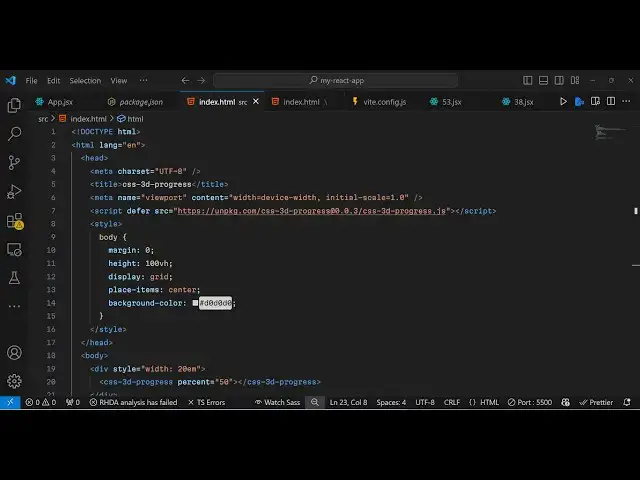
Build a CSS3 3D Loading Progressbar Web Components in Browser Using HTML & Javascript
Jan 9, 2025

Get the full source code of application here:
https://gist.github.com/gauti123456/cd9c8daa19dd39838352970057409a7f
Show More Show Less View Video Transcript
0:00
uh hello guys welcome to this video so
0:02
in this video I will show you a progress
0:04
bar 3D progress Bar library where you
0:08
can show these nice little 3D progress
0:11
parts right in their application so you
0:14
can
0:16
easily build this inside right in the
0:19
browser Itself by including the CDN I
0:22
have given the link for the code in the
0:24
description of this video so if you just
0:27
search for this package which is CSS
0:30
3D
0:32
progress It's a JavaScript library and
0:35
the very first result which comes this
0:37
is their GitHub repo and it also
0:39
supports uh support for reactj vuejs
0:43
swelt all the front-end packages so they
0:46
have given a nice little example right
0:48
here as well
0:51
and this is their live
0:53
demo you can see you can change the
0:56
colors here accordingly
1:00
so it's a 3D progress bar and now to get
1:04
started just create a very very simple
1:07
index. HTML file and just after the
1:10
title you need to include the
1:12
CDN so you will just include the CDN
1:19
uh can include this script T So after
1:23
including the CDN now you can use this
1:26
package so we will now
1:31
right in our
1:33
HTML we will use
1:36
this web component which is CSS 3D
1:43
progress It's it has a opening and a
1:45
closing tab it's web component here and
1:48
directly use it and here you can pass in
1:52
percentage that's suppose 50% so now it
1:56
if you open it in the browser you will
1:58
see this 3D progr this part and it is
2:01
now 50% you can just style it little bit
2:05
by just having some CSS code I will
2:08
style the body and
2:12
just uh just give it a width as
2:16
well of
2:20
fif I will just give it a
2:23
width just give it a style here width of
2:27
20 RM so now what it it actually reduces
2:32
it to 20 RM and just to make it in the
2:35
center position we will add the CSS
2:40
Styles so now it appears in the center
2:42
position this pink
2:44
color you can change this percentage
2:47
accordingly which is 20% you can animate
2:49
this accordingly whenever you're inside
2:52
your application if you're fetching some
2:53
data you can show this nice little 3D
2:55
progress bar and uh I think it also
2:59
takes
3:05
so you can check out their documentation
3:07
it is given right here you can see you
3:10
can change the color as well uh this is
3:13
their GitHub
3:15
repo uh so I have given the link in the
3:18
description so all these options are
3:21
supported if you
3:23
see bottom Shadow back Shadow trial
3:26
color stroke color is
3:28
animation whether to enable flow effects
3:31
so there is this attribute is available
3:33
to you so if you want to animate this uh
3:36
you can directly pass this attribute
3:38
which is is animation so you can set it
3:42
to true I think it will animate this a
3:47
small these are called Web components
3:50
where you can directly make your web
3:52
component and it will animate
3:57
it the color that you are seeing
4:00
I think it's
4:01
the stroke
4:17
color so this is you can see the black
4:19
color
4:20
and one more attribute is this Trail
4:26
color you can just customize this webc
4:29
component by passing these attributes
4:31
you can see that so again if I change it
4:35
to
4:36
Black so just refresh and now you will
4:39
see the background color will change to
4:41
Black so you can customize everything
4:44
guys right here in this if I
4:47
change to
4:51
red you see it will change to red so in
4:54
this way you can make this 3D progress
4:56
component web component in right here in
4:58
the browser itself I have given all the
5:00
source code in the description of this
5:02
video so you can check out this open
5:04
source Library so thank you very much
5:06
for watching this video and do check out
5:08
my website as well free mediat tools.com
5:10
uh which contains thousands of tools
5:13
regarding audio video and image and I
5:16
will be seeing you guys in the next
5:18
video
#Software
#Multimedia Software