Up next in 10

Build a Adobe Acrobat PDF Editor to Edit PDF & Fill Forms in Browser Using PDF-LIB & PDF.js in TS
Feb 5, 2025

Buy the full source code of application here:
https://procodestore.com/index.php/product/build-a-adobe-acrobat-pdf-editor-to-edit-pdffill-forms-in-browser-using-pdf-lib-pdf-js-in-ts/
Hi Join the official discord server to resolve doubts here:
https://discord.gg/cRnjhk6nzW
Visit my Online Free Media Tool Website
https://freemediatools.com/
Buy Premium Scripts and Apps Here:
https://procodestore.com/
Show More Show Less View Video Transcript
0:00
uh Hello friends welcome to this video
0:02
so in this video I will show you a new
0:05
tool that I developed inside uh
0:08
typescript it's a PDF editor something
0:11
like Adobe at acrobat where you can edit
0:14
your PDF files directly in the browser
0:17
so I've deployed this tool inside my
0:19
website freem mediat tools.com and uh
0:23
you will see as you load the page you
0:25
will see this interface where you need
0:27
to select a PDF file and
0:30
uh then you can edit this file so we can
0:33
simply go to my directory and let me
0:37
pick any PDF file that I want to edit so
0:40
as I pick the file here you will see the
0:42
files will be the PDF file will get
0:45
rendered so the pages will show this is
0:47
a first page this is a second page so
0:49
you can directly go to a particular page
0:52
similar to Adobe Acrobat so this is the
0:54
first page this is the second page and
0:57
uh just wait let me open my zoomit tool
0:59
so so that I can show you zoom in to the
1:04
features so now you can see basically we
1:08
have this in the drop down this is the
1:10
page this is the first page second page
1:13
so you can clearly see and we have all
1:15
these controls where you can download
1:18
the modified PDF you have the ability to
1:21
add text images then we show these
1:24
controls to see on which page number you
1:26
are in you can even rotate the page as
1:28
well so if you click this the page will
1:30
be
1:31
rotated in the counter clockwise or
1:34
clockwise Direction so now we have the
1:36
ability to bookmark so if you want to
1:39
add some text on in a particular
1:41
location you can just add some text so
1:44
you will say hello
1:45
world and you can change the size here
1:48
so we have all these controls here so it
1:50
changes the size it changes the color of
1:53
the text and here if you click it you
1:55
can move it and place it anywhere
1:58
location so let's suppose from this
2:00
Color Picker I can even change the color
2:02
of the text as well so if I want it to
2:04
change it to Blue so you will see that
2:07
now we can place it anywhere
2:10
else like here and even we can place
2:13
images so if you want to place if
2:16
particular image you can even place this
2:20
image so let's suppose you have do done
2:24
a signature image you can put this
2:26
signature image like here in the PDF
2:29
file
2:31
and you can change the size here it's
2:33
suppose 50% I want to have and then you
2:36
can place it right
2:38
here and we can go to the second page
2:41
and now let's suppose from here we want
2:43
to put
2:45
here this is your page
2:48
second and I can change the size here
2:54
so so in this easy way guys you can see
2:57
we can add text images inside of a PDF
3:00
files and now let's suppose if I wanted
3:02
to add some
3:07
image so you can e easily uh basically
3:10
change the size here by changing this
3:12
property that you see right
3:16
here so you can see that so now you can
3:19
place this image wherever you want to do
3:23
so after you modified this now we can
3:25
simply click the download button if you
3:28
see so if you click download you'll see
3:31
the file will get downloaded and you
3:35
will actually
3:37
see all these changes are displayed if
3:41
you see we have added the signature we
3:44
added this text bookmark we added this
3:46
image as well so in this easy way guys
3:49
you can see you can check out this
3:50
editor which is there on my website
3:52
freem mediat tools.com PDF editor app so
3:56
you can directly purchase the full
3:57
source code of this application it is
3:59
written in in typescript and we have
4:01
used two open- Source libraries for this
4:04
first of all we have used PDF lip which
4:07
is a JavaScript library for interacting
4:09
or modifying uh PDF documents and
4:13
secondly we are using this uh PDF
4:17
JS which is a library
4:20
for embedding the PDF documents in the
4:23
browser or displaying the PDF documents
4:25
in the browser so we are using these two
4:27
open source libraries for this project
4:30
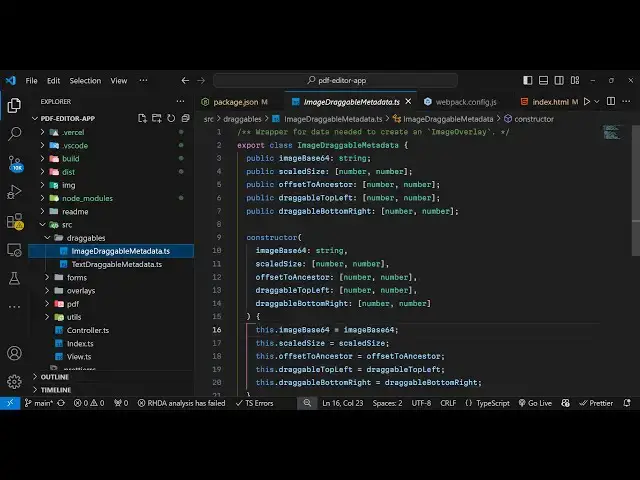
so this is actually the directory
4:31
structure you will get and uh it is
4:35
entirely written in typescript if you
4:37
see and you can see typescript and we
4:40
are using this web pack to
4:43
actually bundle all this code into a web
4:48
application so after you purchase it you
4:51
will get this directory now to run this
4:53
locally what you need to do you need to
4:55
first of all npmi so this will install
4:59
all the nodejs modules which are there
5:01
so execute this command first of all
5:04
npmi and let me also show you the
5:06
package.json file so you will see these
5:08
are the packages that we are using PDF
5:10
lip and PDF JS test so once you execute
5:16
npmi so it will Ex it will create this
5:19
node modules folder after this you just
5:22
need to say npm run
5:24
build then it will build your project it
5:27
will create these two directories which
5:29
is the build directory and the disc
5:31
directory so these two directories will
5:33
automatically get created and if you
5:36
want to deploy this application it's
5:37
very
5:38
simple first of all I want to show you
5:41
how to run this locally so you can just
5:44
uh install this a global package which
5:47
is HTTP server which will actually start
5:50
a server locally inside your machine so
5:53
execute this command to globally install
5:56
this and then you can start this
5:57
application from this directory
6:00
HTTP server and then the port number you
6:02
can select 8,000 so now what happens it
6:05
will start this local server at P 8,000
6:08
and your application will be started so
6:11
if you navigate to Local Host
6:14
8,000 so you'll see the application will
6:16
get started at this and here you can
6:18
choose your file whichever file that you
6:21
want to
6:22
choose you can pick a form as well so
6:25
it's a very nice thing about this
6:26
application you can fill forms as well
6:29
because because um let me show you how
6:31
easy it is so if you have a form that
6:33
you want to fill with your own personal
6:35
details you can see how easy it is so I
6:39
just you can
6:42
see it's very simple you can see
6:46
that you can add the text here like this
6:50
you can fill out the forms very
6:56
easily you can just align it perfectly
6:59
with whatever you need to
7:01
do then you can have select field and
7:04
then for this you can see as you click
7:08
on that you can see you can fill out
7:10
these forms you just need to click it
7:13
like this and then for the date here you
7:16
can simply again add a text field this
7:19
one will be
7:20
for
7:22
22nd today's date is 4 February 2025
7:32
so and then for the signature we do
7:36
have you can add a image here for the
7:38
signature I already have a transparent
7:41
signature picture so what I can do I can
7:43
align this
7:47
picture so after you make this change
7:49
you can click the download button so now
7:52
what happens if you see all these
7:53
changes will added your signature your
7:57
date then you all the fields are also
7:59
filled out properly so in this easy way
8:03
guys you can see that you can fill out
8:04
forms as well alongside with editing
8:06
your PDF files as well so it's a fully
8:08
fleshed Adobe Acrobat PDF editor and
8:12
form filler and it has built using typ
8:15
script you will see that and it's a
8:17
fully web application which runs in the
8:19
browser it doesn't need internet so once
8:21
you build this application you can
8:23
deploy this application on your own
8:25
website you can get the full copyright
8:27
right once you purchase the source code
8:29
the link is given guys in the
8:31
description you can go to my website
8:32
proc Cod store.com so you will get all
8:35
this source code you can see that all
8:37
this is coded inside
8:39
typescript which is TS which is a super
8:42
set of JavaScript so once you get the
8:44
source code you can easily modify it and
8:47
add more features to this so you can see
8:50
that this will be the directory
8:51
structure you will get here and all this
8:54
is there so you can easily build this
8:56
application as well so there is a simple
8:58
command that you say npm run
9:01
build so you can just run this command
9:04
and this will create this disc directory
9:07
it will build out your application so it
9:09
will give you the minified code that you
9:10
want
9:11
to build your application so it's very
9:14
easy to deploy this as well so in this
9:17
easy way guys you can
9:20
simply make this or use this PDF editor
9:24
the link is given in the description so
9:26
once you get the source code you can
9:28
directly start it locally by invoking
9:30
this HTTP server and this will start
9:32
your application at this port
9:37
number so you can if you want to access
9:39
the live demo you can go to my website
9:41
freem mediat tools.com PDF editor app
9:45
and also at the checkout page as well I
9:46
have given the live demo link so if you
9:48
are purchasing it at the time of
9:50
purchasing you can also get the live
9:52
demo link as well
9:54
so so this is the thing if you directly
9:58
go to free media tools com as well you
10:00
will find this latest tool added which
10:02
is Adobe Acrobat PDF editor tool so you
10:05
can simply go to this and then you can
10:07
pick a PDF file to just check out the
10:11
functionality so it's very
10:13
simple so PDF file will get loaded so in
10:17
this easy way guys you can do this so
10:19
thank you very much for watching this
10:20
video If you like this video then please
10:23
hit that like button subscribe the
10:24
channel as well and I will be seeing you
10:27
guys in the next video