Up next in 10

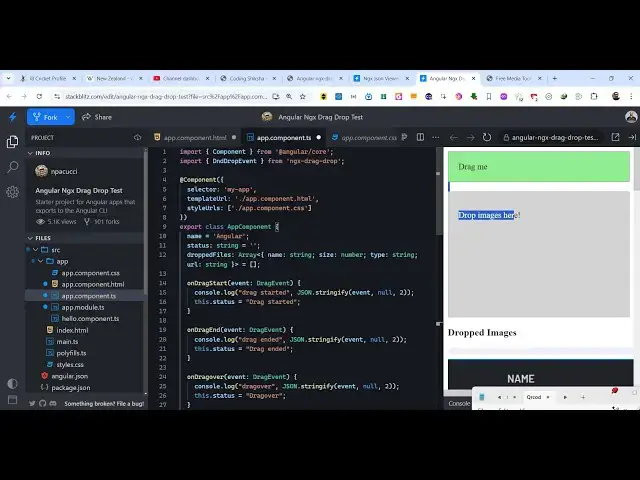
Angular ngx-drag-drop Example to Build Drag and Drop Image Viewer With Live Preview in Browser
Jan 26, 2025

Get the full source code of application here:
https://codingshiksha.com/angular/angular-ngx-drag-drop-example-to-build-drag-and-drop-image-viewer-with-live-preview-in-browser/
Hi Join the official discord server to resolve doubts here:
https://discord.gg/cRnjhk6nzW
Visit my Online Free Media Tool Website
https://freemediatools.com/
Buy Premium Scripts and Apps Here:
https://procodestore.com/
Show More Show Less View Video Transcript
0:00
uh hello guys welcome to this video so
0:02
in this video I will show you uh a drag
0:05
and drop example inside angular so there
0:08
is a package here which you can use to
0:09
actually drag and drop your elements
0:11
right in the browser itself so I will
0:14
show you a drag and drop image example
0:16
so you can directly drag and drop any
0:19
image so you have this example right
0:22
here so if I go to my file system and
0:25
drag and drop any image you will see the
0:28
image will be dropped and you will see
0:30
the live preview of the image and you
0:32
will also see some more details about
0:34
this image such as the name size the
0:37
type of the image and the status which
0:39
is dropped so you can even drop multiple
0:43
images so as soon as you drop multiple
0:45
images the image will get added so this
0:47
is your second image this is the first
0:49
image so you will see in this way you
0:52
can trag and drop images inside your
0:54
angular application and also it will
0:56
show you additional information about
0:58
that image name size and type so there
1:01
is a package here in angula which is
1:03
called as
1:05
ngx drag drop so if you just go to
1:08
npmjs.com just search for this package
1:11
ngx drag drop so this is actually the
1:14
name of the package I have already
1:16
installed it so the command is very
1:24
simple so I've also written a step
1:27
bystep detailed blog post on my website
1:30
it the link is given in the description
1:31
so this is actually the command here
1:34
very simple it's almost having 36,000
1:37
weekly downloads
1:40
so the source code is given in the
1:42
description so now let me start from
1:44
scratch and delete everything from
1:49
here so the very first thing we need to
1:51
do you need to go to this file here app.
1:54
module. typescript file and here first
1:56
of all we need to add this import
1:58
statement we need to register this
2:01
module so we simply say import and then
2:04
your module that you are importing so
2:07
you'll simply write
2:09
here at the very top DND module which
2:13
will be coming from this package ngx
2:16
drag drop so we import this and then we
2:20
add this module in the Imports
2:27
are so we simply add add
2:43
this so you add this import statement
2:46
right here so DND D module and then
2:53
inside this Imports array you basically
2:56
add this module that we imported
3:01
so the configuration part is complete
3:03
now you can close this file and then we
3:05
need to move to the app. component. TS
3:08
file the typescript file and here you
3:11
need to specifically declare some
3:13
variables first of all the status
3:15
variable which will be of type string it
3:18
will tell you the status of the drag and
3:20
drop the initial value will be nothing
3:24
and then we will be having a dropped
3:27
files array
3:29
so this will hold all the files that you
3:32
will drag so this will be of type it
3:35
will have a name property which will be
3:37
of type string and a size property which
3:39
will be of type
3:43
number and it will be an Mt AR whenever
3:46
you start your application so here
3:48
you'll be storing all the drag and
3:50
dropped files so initially the value
3:52
will be Mt
3:55
aray and uh then we need to first of all
3:58
go to app. component. HTML the template
4:00
file and here we need to dis
4:03
uh put a element where we will be
4:08
dragging and dropping the files you'll
4:11
be having this div element and I will
4:13
just give it a
4:15
class of
4:17
draggable and it actually
4:20
takes you can see on the right hand side
4:22
we have this interface so it actually
4:25
takes some properties which is the DND
4:27
dragable you need to give it a name
4:30
and DND effect allowed so this means
4:34
that if you want to put the drag and
4:36
drop effect I will say
4:38
copy and then it takes some functions
4:42
right here when the drag and drop starts
4:45
we bind this function so when the drag
4:49
and drop event starts and when it ends
4:52
so we have these two functions right
4:54
here on DND start and on DND D end so we
4:58
are binding these
5:01
custom functions on drag start on drag
5:04
it now we need to Define these functions
5:06
so we'll simply say drag me so this will
5:09
be the thing and now we need to just uh
5:14
Define these
5:19
functions
5:21
so inside the typescript code so both
5:24
these functions so we simply write here
5:27
on drag start on drag end so this event
5:30
will automatically be passed right here
5:32
so when the dragging start and when the
5:33
dragging
5:36
end so we also need to display this name
5:41
property I think it is
5:51
saying and right here at the top we also
5:54
need to
5:56
import if you go to my blog post you
5:58
will see the step by step instruction
6:00
will be there and I think in the
6:03
typescript
6:04
code yeah so this event that you
6:07
are importing we do need to import this
6:11
this is the DND drop event
6:33
uh yeah sorry just wait I think I made
6:37
some kind of typo mistake so we paste it
6:40
you will see so this is actually your
6:42
drag and rap interface a DND draggable
6:45
so just make
6:47
the and after this we will have the
6:49
actual interface where we will drop all
6:52
of our files we have have a interface
6:55
right here
6:57
dropable so here you will drop all your
7:02
files so this
7:06
section you will see we have this
7:09
section so now we need to attach all
7:11
these properties D and D drop
7:20
zone so DND d drop
7:24
zone we are attaching this on drag over
7:27
on drop so these function we now need to
7:30
write here and inside this we can simply
7:36
say drop images here
7:45
and and we'll be attaching
7:48
this DND placeholder reference
8:03
so here you will actually see all your
8:06
files this is your drop
8:11
soon and now we need to Define both
8:13
these functions on drag over on drop so
8:16
we come to the typescript file so we
8:18
Define these functions on drag over
8:21
which is again the drag and drop event
8:23
and on drop will be the files which will
8:25
be dropped and we first of all change
8:28
the status from
8:30
from to dropped here and then we take
8:34
from this event object we take these
8:37
properties of the files which is name
8:38
size type and the actual URL of the file
8:41
and convert this into base 64 code so as
8:45
soon as you now drop this image we now
8:47
need to display details of this image so
8:51
as soon as you drop drop this image you
8:54
will see we now need to show the image
8:57
for showing this image we add this code
9:01
here in the
9:03
template and we put this if condition NG
9:06
if and we will put a restriction that uh
9:10
if the files have been dropped if the
9:13
length of the files is greater than zero
9:15
then only display this code which
9:19
is the dropped images so then we will
9:22
Loop through all the dropped images one
9:25
by one and uh for this we will be using
9:28
the NG for directive of
9:31
angular and we will Loop through all the
9:35
files
9:36
dropped files one by one and we'll just
9:39
give it a
9:43
class image
9:47
preview and then we will show the image
9:50
and the properties name such as name
9:53
size and the type of the image so you
9:55
can see we are displaying these
9:57
properties in double qual brackets and
10:00
if you
10:00
now drop your images it can be multiple
10:04
images I think you will see the images
10:07
is dropped as and also at the bottom
10:09
side you see the information about this
10:11
image name size and type so this is a
10:13
very handy module in angular you can
10:15
integrate inside your application if you
10:17
want to implement drag and drop
10:20
functionality and it's not limited to
10:22
images you can drag and drop any element
10:25
you can see that it can be a div element
10:28
element or video image anything this is
10:32
actually the package ngx drag drop you
10:35
can use it inside your angular
10:37
applications and all the source code is
10:39
given in the description and also check
10:41
out my website as well free mediat
10:43
tools.com uh which contains thousands of
10:46
tools regarding audio video and image
10:49
and I will be seeing you guys in the
10:51
next video