Up next in 10

Angular ngx-bootstrap Example to Build Bootstrap Multiple Tabs & Windows in Browser Using TS
Jan 26, 2025

Get the full source code of application here:
https://codingshiksha.com/angular/angular-ngx-bootstrap-example-to-build-bootstrap-multiple-tabs-windows-in-browser-using-ts/
Hi Join the official discord server to resolve doubts here:
https://discord.gg/cRnjhk6nzW
Visit my Online Free Media Tool Website
https://freemediatools.com/
Buy Premium Scripts and Apps Here:
https://procodestore.com/
Show More Show Less View Video Transcript
0:00
uh hello guys welcome to this video so
0:02
in this video I will show you how to
0:04
create multiple tabs inside your angular
0:07
application using bootstrap you can see
0:09
we inside this web page we have multiple
0:12
tabs this is the first tab this is the
0:14
second tab simil inside the browser here
0:18
we can we can create multiple tabs
0:20
inside each tab we have different
0:21
content so similarly inside your angular
0:24
application you can have multiple tabs
0:26
like this you can see that this is a
0:28
first tab this is different content if I
0:30
move to the second tab this will have
0:32
different content so if you have a lot
0:34
of content to display inside the web
0:36
page you can create multiple tabs and
0:39
there is a package here a bootstrap
0:41
official package for
0:43
angularjs if you go to npmjs.com just
0:46
search for this package ngx bootstrap
0:49
this is actually the package uh I've
0:51
already installed it so this is actually
0:54
the official package of bootstrap npmi
0:57
ngx bootstrap and it's almost having
1:00
247,000 weekly downloads
1:04
so I have given the full step by-step
1:06
detailed blog post on my website with
1:08
the full example code so if you want to
1:11
reference that the link is given in the
1:12
description so I will now start from
1:15
scratch delete everything and explain to
1:18
you how to implement
1:21
this so first of all inside this is a
1:23
brand new Ango project and you need to
1:26
go to this file app. module. typescript
1:29
file and and you first of all need to
1:31
register this module uh for registering
1:34
it it's very simple and first of all we
1:37
also need the forms module because we
1:39
are working with forms so forms module
1:42
are built in inside angular so we can
1:44
directly import this using this import
1:46
statement and then after that we import
1:49
this ngx bootstrap module and it
1:52
actually contains this tabs
1:55
module specifically we need this tabs
1:58
module from this ngx bootstrap
2:02
slabs so in this way you can import this
2:06
module the forms one and the tabs one
2:09
now we need to go to this Imports array
2:12
and we need to register it so just
2:14
inside this we first of all add the
2:16
forms module and then we add the tabs
2:19
module for
2:21
root so in this way you can configure
2:24
this register this module globally so
2:26
now you can directly use this uh library
2:30
inside your angular application we can
2:33
directly go to this file app. component.
2:35
HTML file and we can
2:39
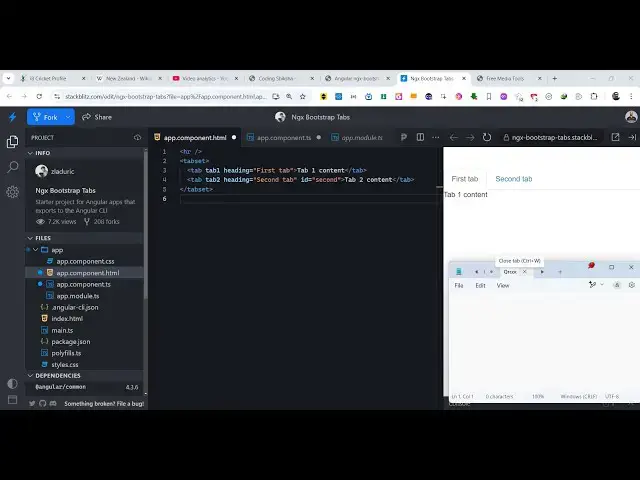
directly create tabs right
2:42
here so you will see on the right hand
2:45
side live preview so we have this tab
2:48
set tag right
2:50
here and here we can create multiple
2:53
tabs so we can create a tab using this
2:56
tag here which is this tab and here you
3:00
can actually pass some options to this
3:04
tab here so let me call this tab tab
3:09
one so as soon as you do this you will
3:12
see this content here so we can simply
3:16
say tab One content so we can give it
3:19
some properties to this first of all
3:22
this is tab one and whatever heading
3:25
that you want to give this is I will say
3:27
first tab
3:29
and it will look something like this
3:32
similarly we can create multiple
3:36
tabs so it's very easy you can see
3:48
that so we have created Five tabs here
3:51
you can see we can change the content
3:57
here this is a very easy way
4:00
using bootstrap you initialize it and
4:03
then you can create multiple tabs and
4:05
then you can just
4:07
change the heading here you can see that
4:10
according to your application
4:15
so so no configuration no typescript
4:18
code is required you simply go to the
4:20
template file just add these tabs one by
4:23
one and in this way you can now have
4:26
five tabs here each tab is having unique
4:28
content you can and click the click with
4:31
this mouse and each Tab and you can
4:34
navigate in between these five tabs so
4:37
in this way you can manage multiple tabs
4:40
inside your angular application using
4:42
bootstrap using this package ngx
4:44
bootstrap first of all you go to the
4:46
app. module. typescript file and
4:48
configure this using these two import
4:50
statements and then you directly come to
4:52
the app. component. HTML file and then
4:56
using this code you can do this so thank
4:59
you very much guys for watching this
5:01
video and uh also visit my website free
5:04
mediat tools.com uh which contains
5:07
thousands of tools regarding audio video
5:09
and image and I will be seeing you guys
5:12
in the next video
#Programming
#Education
#Other