live_tv
Livestream Starting Soon
00
Hours
:
00
Minutes
:
00
Seconds
Up next in 10

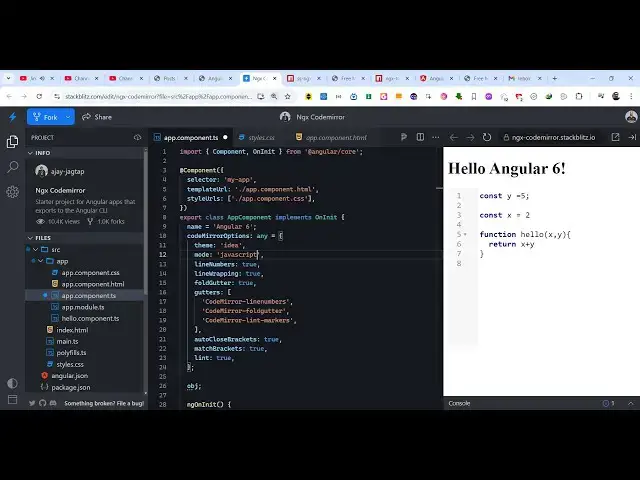
Angular Codemirror Syntax Highlighter Example to Display Source Code in Browser Using TypeScript
Jan 30, 2025

Get the full source code of application here:
https://codingshiksha.com/angular/angular-codemirror-syntax-highlighter-example-to-display-source-code-in-browser-using-typescript/
Hi Join the official discord server to resolve doubts here:
https://discord.gg/cRnjhk6nzW
Visit my Online Free Media Tool Website
https://freemediatools.com/
Buy Premium Scripts and Apps Here:
https://procodestore.com/
Show More Show Less View Video Transcript
0:00
uh hello guys welcome to this video so
0:02
in this video I will show you how to
0:05
integrate the code mirror syntax
0:08
highlighter inside your angular
0:10
application so if you want to show
0:12
source code inside your application you
0:14
can integrate this editor where you
0:17
allow the user to enter any source code
0:19
in any language so we are specifically
0:22
taking example of JavaScript code here
0:24
so as I'm writing here you will see the
0:28
code has been syntax highlighting
0:30
with line numbers also appearing if you
0:32
see so code mirror if you don't know
0:35
it's a open
0:37
source syntax highlighting library for
0:40
JavaScript this is actually their
0:42
official documentation
0:44
website and there is a module available
0:47
for angular application so if you want
0:49
to integrate this you just need to
0:52
search for this module at theate control
0:56
ngx code mirror this is actually the
0:59
name of the module
1:02
so Ive already installed
1:06
it the command is very simple this is a
1:10
command so it is almost having 27,000
1:13
weekly downloads so I have written a
1:16
step-by-step blog post on my website if
1:18
you need to get the full source code you
1:20
can go to the description link to follow
1:22
along with this video so now I will
1:25
delete everything and start from scratch
1:27
so the very first thing we need to do
1:30
we need to go to this file app. module.
1:33
typescript file of your angular project
1:36
and here you need to add this import
1:38
statement so we simply import this code
1:44
mirror module and it will be coming from
1:47
this
1:52
package so ngx code
1:57
mirror so after we do this we just need
2:00
to go to the Imports array and simply
2:02
add this
2:09
module so after we add this now you can
2:12
close this file and move to the app.
2:16
component. HTML file your template file
2:19
and right here we will
2:24
simply make use of this ngx code mirror
2:31
directive so it actually takes some
2:34
options right here the very first option
2:36
is take is the actual options array
2:39
object so I will just say code mirror
2:43
options so I will Define it inside uh
2:46
app. component.ts
2:50
file so this options here you can pass
2:54
the series of options right in this
2:57
typescript file we will Define all these
2:59
options
3:01
[Music]
3:04
so code
3:10
mirror options and is of the type it's
3:14
an object right here and here you will
3:16
provide the theme here which will be of
3:19
idea mode I will set it to
3:24
JavaScript and you can even put line
3:27
numbers to be true
3:31
so now you can see that the line numbers
3:34
are appearing so as you type your code
3:37
these line numbers will
3:38
appear and
3:43
uh we have configured the language here
3:46
if you see JavaScript because you can
3:49
see we put Javascript language and we
3:52
also have all these option R wrapping to
3:57
true then we have fold cutter to also
4:03
true so all these options you can just
4:06
provide
4:08
this so you can see that autoclose
4:11
brackets to true so now what happens if
4:17
you so this set of quy brackets the
4:21
ending bracket will automatically come
4:23
so this is
4:24
actually meant by this and here you can
4:28
if you want to add add a code as soon as
4:31
the application load then there is this
4:34
NG on in it we can actually declare
4:39
and object so what I will do this.
4:53
object so we can pass this object right
4:56
here to this template so
5:02
we can pass this as a
5:05
directive you can say NG model and this
5:08
is equal to your
5:10
obj so now what happens automatically
5:13
this code is written so when you type
5:16
this if you want to display the code
5:19
here you can display it like this
5:37
so in this way now if you uh reload the
5:42
page this code will automatically been
5:44
written so you can make a simple code
5:47
little editor with syntax highlighting
5:49
and when you change the code there is a
5:53
also this NG model change on change
5:56
event handler which which will fire and
5:59
here you can define a function so I will
6:02
simply say
6:03
set so whenever you make this change
6:06
this function will automatically execute
6:09
so we can now Define this function so
6:21
set and we can just console log
6:25
it this. object
6:33
if you write something you will see in
6:34
the console
6:36
this whatever that you write it will be
6:39
captured so this is actually the way by
6:41
which you can you can change the theme
6:44
here you can go go to the website and we
6:46
have all these themes available you can
6:49
select any theme of your
6:52
choice this is a Dracula
6:54
theme if you want to apply this theme
6:57
what you need to do you need to go to
6:59
this styles. CSS and you can see we are
7:02
applying idea CSS theme so we are
7:05
importing the CSS file so we just need
7:08
to add the appropriate theme that you
7:11
are using so I will simply change to
7:14
Dracula and now in the theme Here we can
7:17
change this theme to
7:19
Dracula so now the theme changes you
7:21
will see that so in this way you can
7:24
change the theme as well of the syntax
7:26
highlighting so this code mirror themes
7:28
supports all these themes from the
7:30
dropdown you can select your favorite
7:31
theme and then you can import their CSS
7:34
file so I have given all the source code
7:36
guys in the description you can check
7:38
out my blog post you can find out this
7:41
full example code and then you can
7:43
customize it so thank you very much for
7:46
watching this video and also check out
7:48
my website as well free mediat tools.com
7:50
uh which contains thousands of tools
7:53
regarding audio video and image and I
7:56
will be seeing you guys in the next
7:58
video